

AI Sales Pipeline Enrichment Tools: A Head-to-Head Comparison of the 7 Best Options in 2026
A side-by-side comparison of the top AI sales pipeline enrichment tools in 2026, organized by three architectural approaches—native CRM agents, external point solutions, and orchestration layers—to help B2B sales and RevOps teams select the best fit based on CRM platform, team size, budget, and compliance needs.
A CRM can look full and still fail at the moments that matter. The account has a domain, a headcount range, a title, maybe even a phone number. Then routing misses the territory rule, scoring overweights a stale firmographic field, and the rep opens LinkedIn anyway because the record does not feel current enough to trust.
That is the real problem AI sales pipeline enrichment tools are supposed to solve in 2026. Not “more contacts.” Not a larger logo wall of data providers. The useful test is whether better data reaches the workflow where routing, prioritization, scoring, and outreach actually happen.
The pressure is not theoretical. B2B data decays at roughly 30% annually, which means a 40,000-account CRM can lose accuracy on about 12,000 records in a year if nothing keeps it current.[1] Only 35% of sales professionals fully trust CRM data accuracy, according to Salesforce State of Sales data cited by EverWorker.[2] Coffee.ai cites analysis that dirty CRM data costs roughly 12% of annual revenue, and also cites HG Insights on external enrichment platforms seeing usage decline within 90 days of deployment.[3]
The failure pattern is familiar: the tool enriches records somewhere, the CRM receives some of the fields, operations inherits the mapping logic, and reps quietly decide whether the output is worth opening. By the second or third month, the issue is rarely whether the enrichment vendor has a useful database. It is whether the system became part of the revenue workflow or remained a separate destination.
So the better comparison in 2026 is not seven isolated product cards. It is three architectures: native CRM agents, external point solutions, and orchestration layers. The seven tools below sit inside those architectures, and the right choice depends more on CRM maturity, GTM motion, compliance needs, and operating tolerance than on database-size claims.
The Shortlist by Architecture
| Architecture | Best-fit tools in this comparison | What it optimizes for | Where it usually gets painful |
|---|---|---|---|
| Native CRM agent | Coffee.ai, HubSpot Breeze AI | Keeping enrichment inside the CRM workflow, reducing tab-switching, and making updates visible where reps and ops already work | Vendor-owned sourcing, newer deployment patterns, and less flexibility for teams that want to compose their own data stack |
| External point solution | ZoomInfo, Cognism, Apollo, Clearbit | Known data products, prospecting workflows, contact discovery, and enrichment outside the CRM core | TCO exposure, contract complexity, admin overhead, and adoption decline if reps must leave normal workflow |
| Orchestration layer | Clay | Flexible enrichment workflows, multi-provider logic, experiments, and fast-changing GTM motions | Operational complexity, credit management, workflow governance, and the need for a stronger RevOps owner |
There is no clean “best overall” here. A 20-person HubSpot-native team trying to improve lead scoring does not need the same system as an enterprise Salesforce team standardizing global account data. An outbound-heavy startup testing new segments every month has different needs again.

The Comparison Criteria That Actually Change the Decision
Most enrichment comparisons over-index on feature inventory: email, phone, firmographics, technographics, intent, AI writing, CRM sync. Those matter, but they do not explain why two tools with similar claims behave differently after rollout.
For pipeline enrichment, five criteria carry more weight.
- Enrichment method: whether the platform searches multiple sources in parallel, uses a sequential waterfall, or relies primarily on its own data layer.
- CRM fit: whether enrichment runs where reps, managers, and ops already review records, or whether it creates another surface to monitor.
- TCO exposure: whether advertised pricing hides credits, minimum contracts, implementation, integration work, admin time, or duplicate-data cleanup.
- Compliance fit: whether the vendor’s sourcing, geography, and consent posture match the markets the team sells into, especially for EMEA-focused motions.
- Team-size fit: whether the system rewards a lean team that needs simplicity, a mid-market team that needs process control, or an enterprise team that can support governance.
The pricing point deserves special care. Public list pricing and negotiated enterprise contracts are unstable enough that neat rankings can mislead. For external enrichment platforms, the practical cost can land well above the visible subscription once credits, minimums, CRM integration, admin time, data hygiene work, and renewal terms are included. The safer operating assumption is to model total cost, not just license cost.
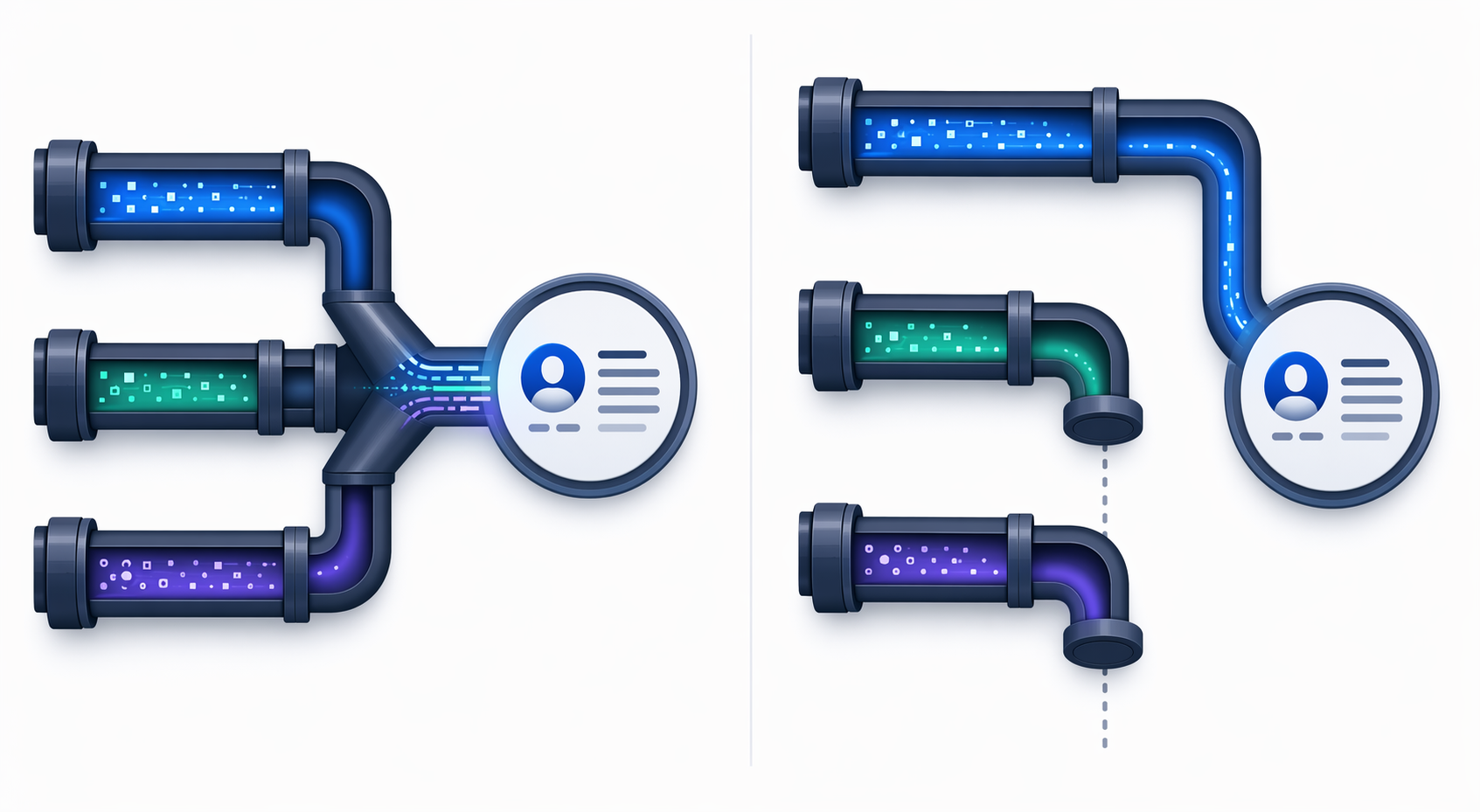
Parallel Waterfall vs. Sequential Waterfall Is Not a Minor Detail
The most consequential technical distinction in this category is often buried: does enrichment check many sources at once, or does it move down a waterfall and stop when it finds an acceptable match?
ZoomInfo describes GTM Studio as using a parallel waterfall across more than 25 providers simultaneously.[4] Clay describes AI enrichment workflows in which teams can build enrichment steps and waterfalls that move through providers based on configured logic, commonly stopping once a match is found.[5] Those are not just two implementation styles. They change cost control, completeness, latency, and error handling.
| Method | How it behaves | Operational upside | Operational risk |
|---|---|---|---|
| Parallel waterfall | Multiple providers are queried at the same time for the same record. | Can improve coverage and comparison across sources when the platform resolves conflicts well. | Can increase cost exposure and requires trust in the vendor’s source-selection and deduplication logic. |
| Sequential waterfall | Providers are queried in order, and the workflow can stop after a sufficient match. | Gives RevOps more control over provider order, credit usage, and fallback logic. | Can miss better downstream matches if early-provider acceptance rules are too loose. |
A simple hypothetical makes the difference clear. Suppose a rep needs a current VP-level contact at an account. In a parallel model, the platform may check several data sources at once, compare outputs, and return what its system treats as the best result. In a sequential model, RevOps may place a preferred provider first, then fall back to another source only when the first fails or lacks the required field. The first approach asks the vendor to resolve more of the decision. The second asks RevOps to own more of the logic.
Neither is automatically superior. Parallel is attractive when the team wants less workflow design and broader simultaneous coverage. Sequential is attractive when the team wants fine-grained control and can maintain the rules. The mistake is buying one while assuming it behaves like the other.
Head-to-Head Tool Matrix
| Tool | Architecture | Best fit | Enrichment method | CRM fit | TCO and compliance watch-outs |
|---|---|---|---|---|---|
| Coffee.ai | Native CRM agent | Salesforce-native teams that want enrichment to happen inside CRM workflows | AI agent approach with vendor-owned sourcing and CRM-native execution | Strongest when the team wants reps and ops to stay in the CRM rather than adopt another tool | Early-deployment evidence is still limited; verify source transparency, field-level controls, and regional compliance fit |
| HubSpot Breeze AI | Native CRM agent | HubSpot-native SMB and mid-market teams that already run sales motion inside HubSpot | CRM-native AI and enrichment-style assistance within the HubSpot environment | Strong fit when HubSpot is the operating system for sales and marketing | May be less flexible for teams that want provider-level orchestration or cross-CRM data workflows |
| ZoomInfo | External point solution with orchestration capabilities | Mid-market and enterprise teams that need broad B2B data coverage and structured GTM workflows | Parallel waterfall across 25+ providers in GTM Studio, according to ZoomInfo | Can integrate into CRM, but still requires careful sync design and admin ownership | Enterprise pricing is commonly negotiated rather than cleanly public; model credits, contract terms, and admin overhead |
| Cognism | External point solution | EMEA-focused teams and buyers that put compliance and regional data quality high in the selection process | Provider-owned enrichment and prospecting data workflow | Useful when sales teams need external prospecting and enrichment alongside CRM | Validate current regional coverage, consent posture, and contract structure before assuming fit |
| Apollo | External point solution | SMB and growth teams that want prospecting, enrichment, and sales engagement in one accessible platform | Database-led enrichment with workflow features | Works best when the team accepts an external sales workspace as part of daily motion | Risk rises when CRM hygiene, routing, and governance depend on data that reps manage outside the CRM |
| Clearbit | External point solution | Marketing-led teams that prioritize account and company enrichment for scoring, segmentation, and routing | API and enrichment-led data workflow | Strongest when enrichment feeds marketing automation, scoring, and web or form workflows | Check how current product packaging, ownership, and CRM integration requirements affect total cost |
| Clay | Orchestration layer | RevOps-led teams testing segments, combining sources, and building custom enrichment logic | Sequential waterfall and configurable AI enrichment workflows | Best when CRM is the system of record but not the only workspace for data operations | Requires workflow governance, credit monitoring, and someone accountable for provider order and acceptance rules |
This matrix is intentionally more operational than promotional. Zapier’s 2026 enrichment roundup is useful for seeing the broader market of data enrichment tools, while vendor-authored lists from ZoomInfo, Warmly, and Artisan help surface product positioning and common comparison categories.[6][4][7][8] The buying decision still comes back to where the enrichment runs, who maintains it, and what happens when the returned field is wrong.
Native CRM Agents: Coffee.ai and HubSpot Breeze AI
Native CRM agents are the cleanest answer to the adoption problem. If enrichment runs inside the CRM, reps do not have to remember another tab, managers do not have to reconcile another dashboard, and RevOps can inspect the fields where downstream workflows already depend on them.
Coffee.ai makes the most explicit version of this argument. Its article frames native CRM agents as a response to decaying B2B data, low CRM trust, and the drop-off that can happen when enrichment sits outside the working environment.[3] It also cites that 76% of organizations report less than 50% of CRM data is accurate or complete, and positions its agent model around recovering 8–12 hours of admin time per rep per week.[3]
Those claims are directionally aligned with the pain RevOps teams feel, but they should be evaluated carefully. AI agent workflows and MCP-style CRM-native capabilities are still new enough in 2026 that long-term adoption data is limited. The right pilot question is not “does the demo enrich the record?” It is “does this improve routing, scoring, prioritization, or rep action without creating a hidden admin queue?”
Coffee.ai is most compelling for Salesforce-centered teams that want enrichment to be operationally invisible. The caveat is vendor-owned sourcing: buyers should ask how sources are selected, how conflicting values are resolved, what fields can be locked, and how failed or low-confidence updates appear to admins.
HubSpot Breeze AI belongs in the same architectural conversation for HubSpot-native teams. If HubSpot is already the place where marketing, sales, scoring, and handoff rules live, CRM-native assistance can be more useful than a powerful external database that creates sync and adoption work. Teams already comparing HubSpot-native AI should also pressure-test how enrichment supports their lead scoring model, not just whether it fills blank fields. A deeper setup-oriented view belongs in a dedicated HubSpot Sales Hub Breeze AI review.
External Point Solutions: ZoomInfo, Cognism, Apollo, and Clearbit
External point solutions remain the default shortlist for many teams because they solve a visible problem quickly: sales and marketing need more complete account and contact data than the CRM currently contains. The trade-off is that these tools often become a second operating layer. That can be fine when reps actually work there. It becomes expensive when RevOps is the only team still logging in after launch.
ZoomInfo
ZoomInfo is the most obvious fit for mid-market and enterprise teams that want broad B2B data coverage, mature prospecting workflows, and a platform that can support more structured GTM operations. Its GTM Studio parallel waterfall claim matters because it points to a different philosophy from configurable sequential enrichment: query broadly, resolve centrally, and reduce the amount of workflow design the customer has to own.[4]
That is useful when the team has enough scale to justify platform governance. It is less attractive if the buyer mainly needs a low-friction way to enrich a few CRM fields. The evaluation should include CRM sync behavior, duplicate handling, field overwrite rules, credit or usage exposure, and the internal owner who will monitor source quality after the first rollout.
Cognism
Cognism is a natural shortlist candidate for EMEA-focused teams or buyers that treat compliance posture as a selection constraint rather than a procurement afterthought. A vendor label does not settle compliance. Buyers still need to validate current regional coverage, consent basis, suppression handling, and how the platform supports the team’s own lawful outreach process.
The main fit question is whether Cognism’s external workflow matches the team’s selling motion. If reps prospect heavily outside the CRM, an external platform may be practical. If the CRM is already the daily command center, the value depends on how cleanly enriched fields flow back into routing, scoring, and task creation.
Apollo
Apollo is strongest for SMB and growth teams that want prospecting, enrichment, and outreach workflow in one accessible environment. The appeal is practical: smaller teams often do not have the appetite to assemble separate enrichment, sequencing, and data-operations layers before reps can start working.
The risk is CRM drift. If the team’s most current prospecting activity lives in Apollo while lifecycle stage, territory assignment, scoring, and attribution live in the CRM, someone has to define which system wins. Without that decision, enrichment creates a second version of truth rather than better pipeline data.
Clearbit
Clearbit fits best when the enrichment job is marketing-led: account identification, company enrichment, form enrichment, segmentation, routing, and scoring. It is less about giving every rep a large prospecting workspace and more about making inbound and account data useful at the moment a workflow needs to make a decision.
That makes it a better fit for demand gen and marketing ops teams than for sales organizations looking primarily for outbound contact discovery. The evaluation should stay close to downstream workflows: which fields improve scoring, which fields improve routing, and which fields are reliable enough to automate against. For teams working through scoring design, the enrichment conversation connects directly to an AI-assisted lead scoring workflow.
Orchestration Layer: Clay
Clay is the best fit when the enrichment problem is not one database but workflow design. A RevOps or growth team may want to test a new ICP, enrich only certain accounts, combine multiple sources, trigger AI research steps, and send only approved fields back to the CRM. Clay’s AI enrichment materials emphasize building enrichment workflows and using AI across steps rather than relying on a single static database experience.[5]
That flexibility is why Clay keeps showing up in modern GTM stacks. It is also why it can become messy. Sequential waterfalls require decisions: which provider comes first, what counts as a match, when the workflow should stop, when it should keep searching, and who audits the results. Those decisions are powerful when owned. They are dangerous when copied from a template and forgotten.
Clay is best for teams with a RevOps owner who enjoys systems work and can tolerate iteration. It is not the simplest answer for a sales leader who just wants better CRM fields by next week. If the company’s GTM motion changes quickly, though, an orchestration layer can preserve optionality better than a rigid point-solution rollout. That is the same sequencing logic behind building an AI sales and marketing stack around intelligence flow before tool sprawl.
Pricing: Treat the Sticker Price as the Beginning, Not the Cost
Pricing comparisons in this category are easy to make precise and hard to make true. Enterprise tools often use negotiated contracts. Credit systems change the economics. Integration costs show up in operations time rather than invoices. Admin work appears after implementation, when duplicate fields, overwrite rules, and routing exceptions need to be cleaned up.
A practical TCO model should include at least these costs.
- License or subscription cost, including minimum contract size and renewal terms.
- Credits, record limits, provider usage, or enrichment runs that scale with volume.
- CRM implementation work: field mapping, permissions, duplicate handling, overwrite rules, and sandbox testing.
- Admin time after launch: source audits, exception queues, rep feedback, and routing or scoring fixes.
- Adoption cost: training, workflow redesign, and the risk that reps stop using an external surface after the first quarter.
This is where CRM-native tools can look better than their feature lists suggest. If they reduce implementation drag and rep avoidance, they may win even with a narrower enrichment surface. It is also where orchestration tools can justify themselves: if RevOps can control when credits are consumed and which provider runs first, the team may get better economics than a broad platform used indiscriminately.
For a broader view of where AI tools actually return value in sales and marketing, it helps to separate enrichment from adjacent claims about productivity, personalization, and automation. That larger ROI framing is covered in AI for Sales and Marketing: Where the Returns Actually Are in 2026.
Best Fit by Team Type
| If your team looks like this | Start with | Why |
|---|---|---|
| HubSpot-native SMB or mid-market team | HubSpot Breeze AI, then Clearbit if marketing enrichment needs are more specific | Workflow simplicity matters more than provider complexity when HubSpot already runs sales and marketing. |
| Salesforce-native team with CRM adoption issues | Coffee.ai, then ZoomInfo if broader data coverage is required | Native enrichment may reduce rep avoidance and keep updates closer to routing and scoring rules. |
| Mid-market outbound team needing broad prospecting data | ZoomInfo or Apollo | The team likely needs both contact discovery and enrichment, but should model CRM sync and TCO carefully. |
| EMEA-focused sales organization | Cognism, with a compliance review before contract | Regional data posture and consent handling should narrow the shortlist early. |
| RevOps-led growth team testing new GTM motions | Clay | Configurable workflows and sequential enrichment logic help when segments, providers, and rules change often. |
| Marketing-led team improving scoring and routing | Clearbit, HubSpot Breeze AI, or Coffee.ai depending on CRM | The right tool is the one that improves the fields your automation actually trusts. |
The shortlist should get smaller before demos begin. If your reps live in Salesforce and avoid external tools, do not start with a point solution just because its database is well known. If your GTM motion changes every month, do not lock yourself into a rigid enrichment path just because the demo looked clean. If EMEA is core to revenue, do not leave compliance questions for procurement.
The next evaluation step is a field-level pilot, not another feature comparison. Pick a real workflow: inbound routing, account scoring, outbound prioritization, renewal-risk review, or territory assignment. Define which fields are allowed to change, which system owns them, how conflicts are handled, and what success looks like after 30 to 60 days. A tool that improves one live workflow is more valuable than a platform that enriches a large export no one trusts.
References
- How to Build a B2B Data Enrichment Strategy That Scales with AI — HG Insights
- AI Agents for Sales Data Enrichment — EverWorker
- AI Data Enrichment for Sales: Native CRM Agents Win — Coffee.ai
- 10 Best Lead Enrichment Tools of 2026 — ZoomInfo Blog
- How to Enrich with AI: Benefits, Steps & Tools 2026 — Clay
- The 11 best data enrichment tools in 2026 — Zapier
- 12 Best Lead Enrichment Tools for GTM Teams (2026) — Warmly
- We reviewed 15 B2B data enrichment tools — Artisan AI



Comments
Join the discussion with an anonymous comment.