

Help Kids Market Their Business Ideas With Free AI Tools
Free and low-cost AI tools like Canva AI, ChatGPT, and CapCut let kid entrepreneurs create professional marketing materials without design or writing skills. This guide shows parents and educators how to supervise tool selection, output quality, and digital safety so the experience builds real business skills rather than becoming a distraction.
If you searched for kids business ideas marketing, this guide is about kids marketing their own small business ideas, not companies marketing products to children. That boundary matters. A child selling lemonade, bracelets, dog-walking slots, slime kits, baked goods, or tutoring help needs practice describing an offer, choosing a buyer, making a sign, and learning from what happens. They do not need an unsupervised tour of every publishing platform on the internet.
Last reviewed: July 2026. Free and low-cost AI tools can now help a kid make a flyer, write a product description, draft a short pitch, edit a simple video, or publish a basic page without first becoming a designer or copywriter. The adult’s job is not to make the materials better by quietly taking over. It is to choose age-appropriate tools, supervise accounts, review the output, and keep the child responsible for the business decisions.
| Task | Good free or low-cost AI tool options | Adult checkpoint |
|---|---|---|
| Turn an idea into a clear offer | ChatGPT, Gemini | Make the child name the customer, price, delivery method, and what is actually included. |
| Design a flyer, sign, label, or booth card | Canva AI, Adobe Express | Check that the offer is accurate, readable, and not over-designed for the selling place. |
| Write product descriptions or a short pitch | ChatGPT, Gemini | Remove false claims, exaggerated promises, copied-sounding language, and anything the child cannot explain. |
| Make a short video | CapCut, Canva, Adobe Express | Decide where the video can safely be shared before making it. |
| Publish a simple page or order form | Simple website builders, Shopify where relevant | Use an adult-owned account and avoid publishing personal information. |
The timing is not accidental. Youth entrepreneurial activity among 18-to-24-year-olds in the United States has grown from about 10% in 2013 to 25% in 2024, and Junior Achievement has reported that 75% of teens are interested in starting a business.[1] That does not prove that elementary and middle school kids are launching companies at the same rate; under-18 business-starting data is thinner, with estimates for teens 15–17 more limited, around 4–6%. Still, the interest is real enough for parents, teachers, and youth program leaders to need a practical operating model.
Small business marketing is also moving quickly toward AI. Constant Contact’s Q1 2026 reporting, cited by Forbes, said 54% of small businesses already use AI marketing tools and projected that 80% would by the end of 2026.[2] Shopify’s roundup of AI marketing statistics cites SimpleTexting research finding that 59% of small businesses incorporate AI into marketing strategies, with 85% of those users reporting marketing success.[3] Those are adult small-business figures, not kid-business proof. They are useful mainly because they show the tools a child will see around them are no longer experimental toys.
Start With the Business Decision, Not the Tool
A kid can generate ten lemonade logos before anyone has answered the one question that matters: who is supposed to buy this, and where will they see it? AI makes the fun parts visible fast, which is exactly why the first checkpoint has to be boring in the best possible way.
- What are you selling?
- Who is it for?
- Where will that person encounter the offer?
- What does it cost?
- What does the buyer get, and when?
A prompt can help, as long as it asks the child to think rather than letting the model invent the business. For a lemonade stand, handmade craft table, lawn-raking service, or school fair booth, the adult can sit next to the child and type something like this:
Help me turn this kid business idea into a simple offer. Ask me questions before writing anything. The business is: [child's idea]. The customer is probably: [child's guess]. The selling place is: [market, school fair, neighborhood, family event, supervised website]. Keep the wording age-appropriate and do not make claims we cannot prove.That last sentence is doing real work. Children often like the most dramatic version of the copy. AI often cooperates. “Best lemonade in town” sounds harmless until the child starts learning that marketing means saying things carefully enough that a customer can trust them. Better copy is usually more specific: “Fresh lemonade at the Saturday block sale” or “Handmade clay charms, $4 each, sold at the school craft table.”
This is where recognizable kid-business stories are useful, but only in proportion. Riley Kinnane-Petersen’s Gunner & Lux, Mikaila Ulmer’s Me & the Bees, and Gabby Goodwin’s GaBBY Bows are often discussed because they began with child-scale products, family support, and early marketing that made the offer visible before the brands grew larger.[1] The lesson is not that every child needs a national brand. It is that the first marketing job is usually local and concrete: a table, a sign, a short explanation, and an adult nearby.
The Idea → Design → Publish → Share → Learn Workflow
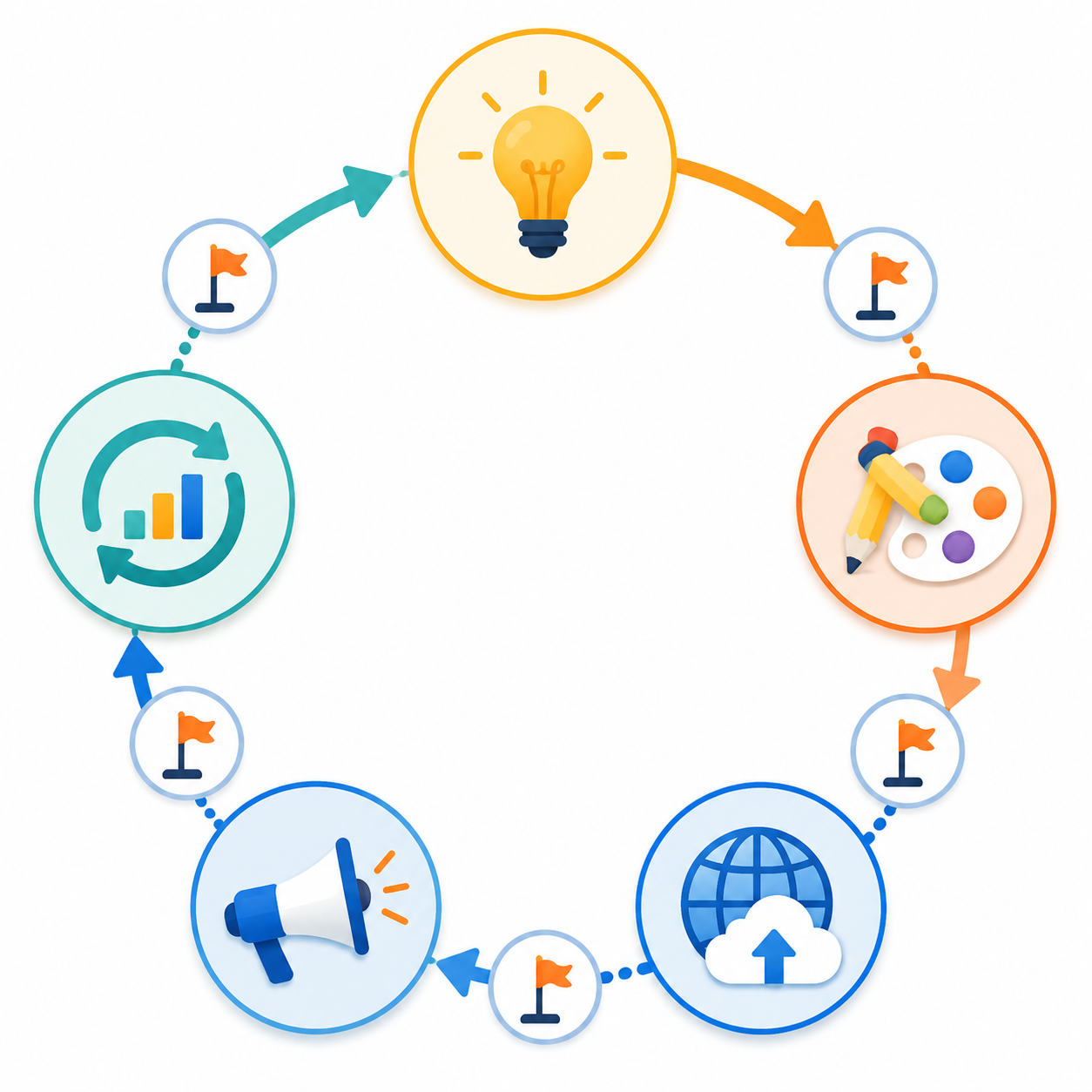
The cleanest way to use AI with a kid entrepreneur is to keep the workflow short: Idea, Design, Publish, Share, Learn. The order matters less as a productivity system than as a guardrail. It prevents the afternoon from disappearing into font swaps before anyone knows whether the flyer is for a driveway stand, a school hallway, a farmers market table, or a private family group.
| Step | Child owns | AI helps with | Adult owns |
|---|---|---|---|
| Idea | The product, customer guess, price, and selling place | Questions, offer wording, pitch drafts | Reality check and safety boundary |
| Design | Choosing the message and approving the look | Flyers, labels, signs, booth cards, simple brand variations | Accuracy, readability, account supervision |
| Publish | Deciding what a buyer needs to know | Simple page copy, product descriptions, FAQs | Account setup, privacy, payment and contact choices |
| Share | Explaining the offer to real people | Short scripts, captions, video edits | Channel choice, audience limits, personal information review |
| Learn | Noticing what sold, what confused people, what to change | Simple reflection prompts and comparison tables | Keeping the lesson tied to evidence, not vanity metrics |
Idea: Make the Child Say the Offer Out Loud
Before opening Canva, ask the child to explain the business in one sentence. If they cannot, that is not a failure; it is the lesson. ChatGPT or Gemini can turn a messy explanation into options, but the child should choose the version that sounds true. A seven-year-old’s bow business, a ten-year-old’s bracelet stand, and a teenager’s tutoring service should not all come out sounding like the same startup landing page.
For younger kids, the adult may need to handle most of the typing. For older kids, the adult can move into reviewer mode. Either way, the useful question is not “Does this sound professional?” It is “Would a customer understand what to do next?”
Design: Let AI Remove the Skill Barrier, Then Slow Down
Design is where AI feels most magical to a child. A plain prompt can become a flyer, label, menu, booth sign, sticker, or product card that looks closer to a real brand than most kids could make from scratch. Canva AI and Adobe Express are useful here because they let a child move from an idea to a presentable draft without needing to understand layout, spacing, typography, or file formats first.
That moment is worth protecting. When a child sees a lemonade flyer or craft sign that looks real, they often take the business more seriously. The risk is that “more seriously” turns into polishing the logo for two hours while the lemons sit on the counter. Give the design phase a job and a limit.
- One flyer for people walking by.
- One small sign with the product and price.
- One product card or menu if there is more than one item.
- One optional thank-you card or QR card for an adult-approved page.
The adult review should be practical. Can someone read it from six feet away? Is the price visible? Does the image match the actual product? Does the copy promise anything the child cannot deliver? Does the flyer include a child’s full name, home address, school, personal phone number, or unsupervised social handle? If so, fix that before admiring the design.
A good design prompt is specific about use. “Make a cute bracelet flyer” invites decoration. “Make an 8.5-by-11 flyer for a supervised school craft fair table selling handmade friendship bracelets for $3 each; include the price, table name, and a friendly one-sentence description; leave out personal contact information” gives the tool a business task.
Publish: Keep the Page Simple and Adult-Owned
Not every kid business needs a website. Many are better served by a printed sign, a booth, a school fair listing, a neighborhood message approved by a parent, or a flyer at a community event. Offline-first marketing is often easier to supervise because the audience is known and the transaction has an adult nearby.

When a page does make sense, AI can help with product descriptions, FAQs, simple page structure, and checkout wording. A simple website builder may be enough for a craft table, service menu, or event page. Shopify is more relevant when the adult is prepared to manage a real ecommerce setup, payments, fulfillment, policies, and customer service. The child may be the founder in spirit, but an adult should own the account, payment setup, customer messages, and privacy decisions.
This is also where broader AI marketing advice can become too adult too quickly. A working marketer may know how to build funnels, retargeting audiences, and conversion tests, but a kid entrepreneur usually needs a much smaller version: one clear page, one offer, one safe way for a customer to respond. For a wider view of AI marketing roles and tools, Signal & Convert’s role-by-role AI marketing guide is the better place to go deeper. Here, restraint is part of the supervision.
Share: Decide the Channel Before Making the Content
Sharing is where the adult boundary matters most. CapCut, Canva, and Adobe Express can help make a short video look polished fast. ChatGPT or Gemini can draft a caption, a booth script, or a short pitch. None of that answers the harder question: where can this safely go?
For many kids, the safest marketing channels are still local and supervised: a farmers market youth table, a school fair, a neighborhood event, a parent-approved community group, a family email, a printed flyer at an approved location, or a booth sign. Older teens may be ready for more digital responsibility, but that is a household or program decision, not something an AI tool should quietly settle by offering a “post” button.
The practical rule is simple: if the child would not be allowed to talk to that audience directly, do not let the content reach that audience through AI-assisted publishing. A cute product video does not need a public account to teach marketing. It can be used at a booth, sent to relatives by an adult, embedded on an adult-managed page, or shown during a supervised pitch.
Before anything is shared, review it for personal information, location clues, school names, uniforms, house numbers, license plates, order details, customer names, and comments that invite direct contact with the child. Also review the claim itself. “Sold out last week” should only appear if it happened. “Eco-friendly,” “safe for all pets,” “allergy-free,” or “donates profits” may require more care than a child realizes.
Learn: Measure Something the Child Can Act On
The learning step should not turn into a dashboard project. A child does not need adult-style marketing analytics to learn whether the sign worked. They need a few observations close to the sale.
- How many people stopped to look?
- What question did people ask most?
- Which product sold first?
- Did anyone seem confused by the price or offer?
- What would we change on the sign next time?
AI can help turn those observations into a short reflection. It can compare two flyer versions, suggest clearer wording, or help a teen think through whether a price change is reasonable. The adult should keep the conversation anchored to what actually happened, not to what the tool predicts would happen in a pretend market.
A Supervision Model That Does Not Turn the Adult Into the Marketing Department
The easiest way for a parent or educator to ruin the learning is to improve everything. Rewrite the pitch, fix the colors, choose the template, set the price, write the caption, and the child ends up with impressive materials and very little ownership. The opposite mistake is handing over a tool account and calling it independence.
A better split is “child decides, AI drafts, adult reviews.” The child chooses the product, customer, price, and place to sell. The AI creates first drafts the child could not have made alone. The adult checks safety, truthfulness, readability, and fit for the channel.
| Age range | Useful AI role | Adult role |
|---|---|---|
| 7–10 | Generate visual options, simple signs, short product wording, and practice questions. | Own the account, type most prompts, supervise every output, and keep selling local or private. |
| 11–13 | Draft flyers, booth scripts, product descriptions, and simple video ideas. | Review prompts and outputs, manage accounts, approve channels, and prevent over-polishing. |
| 14–17 | Support copy testing, page structure, pricing explanations, video edits, and pitch practice. | Set platform rules, review claims and privacy, and let the teen defend their choices. |
Tool age rules and account requirements change, and many mainstream AI and design platforms are not intended for unsupervised use by younger children. Treat adult-owned accounts, shared-screen use, and pre-publication review as normal, not as a lack of trust. The trust is in the child’s business thinking. The supervision is around systems built for older users.
Prompts That Keep the Kid in Charge
Good prompts make the tool ask for missing business information instead of filling the gaps with fake confidence. These are starter prompts an adult can adapt while sitting with the child.
You are helping a kid improve a small business idea. Ask three questions about the customer, price, and selling place before suggesting any marketing copy. Keep the language simple and do not invent facts.Create three flyer headline options for this kid business: [idea]. The flyer will be used at [place]. The customer is [customer]. The price is [price]. Avoid hype, guarantees, or claims we cannot prove.Review this product description for a kid business. Tell us what sounds unclear, exaggerated, unsafe to publish, or unlike a child would naturally say. Then suggest a simpler version.Help us plan a 20-second video for a supervised local sale. Do not include the child's full name, school, home address, personal phone number, or direct messages. Focus on the product, price, and where adults can learn more.The strongest prompt is often the review prompt. Kids can learn a lot by seeing why a sentence sounds too big, too vague, or too much like an advertisement they would scroll past. That is a better lesson than producing one perfect caption.
What Counts as Success
For kids marketing their business ideas, success is not a professional-looking asset folder. It is a child who can explain what they are selling, who it is for, why the price makes sense, where the message will appear, and what they learned after real people saw it.
AI is useful because it lets children attempt real marketing decisions earlier than their design and writing skills would normally allow. It can make the flyer legible, the product description clearer, the pitch less awkward, and the video easier to assemble. It cannot decide whether the claim is honest, whether the channel is safe, whether the child is spending too long polishing, or whether the business experience still belongs to the kid.
The operating model is modest and durable: start with the offer, use AI for drafts, review like a responsible adult, publish only where the child can safely be represented, and end by asking what happened. That is enough.
References
- The State of Youth Entrepreneurship 2026, Laurie Stach, May 3, 2026.
- By Year’s End, 4 In 5 Small Businesses Will Use AI Marketing Tools, Forbes, February 11, 2026.
- 34 AI in Marketing Statistics: Industry Trends in 2026, Shopify.
Comments
Join the discussion with an anonymous comment.