
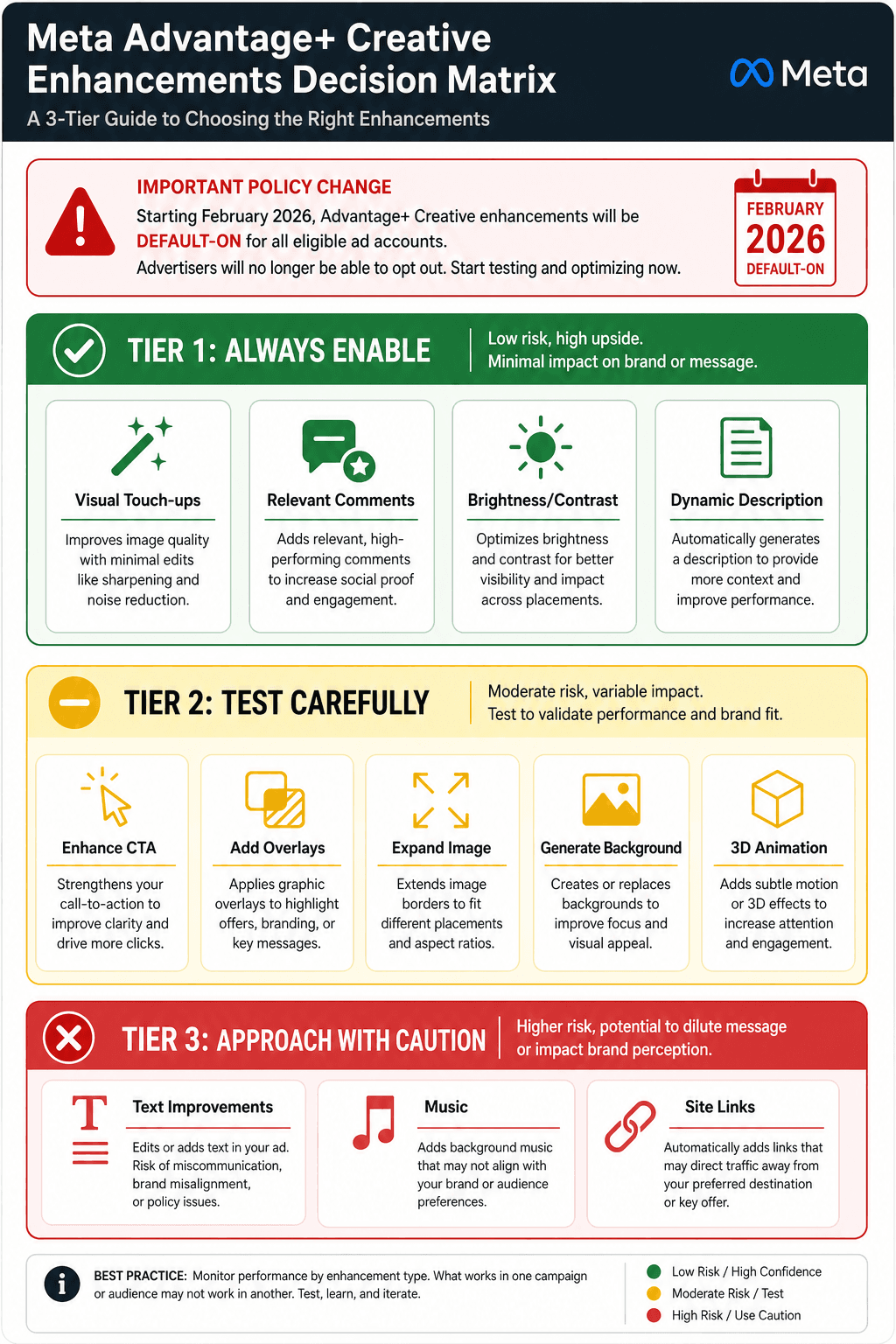
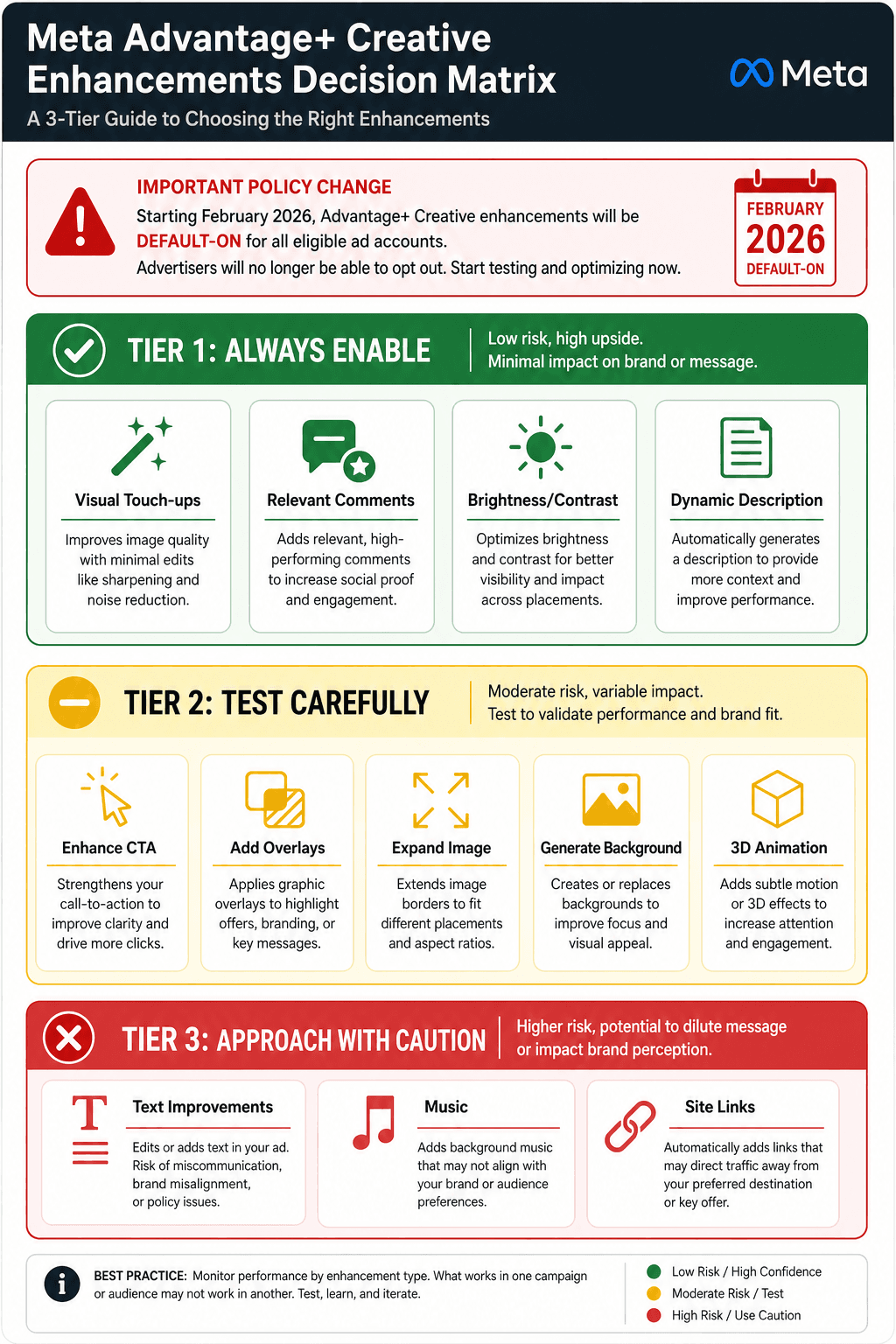
Meta Advantage+ Creative Enhancement Decision Matrix: Which Toggles to Turn On, Off, and Test
A practitioner-level guide for paid media managers on configuring Meta Advantage+ Creative enhancements. Provides a three-tier decision matrix (always-enable, test-carefully, approach-with-caution) with per-enhancement recommendations, brand risk examples, and a repeatable configuration protocol.
Why the Default 'Everything On' Policy Is Risky
Since February 2026, Meta has changed the default configuration for all new Sales, Leads, and App Promotion campaigns. Every single Advantage+ Creative enhancement now launches in the "on" position. For a paid media manager managing multiple accounts, this means the platform is automatically authorized to crop images, rewrite headlines, add background music, generate entirely new visual elements, and even rearrange your carefully crafted ad copy — unless you explicitly intervene.
This shift is tied directly to Andromeda, Meta's next-generation ad delivery system. Andromeda processes thousands of times more ad variants in parallel than its predecessor, according to industry analysis from AdMove. The system's primary performance lever has shifted from audience targeting to creative diversity. The algorithm needs a wide range of asset permutations to find winning combinations, and it gets those permutations by applying its own enhancements to your base creative. If you leave every toggle on, you are effectively giving Andromeda permission to experiment with your brand's visual identity and messaging across hundreds of variations.
The risk is not theoretical. In 2025, the apparel brand True Classic discovered that AI enhancements had been activated without their explicit intent. The system generated ad images featuring an older woman — a "grandma" — holding a product the brand does not sell. This incident, documented by Ads Uploader, illustrates how quickly automated creative generation can produce off-brand, inaccurate, or even damaging output at scale. The brand had no control over the imagery until after it had already been served to audiences.
Additionally, since March 2026, Meta requires disclosure labels on ads containing AI-generated or AI-modified content. This regulatory requirement adds a compliance dimension to the creative enhancement decision. An enhancement that significantly alters your original creative — such as Generate Background or Text Improvements — may trigger the disclosure label, which could affect consumer perception and click-through rates.
The practical takeaway is straightforward: the default configuration is optimized for Meta's system performance, not for your brand safety or messaging precision. Intentional configuration — deciding which enhancements to enable, which to test, and which to disable entirely — is no longer optional. It is a core responsibility of the paid media manager in the Andromeda era.
The Three-Tier Decision Matrix for Advantage+ Creative Enhancements
The following framework categorizes every available Advantage+ Creative enhancement into three tiers based on brand risk, performance impact, and control level. This matrix is derived from documented enhancement behavior, practitioner case studies, and published best practices from AdMove and Ads Uploader. Use it as your starting point, then adjust based on your specific brand guidelines and campaign objectives.
| Tier | Enhancement | What It Does | Recommended Action |
|---|---|---|---|
| Tier 1: Always Enable | Visual Touch-ups (Images) | Non-destructive adjustments: cropping, text animation, minor color corrections to fit more placements. | Enable for all campaigns. Low risk, high placement coverage. |
| Tier 1: Always Enable | Relevant Comments | Pins a relevant, positive comment from your page to the top of the ad's comment section. | Enable for all campaigns. Social proof benefit with minimal downside. |
| Tier 1: Always Enable | Adjust Brightness and Contrast | Subtle color and lighting tweaks applied when the algorithm predicts improved performance. | Enable for all campaigns. Non-destructive and rarely noticeable. |
| Tier 1: Always Enable | Dynamic Description | Auto-generates product descriptions from your catalog feed for dynamic ads. | Enable for catalog campaigns. Essential for scaling dynamic creative. |
| Tier 2: Test Carefully | Enhance CTA | AI finds key words and phrases to create new CTA buttons on Instagram Stories placements. | Test on non-brand campaigns first. Monitor for tonal mismatch. |
| Tier 2: Test Carefully | Add Overlays | Adds text overlays, countdown timers, or promotional badges to existing images. | Test with clear brand guidelines. Overlays can clutter clean creative. |
| Tier 2: Test Carefully | Expand Image | Extends image backgrounds to fit different aspect ratios across placements. | Enable for multi-placement campaigns. Preview to ensure no awkward cropping. |
| Tier 2: Test Carefully | Generate Background | AI generates entirely new backgrounds for your product images. | High brand risk. Test only with products that have simple, consistent backgrounds. |
| Tier 2: Test Carefully | 3D Animation | Applies 3D rotation or depth effects to images on Instagram placements. | Test selectively for visual products. Can increase engagement but may distort brand imagery. |
| Tier 3: Approach with Caution | Text Improvements | AI rewrites primary text, headlines, and descriptions to optimize for engagement metrics. | Disable for brand campaigns. Test only on direct-response campaigns with loose copy constraints. |
| Tier 3: Approach with Caution | Music | Adds background music to video ads from Meta's licensed library. | Disable by default. Enable only with manual music selection to avoid tonal mismatch. |
| Tier 3: Approach with Caution | Site Links | Auto-generates site link descriptions from your website content. | Disable for most campaigns. Risk of irrelevant or outdated link text. |
Tier 1: Always Enable — Low Risk, High Coverage
These enhancements are non-destructive. They modify, crop, or supplement your existing creative without generating entirely new content. Visual Touch-ups, for example, adjust image cropping and animate text to fit different placements — they do not invent new visual elements. Relevant Comments pins an existing positive comment, which is a social proof signal with no creative risk. Brightness and Contrast adjustments are subtle enough that most viewers will not notice them. Dynamic Description only applies to catalog campaigns and pulls from your existing product feed, so the content is already under your control.
Tier 2: Test Carefully — Measured Experimentation
These enhancements can generate content that never existed in your original creative. Enhance CTA, Add Overlays, Expand Image, Generate Background, and 3D Animation all fall into this category. They are classified as "AI-labeled" enhancements by Meta, meaning they may trigger the AI disclosure requirement. The key is structured testing: run a controlled A/B test with the enhancement enabled against a control ad set without it. Use the AI Ad Copy A/B Testing workflow to isolate the enhancement's impact from other variables. If the enhancement degrades CTR or increases CPM without improving conversion rate, disable it.
Tier 3: Approach with Caution — Documented Brand Risks
Text Improvements, Music, and Site Links carry the highest risk of producing off-brand or misleading output. Text Improvements is particularly dangerous because Meta's AI optimizes for engagement metrics — click-through rate, comments, shares — not for message accuracy. The system can completely rearrange your primary text, headline, and description, potentially altering your value proposition or making claims your product does not support. Music can create tonal dissonance if the AI selects a track that conflicts with your brand voice. Site Links can pull outdated or irrelevant descriptions from your website. For most brand campaigns, the safest default is to disable all three.
How to Preview Enhancements Before Enabling
The single most underused feature in Ads Manager is the enhancement preview carousel. According to Jon Loomer, most advertisers skip this step entirely, enabling enhancements based on assumptions rather than visual evidence. The preview tool shows exactly how each enhancement will affect your ad across every placement — before a single impression is served.
Here is the step-by-step workflow:
- Navigate to the Advantage+ Creative section during ad creation or editing in Ads Manager.
- Click the "Edit" button next to any enhancement you are considering enabling.
- The preview carousel will open, showing your ad as it will appear with that specific enhancement applied.
- Scroll through all placement previews — Facebook Feed, Instagram Feed, Stories, Reels, Marketplace, and any other placements you have selected.
- Check for visual distortions, awkward cropping, text truncation, or tonal mismatches.
- Repeat for each enhancement you are considering. Some enhancements interact with each other, so preview combinations as well.
Pay special attention to vertical placements. Roughly 90% of Meta's ad inventory is vertical, and 98% of users access Meta on mobile, according to AdMove. An enhancement that looks fine in the Facebook Feed may produce a disastrous crop in Instagram Stories. The preview carousel is the only way to catch these issues before they go live.
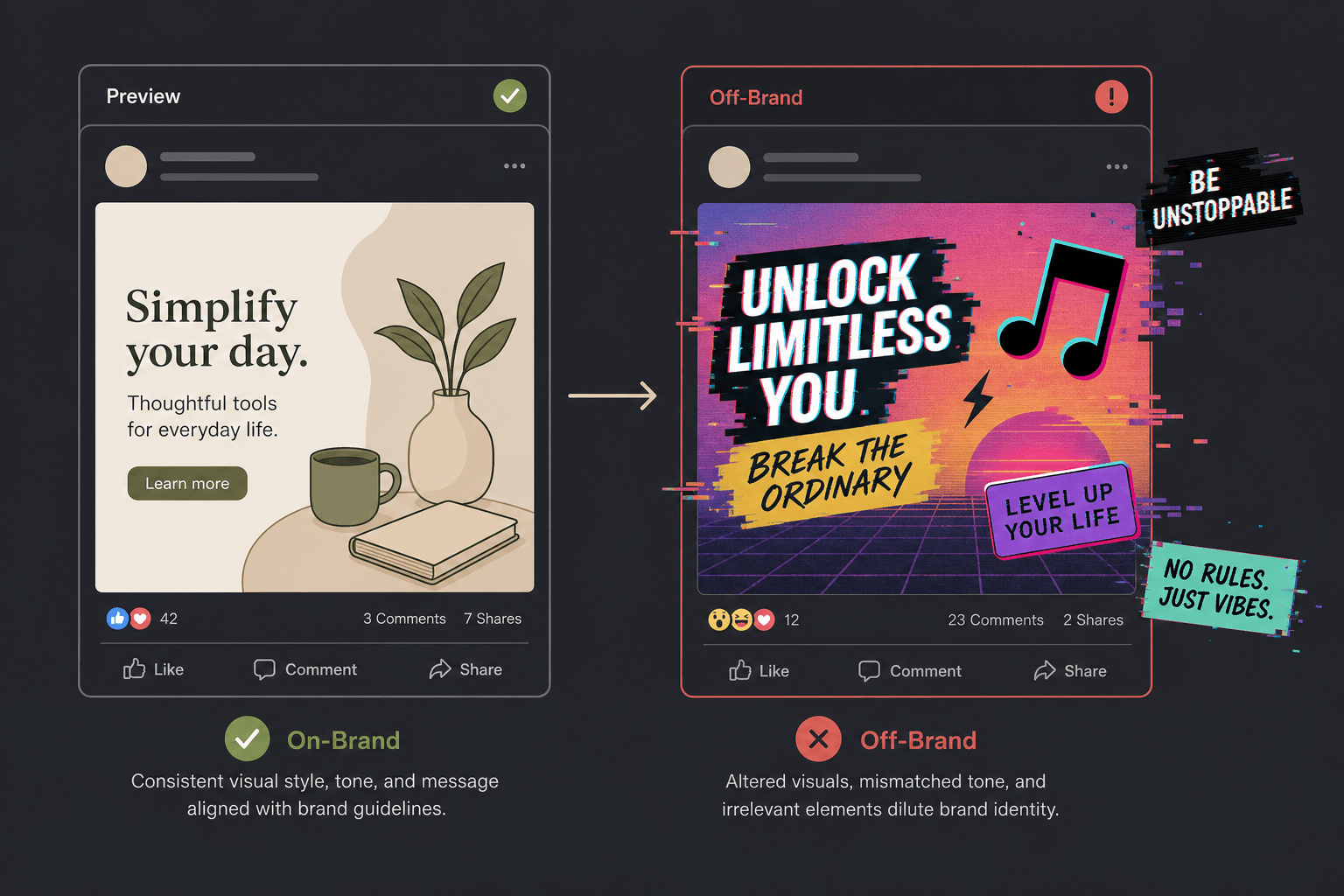
Brand Risk Examples: When AI Enhancements Go Off-Brand
The True Classic incident is the most cited cautionary tale, but it is far from the only example of AI-generated creative failures in Meta's ecosystem. Understanding the specific failure modes helps you anticipate problems before they occur.
The True Classic Grandma Incident
In 2025, True Classic — a men's apparel brand — had AI enhancements enabled without explicit configuration. Meta's system generated ad images featuring an older woman holding a product the brand does not sell. The enhancement had extrapolated from the brand's existing creative in a way that was both demographically and product-wise incorrect. The Ads Uploader source that documented this incident notes that the brand had no intention of targeting or depicting that demographic. The AI had essentially created a fictional product endorsement that never existed in the brand's actual marketing.
Text Improvements: When AI Rewrites Your Message
Text Improvements is one of the highest-risk enhancements because it directly alters your ad copy. Meta's AI optimizes for engagement metrics — click-through rate, comments, shares — not for message accuracy or brand voice. The system can swap your primary text, headline, and description in ways that change the meaning of your offer. For example, a headline that says "Free Shipping on Orders Over $50" could be rewritten to "Free Shipping on Everything" if the AI predicts higher engagement from the broader claim. This is not a hypothetical scenario; it is a documented behavior of the enhancement.
For brands with strict compliance requirements — regulated industries, financial services, healthcare, or any sector where messaging accuracy is legally mandated — Text Improvements should remain disabled at all times. The risk of generating non-compliant copy at scale is too high.
Music: Tonal Mismatch at Scale
The Music enhancement adds background audio from Meta's licensed library to video ads. The problem is that the AI selects the track based on engagement predictions, not brand fit. A luxury brand's video could be paired with an upbeat pop track that undermines its premium positioning. A B2B software demo could get a cinematic orchestral score that feels disconnected from the product's practical value proposition. Jon Loomer recommends enabling Music only with manual selection, where you choose the specific track rather than letting the AI decide. This gives you control over the tonal fit while still benefiting from the enhancement's placement optimization.
Campaign-Type-Specific Recommendations
Not all enhancements behave the same way across campaign formats. A enhancement that works well for a catalog campaign may introduce unacceptable risk for a single-image brand campaign. The following table provides format-specific guidance.
| Campaign Format | Enhancements to Prioritize | Enhancements to Disable | Key Consideration |
|---|---|---|---|
| Catalog / Dynamic Ads | Dynamic Description, Visual Touch-ups, Brightness/Contrast | Text Improvements, Music, Site Links | Catalog campaigns already have structured data. Let enhancements handle placement adaptation, not messaging. |
| Single Image Campaigns | Visual Touch-ups, Expand Image, Brightness/Contrast | Generate Background, 3D Animation, Text Improvements | Single image campaigns have limited creative diversity. Expand Image helps with placement fit without inventing new content. |
| Video Campaigns | Visual Touch-ups (Video), Brightness/Contrast, Relevant Comments | Music (unless manually selected), Text Improvements, Site Links | Video is the most brand-sensitive format. Manual music selection is the only safe approach. |
| Lead Gen Campaigns | Visual Touch-ups, Brightness/Contrast, Relevant Comments | Text Improvements, Enhance CTA, Generate Background | Lead gen forms have specific compliance requirements. Any enhancement that alters form copy or imagery introduces risk. |
For catalog campaigns, the Dynamic Description enhancement is particularly valuable because it auto-generates product descriptions from your feed, ensuring every product in your catalog has unique, relevant copy without manual effort. This is one of the few enhancements that actually reduces workload while improving performance.
For single image campaigns, Expand Image is a practical enhancement that extends your image background to fit different aspect ratios. It does not generate new content — it extrapolates from the existing image edges. However, preview is critical here: if your image has a solid color background, the extension will look natural. If your image has complex edges or text near the borders, the extension may produce visible artifacts.
Post-Launch Monitoring: What to Watch After Going Live
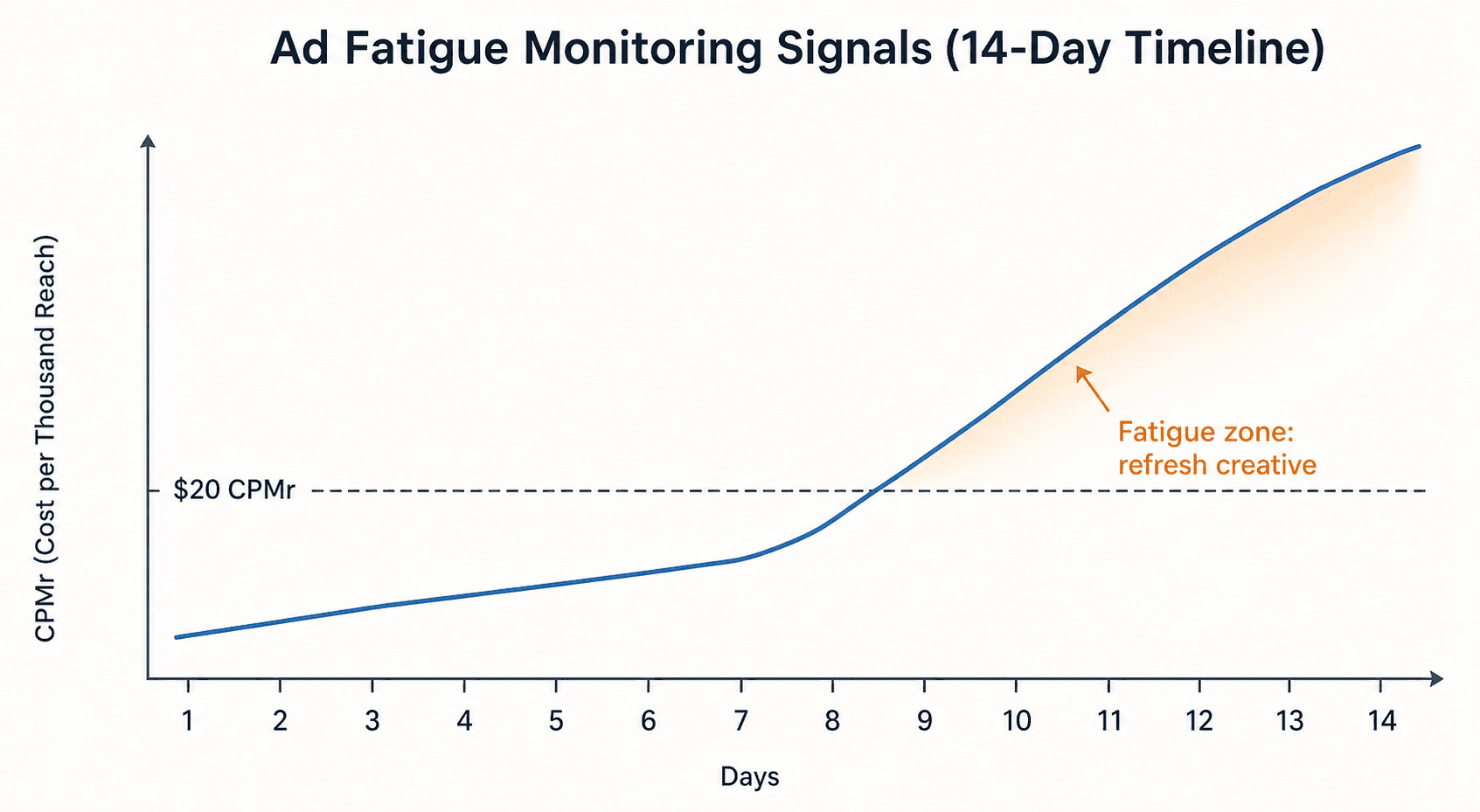
Once your campaign is live with your configured enhancements, monitoring becomes the primary feedback loop. The most important metric to track is CPM-reach (CPMr), which measures the cost to reach 1,000 unique users. According to AdMove, a healthy CPMr typically stays below $20 for most verticals. When CPMr climbs above that threshold and sustains the increase over 7 or more consecutive days, it signals creative exhaustion — your audience has seen your ad variations too many times and is tuning out.
Secondary signals to monitor include:
- CTR trend: A declining CTR over 5-7 days, even as CPMr remains stable, suggests the creative is losing relevance. The enhancements may not be generating enough variety to maintain audience interest.
- Frequency: When frequency exceeds 3-4 within a 7-day window, creative fatigue is likely. Enhancements can help extend the effective frequency ceiling by introducing variation, but they cannot overcome fundamentally exhausted audiences.
- Cost per result: If your CPA or cost per lead starts climbing while CPMr is also rising, the enhancements are not compensating for creative fatigue. This is the clearest signal to refresh your base creative assets.
A practitioner case study from the Perpetual Traffic podcast provides a real-world example of Advantage+ Sales campaign performance. In a $4M+ test, a small ad account spending under $10K per month achieved a new customer acquisition cost of $12.26 after scaling budget. The campaign's best CPA was $13, compared to a control campaign at $42 CPA and a Mother's Day sale at $33 CPA — a 75% improvement in cost per acquisition over the control after three weeks without any ad-level pausing or optimization.
The case study also reinforces a critical monitoring principle: do not pause ads that are not spending in the first week. Meta is building a mini-funnel inside the ad set, showing different ad variations to users who engage but do not convert. The algorithm needs time to learn which enhancement combinations work for which audience segments. Premature pausing interrupts this learning process and can degrade long-term performance.
Quick Reference Table for Ad-Level Configuration
The following table consolidates every enhancement into a single scannable reference. Use it as a daily checklist when setting up new campaigns or auditing existing ones.
| Enhancement | Tier | Default Action | Key Risk / Benefit |
|---|---|---|---|
| Visual Touch-ups (Images) | 1 | Enable | Non-destructive placement adaptation. Low risk. |
| Relevant Comments | 1 | Enable | Social proof signal. No creative risk. |
| Adjust Brightness and Contrast | 1 | Enable | Subtle performance tweaks. Rarely noticeable. |
| Dynamic Description | 1 | Enable | Auto-generates catalog descriptions. Essential for dynamic ads. |
| Enhance CTA | 2 | Test | New CTA buttons on Stories. Monitor for tonal mismatch. |
| Add Overlays | 2 | Test | Text overlays and badges. Can clutter clean creative. |
| Expand Image | 2 | Test | Extends backgrounds for placement fit. Preview for artifacts. |
| Generate Background | 2 | Test | AI generates new backgrounds. High brand risk. |
| 3D Animation | 2 | Test | Depth effects on Instagram. May distort brand imagery. |
| Text Improvements | 3 | Disable | AI rewrites ad copy. Optimizes for engagement, not accuracy. |
| Music | 3 | Disable | Background audio from licensed library. Tonal mismatch risk. |
| Site Links | 3 | Disable | Auto-generated link descriptions. Risk of irrelevant text. |
For a deeper dive into how Advantage+ creative configuration fits into a broader bidding and campaign structure framework, see our Meta Advantage+ AI Bidding Strategy and Creative Configuration guide. For documented case studies of AI-generated creative in paid social campaigns, including risks and outcomes, visit our AI Generative Creative in Paid Social case study.

Comments
Join the discussion with an anonymous comment.