

The AI Marketing Speed Trap: Why Generic Output Fails Small Businesses and How First-Party Data Fixes It
AI tools can generate marketing content in under a second, but without first-party customer data, small businesses produce polished but irrelevant output that fails to convert. This article defines the speed trap, explains why generic AI content underperforms, and provides a three-step framework to connect customer knowledge with AI speed.
The Adoption Reality: Most Small Businesses Are Already Using AI for Marketing
The numbers are clear: small businesses have moved past the experimentation phase with AI marketing tools. The QuickBooks 2026 AI Impact Report, which surveyed 34,000 small and medium-sized businesses, found that 43% now use AI for marketing. The Constant Contact Q1 2026 Small Business Now report (n=1,500) puts the figure even higher at 54%, with another 27% planning to adopt AI tools by the end of the year. The U.S. Chamber of Commerce's 2025 Empowering Small Business Report found that 58% of small businesses self-identify as using generative AI — more than double the rate from 2023. And the SBE Council's October 2025 survey (n=530) reports that 88% of small businesses use AI tools in some capacity.
These figures paint a picture of rapid, widespread adoption. But adoption and effectiveness are not the same thing. The same surveys reveal a gap: while 41% of SBE Council respondents say AI allows them to spend more strategic time growing the business, the Adobe Acrobat Small Business Superpower Study (n=431) found that 42% of small business owners say the biggest challenge with AI is output that feels generic or lacks a human touch. The tools are in place. The results are not.
The Speed Trap Defined: Why Faster Content Can Mean Worse Results
Here is the core problem that the adoption statistics do not capture. AI can generate an email message, a social post, or an ad headline in under one second. That speed feels like an unqualified advantage. But speed without customer knowledge creates a specific failure mode — one that hits small businesses harder than enterprises.
Consider the math. A large brand with a 10-million-person email list that achieves a 2% conversion rate generates 200,000 sales. That same 2% conversion rate applied to a small business with a 3,000-person list yields just 60 sales. The small business loses 2,940 potential customer relationships — not because the content was poorly written, but because it was written for nobody in particular. As TerDawn DeBoe writes in Forbes, "only when speed is combined with customer knowledge will small business AI marketing be successful."

The speed trap is this: AI makes it easy to produce more content faster, but that speed works against you when it bypasses the one advantage small businesses have over large competitors — direct, personal knowledge of their customers. An enterprise marketing team managing millions of customers cannot know them individually. A small business owner who recognizes repeat customers by name, remembers their preferences, and knows their purchase history has a structural advantage. AI tools, used generically, erase that advantage.
Why Generic AI Output Fails: The Segmentation Data
The data on segmentation versus batch-and-blast marketing is not subtle. Klaviyo's published benchmark data shows that segmented email campaigns generate up to 760% more revenue than non-segmented campaigns. That is not a marginal improvement. It is the difference between a campaign that pays for itself and one that quietly erodes list engagement.
The Adobe study confirms the mechanism behind this gap: 42% of small business owners say the biggest challenge with AI-generated content is that it feels generic. When 44% of small businesses use AI to compose content (Constant Contact), and most of them are not segmenting their audiences before generating that content, the result is a flood of polished but irrelevant messages. AI makes batch-and-blast faster, not better.
The problem is structural, not a tool limitation. AI language models generate text based on patterns in their training data. Without specific customer context in the prompt — names, purchase dates, product categories, engagement history — the model defaults to the most statistically common patterns. Those patterns are generic by definition. The output reads like it was written for everyone, which means it resonates with no one.
- Segmented campaigns generate up to 760% more revenue than batch-and-blast (Klaviyo benchmark data)
- 42% of SMB owners say generic output is the biggest AI challenge (Adobe Acrobat Small Business Superpower Study)
- 44% of small businesses use AI to compose content, but most do not segment before generating (Constant Contact Q1 2026)
- AI text generation tools are the most widely used category at 77% (Adobe), making the generic output problem widespread
The Three-Step Framework: Turn Customer Knowledge Into AI Advantage
The solution is not to abandon AI tools. It is to feed them the customer data that small businesses already possess. The following three-step framework, drawn from the Forbes DeBoe article, is designed to be completed in a few hours — not weeks — and requires no technical expertise.
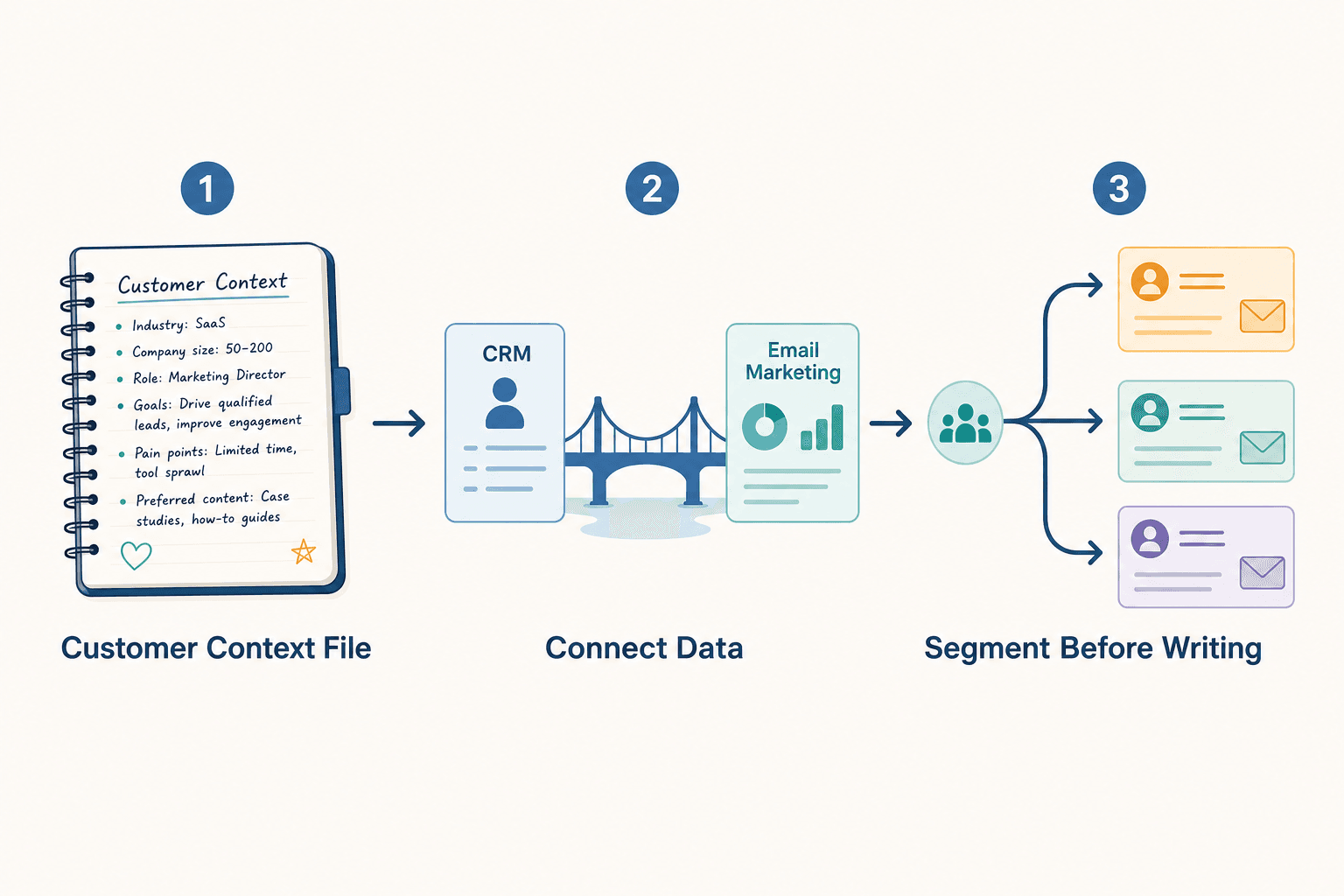
Step 1: Create a 90-Minute Customer Context File
Select your 20 best customers — the ones who buy most frequently, spend the most, or refer the most business. For each customer, document:
- What they purchased and when
- How they found you (referral, search, social, paid ad)
- What problem your product or service solved for them
- The language they used when describing their need (capture actual phrases)
- Any personal details they have shared (preferences, objections, compliments)
This file becomes your prompt library. When you ask an AI tool to write an email or a social post, you paste in the relevant customer context before the instruction. The difference in output quality is immediate and measurable.
Step 2: Connect Your Data Sources
Most small businesses have customer data scattered across QuickBooks, Gmail, a CRM, and their email marketing platform. The Forbes DeBoe article recommends spending a couple of hours connecting these systems. This does not require a data engineer. Most email platforms (Mailchimp, Constant Contact, Klaviyo) offer native integrations with accounting software and CRMs. The goal is to have purchase history, contact source, and engagement data in one place where you can use it to build segments.
| Data Source | What It Contains | Integration Path |
|---|---|---|
| QuickBooks / Xero | Purchase history, invoice amounts, payment dates | Native integration with most email platforms |
| Gmail / Outlook | Email conversations, customer questions, objections | CRM import or manual export |
| CRM (HubSpot, Salesforce, Pipedrive) | Deal stage, lead source, contact notes | Direct API or native integration |
| Email platform (Mailchimp, Klaviyo, Constant Contact) | Open rates, click rates, unsubscribe data | Already centralized — use as the hub |
Step 3: Segment Before Writing
Once your data is connected, build segments that reflect real customer behavior. The Forbes DeBoe article suggests starting with these three:
- Customers who purchased in the last 90 days — send thank-you content, upsell offers, and referral requests
- Customers who have not purchased in 6 months — send re-engagement content with a specific offer
- Customers acquired through referral vs. paid advertising — each group responds to different messaging
For each segment, write one AI prompt that includes the segment's defining characteristic and the specific customer context from Step 1. The AI will generate content that speaks to that group's actual situation rather than a generic audience of "valued customers."
Metrics That Matter: What to Track After You Connect Data
After implementing the framework, you need to measure whether the combination of AI speed and customer data is actually working. The Forbes DeBoe article recommends three specific metrics that reveal the health of your AI + data strategy:
| Metric | What It Measures | Why It Matters |
|---|---|---|
| Sales per email sent | Revenue generated divided by total emails sent | Directly measures whether AI-generated content is converting; compare across segments |
| Unsubscribe rates by segment | Percentage of recipients who opt out, broken down by segment | Rising unsubscribe rates in a segment indicate generic or irrelevant content |
| Repeat purchase rates | Percentage of customers who make a second purchase within a defined window | Measures whether your AI content is building relationships or just pushing transactions |
Track these metrics weekly for the first month after implementing the framework. If sales per email increase and unsubscribe rates decrease, the data connection is working. If metrics do not improve, revisit your Customer Context File — the most common failure point is insufficient or inaccurate customer data in the prompts.
The Trust Dimension: Why First-Party Data Builds Revenue and Relationships
The business case for connecting first-party data to AI tools extends beyond short-term conversion metrics. Forrester found that companies using first-party data platforms achieved revenues 2.4 times higher than those relying solely on third-party data. This is not a coincidence. First-party data — purchase history, engagement patterns, direct customer feedback — is the only data that reflects actual relationships, not inferred demographics.
Small businesses have a structural advantage here. A local retailer who knows that a customer's child just started soccer, or a B2B service provider who remembers that a client mentioned a specific operational challenge in their last call, possesses contextual knowledge that no enterprise CRM can match. The goal of AI in this context is not to replace that knowledge but to amplify it — to generate personalized content at a scale that would be impossible manually, without losing the personal touch.
The businesses that will win won't be those producing the most content, they will be the ones producing content that's actually worth consuming.
That line, from Roger Dooley's Forbes article on the Constant Contact data, captures the strategic shift. The small businesses that will succeed with AI are not the ones generating the most emails, social posts, or ad variants. They are the ones who use AI to deliver content that reflects genuine understanding of their customers — understanding that comes from data they already own but have not yet connected to their AI tools.
The path forward is not complicated. It requires a few hours of focused work: building a Customer Context File, connecting existing data sources, and segmenting before generating content. The tools are already in place for most small businesses. The missing piece is the data that makes those tools produce content that actually converts.


Comments
Join the discussion with an anonymous comment.