

Marketing AI Stack Audit
A quarterly audit framework to inventory your AI marketing tools, calculate fully loaded costs, map capability overlaps, and consolidate to a lean stack that delivers measurable ROI — typically recovering 25–40% of tool spend.
Marketing Categories
A lot of teams looking for the best marketing AI in 2026 already have it. Several times over. They have an AI writer inside the content tool, another one inside the SEO platform, another one inside the social scheduler, another one inside the CRM, and a standalone subscription someone bought because the demo was good and the trial was expiring on Friday.
That would be easier to defend if the combined bill produced clean, measurable returns. It often does not. Digital Applied’s Q2 2026 audit checklist cites a finding that 56% of CEOs report no measurable ROI from AI investments, while BCG/eMarketer benchmark coverage reports that 74% of companies still struggle to scale AI value [1][2]. The same audit conversation points to a more boring but more useful culprit: only about a quarter of organizations have fully integrated their AI tools into operating workflows [1].
Usage is not the same as value. Canva’s marketing and AI report says 97% of its surveyed marketers use AI daily, but that kind of adoption figure is best treated as context, especially because vendor survey panels can skew toward already-engaged users [3]. The practical question for a marketing manager or agency ops lead is smaller and sharper: which tools are earning their place after subscription cost, setup, retraining, workflow maintenance, and duplicated capability are counted?
The answer usually does not come from another roundup. It comes from a quarterly audit. Not an annual procurement theater. Not a Slack thread where everyone explains why their favorite tool is “mission critical.” A real audit: owner, cost, usage, overlap, integration burden, outcome, decision.
The hidden bill is bigger than the subscription line
Most AI stack cleanups start badly because they start with invoice totals. Invoice totals matter, but they understate the cost of a tool that needs admin attention every month, breaks a handoff, forces retraining, or produces work that another person has to reformat before it can move downstream.
Digital Applied frames this as an integration tax: 25–40% of AI tool spend can go toward integration maintenance, training, and setup work rather than the tool itself [1]. That number is useful because it names the thing teams feel but rarely budget. The drag is not always dramatic. Sometimes it is fifteen minutes here, a broken Zap there, a permissions issue before launch, a prompt template nobody updated after the brand guidelines changed.
For audit purposes, use a fully loaded cost model:
Fully loaded annual cost = annual subscription cost × 1.5 to 2.0The multiplier is not pretending to be perfect accounting. It is a managerial correction. A $2,400 annual tool is not really a $2,400 tool if two people spent time configuring it, three people need periodic retraining, and the workflow around it still requires manual cleanup. In a stack of 10–15 point solutions, those small burdens are exactly where the budget goes to hide.
| What the invoice shows | What the audit should count |
|---|---|
| Monthly or annual subscription | Subscription plus setup, onboarding, training, admin, and integration maintenance |
| Seat count | Actual active users, role fit, and whether seats are shared, idle, or duplicated elsewhere |
| Feature list | Capabilities the team actually uses in live workflows |
| Vendor ROI claim | Measured contribution to pipeline, content output, campaign speed, cost reduction, or quality control |
| Integration availability | Whether the integration is stable, maintained, and used without manual repair |
Run the quarterly audit in the order that prevents arguments
A useful audit can be completed in 8–12 hours if someone has access to invoices, admin panels, and the people who actually use the tools [1]. The order matters. If the first meeting starts with “what should we cancel,” every tool gets a defense attorney. Start with inventory instead. Make the stack visible before asking anyone to make a sacrifice.
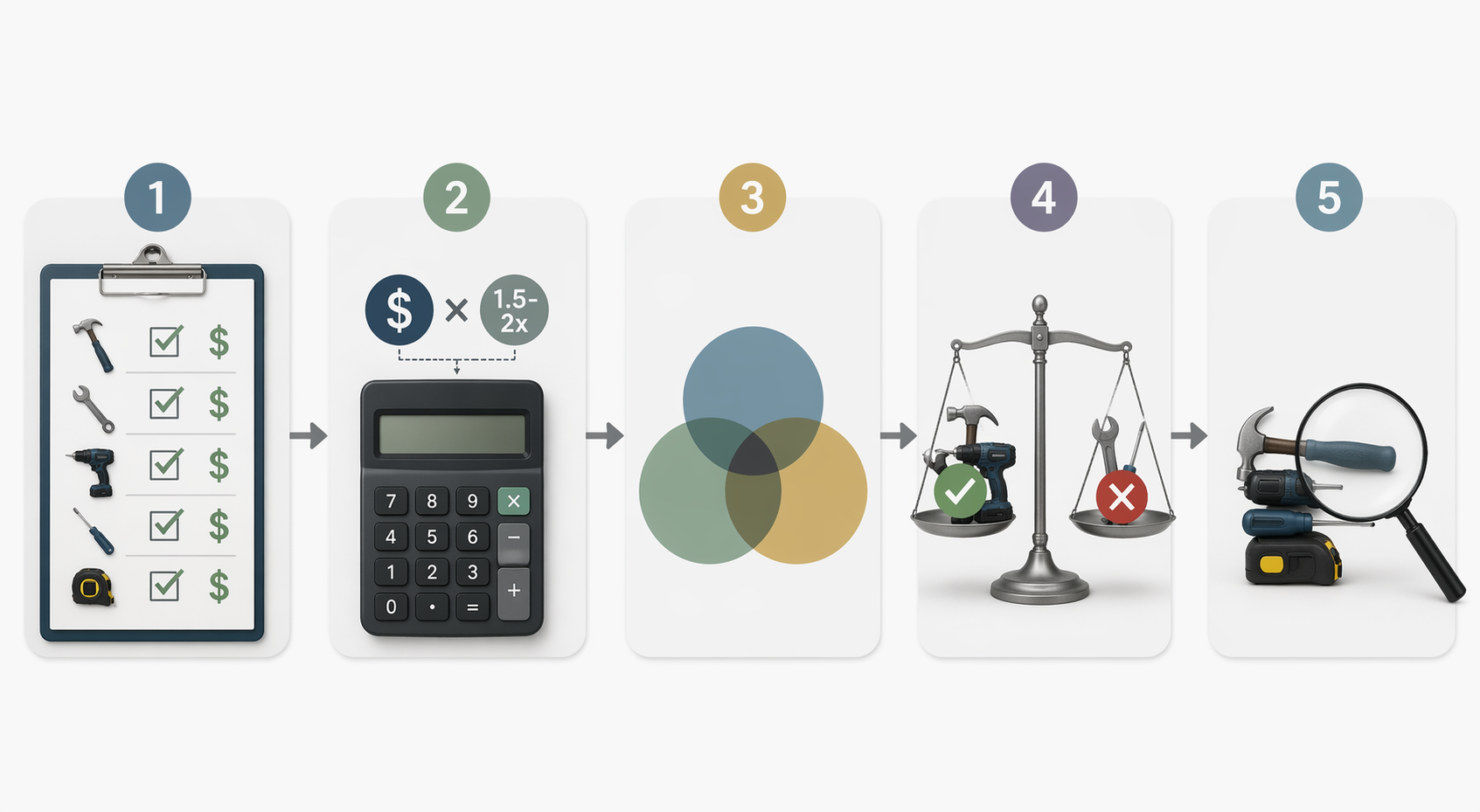
| Audit step | Output |
|---|---|
| 1. Inventory every AI-enabled marketing tool | A single sheet showing tool, owner, department, renewal date, seats, cost, and primary use case |
| 2. Calculate fully loaded cost | Subscription cost multiplied by 1.5–2.0, with notes for tools that create unusual admin or integration burden |
| 3. Map capability overlap | A view of where content generation, SEO, analytics, personalization, automation, creative production, and reporting are duplicated |
| 4. Score ROI and workflow fit | A keep, consolidate, replace, or cancel recommendation using measurable outcomes and a 3:1 ROI bar |
| 5. Check remaining gaps | A lean stack that still covers core marketing work without leaving a critical workflow unsupported |
1. Inventory tools without judging them yet
The first pass is deliberately plain. Put every AI-enabled marketing tool in one spreadsheet, including products where AI is only one feature. CRM assistants count. SEO platforms with AI briefs count. Social schedulers with caption generation count. Design tools with AI image or copy features count. Analytics tools with AI summaries count. The tool nobody has opened since the pilot still counts.
Use columns that make evasive answers difficult:
- Tool name
- Vendor
- Primary owner
- Business function
- AI capabilities used
- Monthly or annual subscription cost
- Seat count
- Active users in the last 30 or 90 days, if available
- Renewal date
- Systems it connects to
- Main workflow it supports
- Measurable outcome claimed
- Measurable outcome verified
The owner column is not decoration. A tool without an owner is already telling you something. It may still be useful, but if nobody is responsible for adoption, settings, renewal review, governance, and outcome reporting, the tool is not being managed. It is merely being paid for.
Be careful with “used by marketing” as a status. One power user is different from a campaign team relying on it every week. A tool that appears in one impressive case study from six months ago is different from a tool embedded in campaign production. The audit should separate occasional usefulness from operating dependency.
2. Convert subscription cost into fully loaded cost
Once the inventory is complete, add three annualized cost columns: subscription cost, estimated burden multiplier, and fully loaded cost. Use 1.5 as the default multiplier for tools that are stable, familiar, and lightly integrated. Use 2.0 for tools that require ongoing setup, training, prompt maintenance, custom workflows, or repeated troubleshooting.
| Tool situation | Suggested multiplier |
|---|---|
| Low-friction tool, few users, no fragile integrations | 1.5× |
| Moderate setup, recurring training, several handoffs | 1.75× |
| Complex integration, frequent admin work, manual cleanup, or unclear ownership | 2.0× |
This is where a cheap tool often stops looking cheap. A small subscription that duplicates a feature in a larger platform, requires separate training, and exports work in the wrong format may be more expensive than simply using the broader platform the team already pays for. The reverse can also be true: an expensive tool can survive the audit if it replaces multiple weaker tools and reduces handoff work.
Do not spend three weeks trying to make this model exact. The point is to make hidden labor visible enough for a decision. If a tool is clearly underused at invoice cost, it will not become defensible after the multiplier is applied.
3. Map capability overlap, not just vendor categories
Vendor categories are misleading because AI features have spread across almost everything. A social platform, an SEO platform, a writing assistant, a CRM, and a design suite may all claim content generation. That does not mean they are interchangeable, but it does mean the team may be paying for the same general capability three or four times.
Marketing Mary’s 2026 tool comparison argues that many teams should consolidate toward 3–5 core AI marketing tools rather than maintaining 10–15 point solutions [4]. Treat that as a useful operating target, not a law. Some teams genuinely need a specialized analytics, localization, compliance, or creative production tool. The burden is on the tool to prove it is specialized in practice, not just in sales copy.
Create a capability map with tools as rows and capabilities as columns. Mark only capabilities the team actually uses, not everything listed on the pricing page.
| Capability | Questions to ask |
|---|---|
| Content drafting | Which tool produces first drafts people actually use? Which drafts get rewritten from scratch? |
| SEO research and briefs | Which tool informs publishable briefs, internal links, SERP analysis, or topic prioritization? |
| Creative production | Which tool reduces design or versioning work without creating brand review problems? |
| Campaign automation | Which tool moves leads, segments, messages, or tasks without manual repair? |
| Analytics and reporting | Which tool changes decisions, not just dashboard aesthetics? |
| Personalization | Which tool affects live audience experiences and can be measured against a baseline? |
| Governance and approvals | Which tool helps control claims, permissions, brand voice, or compliance? |
The overlap map usually creates the first moment of quiet in the room. It is hard to argue for five AI writing surfaces when only one is connected to the editorial calendar, one is used for emergency social captions, and three are mostly there because they came bundled with something else.
Use a 3:1 ROI bar for tools that want to stay
After cost and overlap are visible, the decision rule should be simple enough to survive a budget meeting. A practical threshold is 3:1 ROI on fully loaded cost: for every dollar the tool costs after the multiplier, it should produce at least three dollars in measurable value or defensible equivalent value.
The value does not always have to be direct revenue. Depending on the tool, it may show up as lower production cost, faster campaign launch cycles, reduced agency spend, higher conversion rates, more output at the same headcount, fewer compliance revisions, or saved analyst time. But it does need to be specific enough that a manager can defend the renewal without leaning on “the team likes it.”
| If the tool shows... | Decision |
|---|---|
| 3:1 or better ROI, high usage, clear owner, clean integration | Keep |
| Strong usage but duplicated by a broader platform already in the stack | Consolidate into the broader platform unless the specialist materially outperforms it |
| Good output but poor integration or heavy manual cleanup | Replace or renegotiate after testing the workflow cost |
| Low usage, unclear owner, no measured outcome | Cancel at renewal or sooner if contract terms allow |
| Important capability but weak current tool | Replace only after defining the gap and success metric |
This is also where adoption statistics need discipline. HubSpot’s 2026 State of Marketing Report is useful for understanding how normalized AI has become in marketing operations, and Zapier’s 2026 AI marketing tool coverage shows how many roles now have credible AI options [5][6]. Neither fact means your team needs another subscription. Broad market adoption can justify learning AI. It does not justify keeping a redundant tool with no measured outcome.
Consolidation decisions: keep, absorb, replace, cancel
Once the spreadsheet is filled in, avoid the temptation to rank every tool from best to worst. The useful question is what role each tool plays in the future stack. Four decisions are enough.
Keep the tool that is already doing the job
A tool should be kept when it is deeply used, owned by someone accountable, integrated into the workflow, and tied to an outcome the team can point to. This is where specialized tools can absolutely survive. Consolidation is not a personality test for minimalism. If a specialist SEO, analytics, or creative tool saves enough time or improves enough decisions to clear the ROI bar, keep it and stop apologizing for it.
Absorb the tool when a platform already covers the real need
The easiest cancellations are usually not the worst tools. They are decent tools whose main capability is now available inside a platform the team already uses. If the social scheduler can generate acceptable first-pass captions and the separate caption-writing tool is used twice a month, the separate tool probably does not need a renewal discussion worthy of a courtroom drama.
Before absorbing a tool, test the replacement workflow with the people who will live with it. Make them produce the same asset, report, brief, or campaign step using the broader platform. If the output is acceptable and the handoff is cleaner, consolidate. If quality drops enough to create downstream work, the specialist may still be cheaper than it looks.
Replace tools that solve the right problem in the wrong place
Some tools reveal a real need and still deserve to go. A content tool may produce strong drafts but fail because it does not connect to planning, approvals, or publishing. An analytics assistant may summarize reports nicely but sit outside the dashboards leadership already reviews. A personalization tool may be powerful but depend on data no one trusts.
Replacement should not mean shopping immediately. First write the gap in operational language: “We need campaign brief generation inside the SEO-to-editorial workflow,” or “We need AI-assisted reporting where revenue and campaign data already live.” That kind of sentence prevents the next procurement cycle from becoming another feature tour.
Cancel tools that only have a story
The hardest tools to cancel are the ones attached to a story: the launch sprint where it saved time, the executive demo that went well, the campaign someone still references. Stories are allowed into the audit, but they do not get to substitute for current usage and measurable value.
Cancel when there is no active owner, no clear workflow dependency, no measurable outcome, and no capability that is not already covered elsewhere. If the tool later turns out to be missed, that will show up as a workflow gap. Most canceled tools do not create such clean evidence. They simply stop appearing on the credit card statement.
Do the gap check after cuts, not before
Teams often overbuy because they try to solve every possible future need before cleaning up the present stack. The gap check belongs after the first consolidation pass. Otherwise, every hypothetical use case becomes a reason to keep something.
A lean marketing AI stack still needs to cover the core operating loop: research, production, distribution, automation, analytics, and governance. It does not need a separate product for every verb in that sentence. In many teams, those needs can be handled by roughly 3–5 well-chosen core tools, with a specialist added only where the workflow or performance case is strong [4].
| Core need | What must remain true after consolidation |
|---|---|
| Research and planning | The team can identify topics, audiences, competitors, and campaign priorities without rebuilding manual research from scratch |
| Content and creative production | Writers, designers, and campaign owners can create usable assets with brand and approval controls intact |
| Distribution and automation | Campaigns can move through email, social, paid, CRM, or lifecycle workflows without fragile manual bridges |
| Analytics and reporting | Performance data can be interpreted where decisions are actually made |
| Governance | Permissions, brand standards, compliance review, and data handling are clear enough that AI usage does not become a side channel |
If a cut creates a real gap, define the gap before buying. A hypothetical example: if canceling a standalone AI writer slows the blog workflow because the SEO platform’s drafting feature cannot preserve required structure, the gap is not “we need an AI writer.” The gap is “we need draft generation that works from SEO briefs and preserves editorial templates.” That is a much better buying requirement.
What a defensible stack looks like at the end
Digital Applied’s audit methodology presents 25–40% recovery of AI tool spend as a typical outcome of systematic review, though the actual range will depend on company size, contract timing, maturity, and how much sprawl exists at the start [1]. That caveat matters. The point is not to promise savings on command. The point is that a stack with no owner, no overlap map, and no fully loaded cost model almost always contains spend that cannot defend itself.
A clean final sheet should show, for every surviving tool:
- The workflow it supports
- The owner accountable for usage and renewal
- The annual subscription cost
- The fully loaded annual cost
- The duplicated tools it replaces, if any
- The outcome it improves
- The metric that will be reviewed next quarter
- The renewal decision date
That final column matters. Quarterly review is what keeps a lean stack from quietly becoming a large stack again. Digital Applied and Gartner-linked audit guidance associates quarterly audits with 20% higher ROI than less systematic review cycles, but the more immediate benefit is managerial: nobody has to rediscover the stack from scratch before the next budget meeting [1].
The best marketing AI stack is not the one with the longest feature list. It is the one where each remaining tool has a role, an owner, a fully loaded cost, and a measurable reason to remain. For many teams, that means fewer tools than they have now.
References
- Digital Marketing AI Tool Audit: Q2 2026 Checklist, Digital Applied
- AI Marketing Statistics (2026): ROI & Benchmarks, RankMasters
- The State of Marketing and AI Report 2026, Canva
- Best AI Marketing Tools in 2026: The Complete Comparison, Marketing Mary
- 2026 State of Marketing Report, HubSpot
- The 17 best AI marketing tools in 2026, Zapier

Comments
Join the discussion with an anonymous comment.