
How to Set Up ChatGPT Referral Traffic Tracking in GA4
Learn how to surface ChatGPT traffic hidden in GA4's default reports using a three-layer tracking stack that accounts for free-tier dark traffic, the May 2026 brand link changes, and Google's new AI Assistant channel.
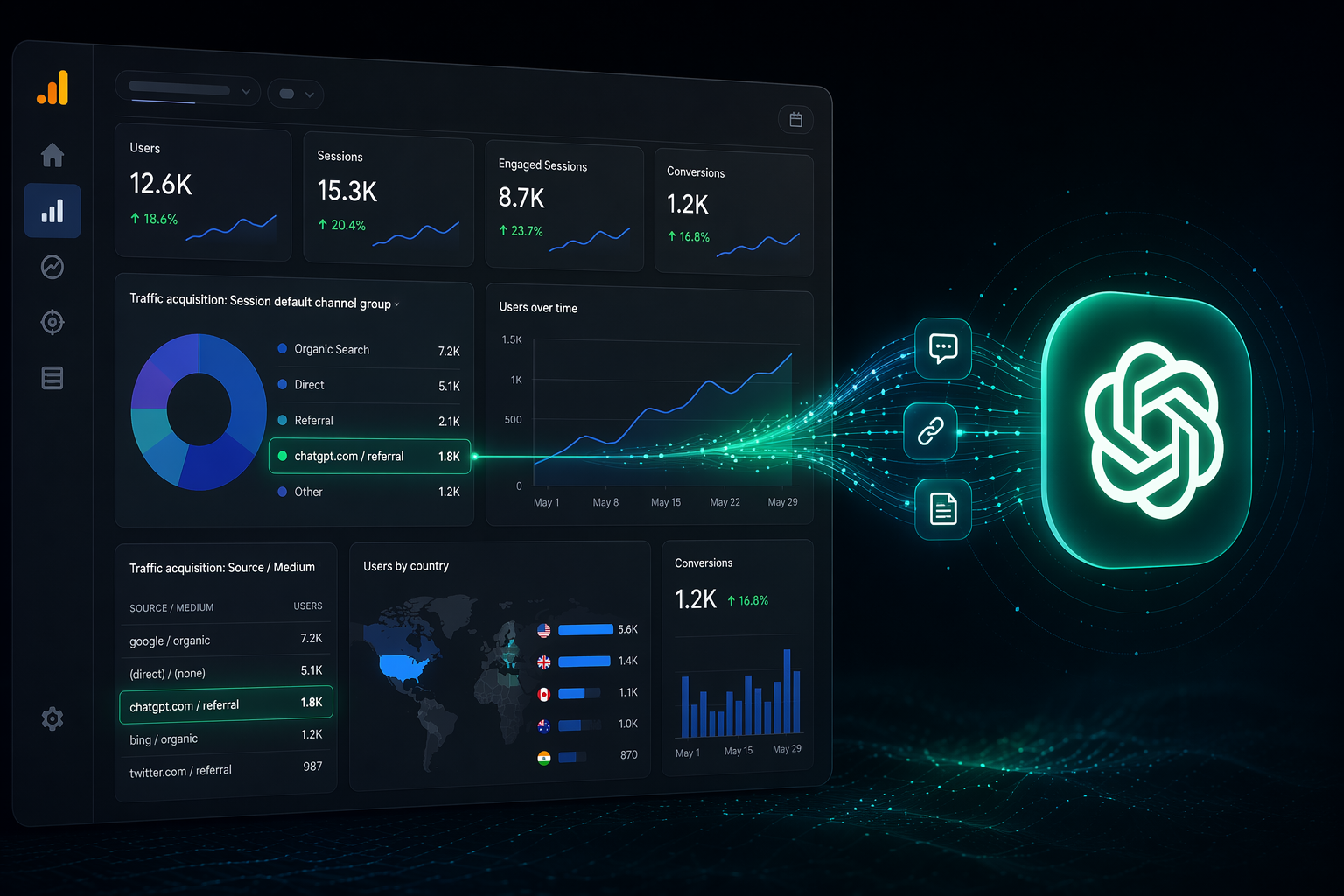
You open GA4, filter for ChatGPT, and the number is smaller than everyone expected. Then you look at referrals and find a few sessions from chatgpt.com. Then you look at Direct and realize some of the missing visits may be there, except GA4 cannot tell you which ones. That is the practical problem with ChatGPT referral traffic tracking in 2026: the visits are not always absent, but they are rarely assembled in a way you can defend in a weekly report.
GA4’s default channel grouping has historically placed ChatGPT and similar AI referrals inside generic Referral rather than a dedicated AI channel, while sessions with stripped referrers can fall into Direct instead.[1][2] The result is a technically true report that is operationally incomplete: some AI traffic is visible, some is mislabeled, and some is only inferable.
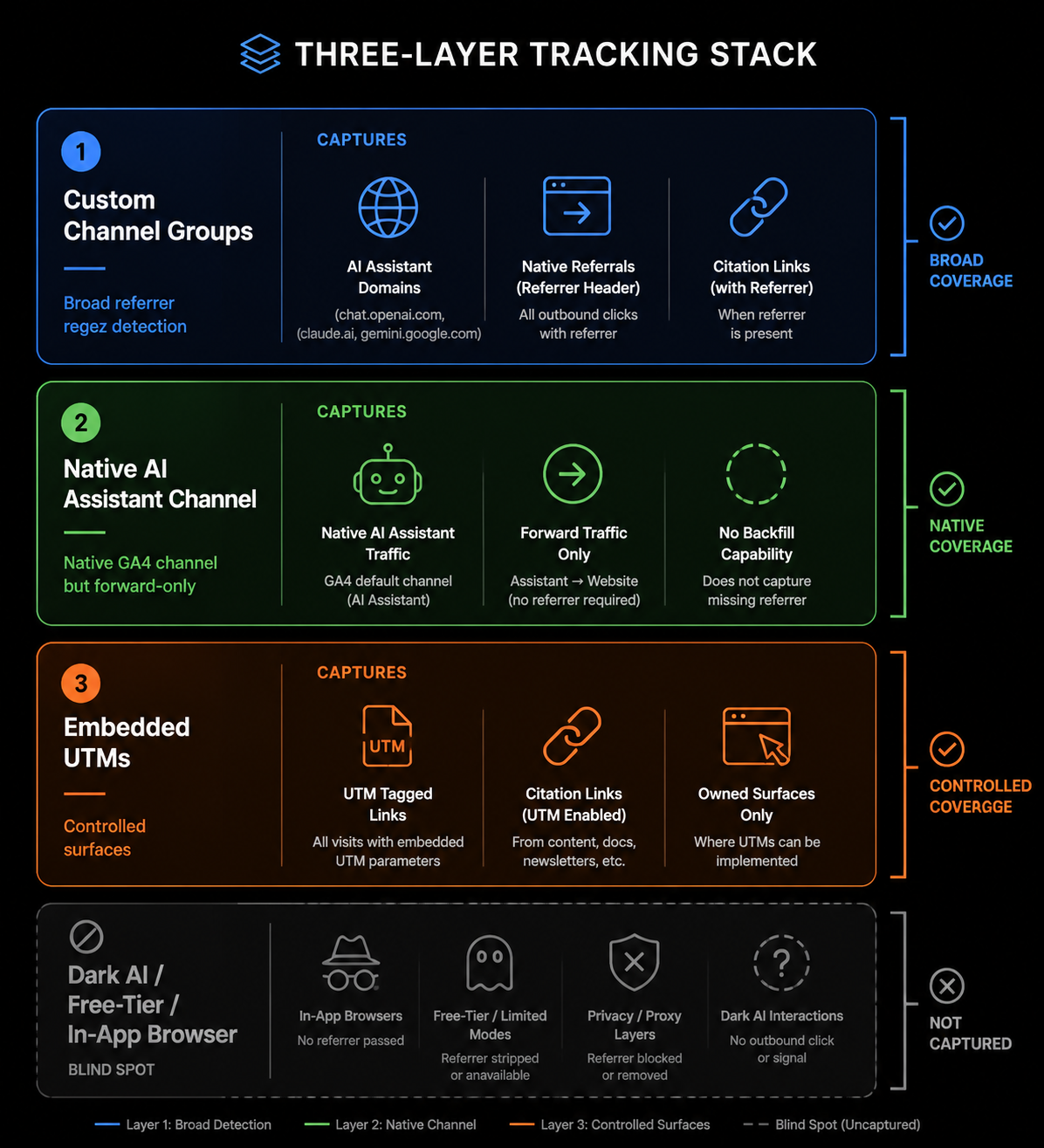
The setup worth building has three layers. Use a custom channel group to catch known AI referrers consistently. Run Google’s native AI Assistant channel beside it as the platform-supported forward view. Add UTMs wherever you control the surface, because referrer-based tracking will never recover every free-tier, in-app browser, or copied-link session.
| Layer | What it captures | What it does not solve |
|---|---|---|
| Custom AI channel group | Known AI referrers such as ChatGPT, Perplexity, Gemini, Claude, Copilot, Grok, and related domains | Sessions where referrers are stripped or hidden |
| Native AI Assistant channel | Google’s own AI-referral classification from the date it became available | Historical comparability and dark AI traffic |
| Embedded UTMs | Links and assets you control, including citations, PDFs, whitepapers, and campaign surfaces | Uncontrolled citations, copied links, and visits from surfaces that remove parameters |
Start With a Custom AI Channel Group
The custom channel group is still the reporting backbone because it is reproducible, editable, and usable across comparison periods. Google’s native channel is useful, but if you need to explain what happened before mid-May 2026, or you need broader control over platform coverage, you need your own rule set.
In GA4, go to Admin, then Data display, then Channel groups. Create a new channel group rather than overwriting your default one. Name it something plain, such as “AI Referrals,” “AI Assistants,” or “AI Traffic.” The name matters less than the fact that the definition is documented and stable enough for someone else to reproduce.
Create a new channel inside that group using Session source, Session source / medium, or a comparable source dimension depending on your GA4 interface. The condition should match known AI domains using a single maintained regex. A production version should cover at least ChatGPT, Perplexity, Gemini, Claude, Copilot, Grok, and a wider set of AI answer or assistant domains; published GA4 guides converge on this regex-based approach because default reports do not isolate these visits cleanly.[1][3][4]
.*(chatgpt\.com|openai\.com|perplexity\.ai|gemini\.google\.com|bard\.google\.com|claude\.ai|anthropic\.com|copilot\.microsoft\.com|bing\.com/chat|grok\.x\.ai|x\.ai|you\.com|phind\.com|poe\.com|writesonic\.com|copy\.ai|jasper\.ai|komo\.ai|neeva\.com|arc\.net|andisearch\.com|metaphor\.systems|exa\.ai|mistral\.ai|pi\.ai|character\.ai).*Treat that regex as a maintained asset, not a one-time paste. New AI products appear, existing products change domains, and some platforms route traffic through broader properties. Put the regex in your analytics documentation, record the date you changed it, and annotate GA4 when a material update affects the channel.
Ordering Is Not Cosmetic
Place the AI channel rule before broader Referral, Organic Search, Cross-network, and any catch-all rules. GA4 evaluates custom channel rules in order, so a session from an AI platform can be swallowed by a broader rule if the AI condition sits too low. That mistake is easy to miss because the session still appears somewhere; it just disappears from the channel you meant to report.
A defensible order usually looks like this:
- Paid channels and other business-critical campaign rules that depend on explicit UTMs.
- AI Referrals, using the maintained AI-domain regex.
- Organic Search, Referral, Email, Social, and other standard acquisition rules.
- Unassigned or fallback rules.
If your organization has custom paid or partner rules, do not blindly move AI above everything. Preserve explicit campaign tracking where the UTM source and medium are already intentional. The goal is to prevent generic channels from absorbing AI sessions, not to overwrite better evidence.
Use Dimensions That Let You Audit the Rule
After the group is created, build an Exploration that shows Session default channel group, your custom channel group, Session source / medium, Landing page, and Key events. This is where the setup becomes useful. If leadership asks why ChatGPT appears in one report but not another, you can show the source-level evidence instead of pointing to a dashboard tile.
Keep a small QA view for the first few weeks. Look for sessions from known AI domains still sitting in Referral. Look for unexpected sources caught by the regex. Check whether AI sessions with explicit UTMs are being classified according to your intended priority. Most errors in this setup are not dramatic; they are ordering and pattern-matching errors that quietly compound.
Run Google’s AI Assistant Channel Beside Your Custom Group
Google introduced a native AI Assistant channel in GA4 on May 13, 2026.[1][4] That is a meaningful change. It gives teams a platform-supported view of AI referrals and reduces the need to explain why every organization has invented its own naming convention.
It should not replace the custom group yet. The native channel is forward-only, so it cannot rebuild your historical AI trend line. It also remains referral-dependent, which means it cannot count sessions where the referrer never reaches GA4. If ChatGPT, an in-app browser, or another surface strips the referrer, a native channel cannot classify evidence it does not receive.
For reporting, keep both views visible for at least several quarters. Use the custom group for historical comparability and broader source coverage. Use Google’s AI Assistant channel as the native benchmark you expect stakeholders, agencies, and platform documentation to reference more often over time.
| Reporting view | Best use | Caution |
|---|---|---|
| Custom AI channel group | Trend analysis, source-level audits, historical comparisons, regex-controlled coverage | Requires maintenance and clear rule documentation |
| Native AI Assistant channel | Forward-looking platform-native reporting | Cannot reconstruct pre-launch history and undercounts referrer-stripped traffic |
| Direct with AI-likelihood analysis | Directional dark-traffic context | Not auditable at the individual-session level |
Do Not Pretend Direct Traffic Is Clean
The uncomfortable part of ChatGPT referral traffic tracking is that some traffic cannot be deterministically recovered. Free-tier interactions and in-app browsers can strip referrer headers, causing visits that originated from AI tools to appear as Direct.[2][3] That is not a GA4 configuration bug you can fully fix. It is a measurement boundary.
You can still reduce the blind spot. Build a directional “Shadow AI” analysis for Direct sessions that behave unlike normal typed-in or bookmarked visits. Common signals include landing on deep informational pages, arriving on long URLs that few people would type manually, or showing patterns similar to known AI-referral landing pages. SEER’s practical guidance frames this kind of method as a way to surface hidden AI traffic, but it remains probabilistic rather than session-level proof.[2]
Label it accordingly. In a report, “Known AI Referrals” and “Estimated Dark AI” should not be merged without explanation. The first is source-evidenced. The second is modeled or rules-based. Both can be useful; only one is auditable in the strict sense.
Use UTMs Where You Control the Surface
UTMs are the part of the stack that changes future evidence instead of trying to rescue missing evidence after the fact. If you control the link, asset, or campaign surface, tag it. That includes PDFs, whitepapers, comparison pages, help docs, partner assets, and any static content likely to be ingested or cited by AI systems.
Published guidance notes that ChatGPT may append utm_source=chatgpt.com on citation links, but this behavior does not cover every search-result link or free-tier interaction.[5][7] That means your rules should recognize both AI referrers and AI-related UTM sources instead of assuming one signal will always exist.
utm_source=chatgpt.com&utm_medium=ai_referral&utm_campaign=ai_citation
utm_source=perplexity&utm_medium=ai_referral&utm_campaign=ai_citation
utm_source=owned_pdf&utm_medium=ai_referral_asset&utm_campaign=product_comparison
For owned downloadable assets, embed canonical links with UTMs inside the asset itself. If an AI system ingests and later surfaces a link from that document, the parameterized URL has a better chance of preserving attribution than an untagged link. This is not a guarantee; it is simply one of the few places where marketing operations can improve the evidence before the session happens.
Use a naming convention that will still make sense when someone exports the data six months from now. Avoid stuffing platform, campaign, content type, and intent into one field. Keep source as the platform or controlled asset source, medium as the acquisition class, and campaign as the initiative you actually plan to compare.
| Surface | Recommended tracking treatment | Why it matters |
|---|---|---|
| AI citation links you can influence | Recognize AI utm_source values and AI referrers | Citations may carry parameters, but behavior is not universal |
| PDFs and whitepapers | Embed parameterized canonical links inside the asset | AI systems may ingest the full asset rather than only the page that hosts it |
| Comparison and integration pages | Use consistent internal links and clean canonical URLs | These pages often become deep landing pages that Direct traffic can obscure |
| Partner or campaign assets | Use explicit source, medium, and campaign UTMs | Explicit campaign evidence should outrank inferred referrer evidence |
Rebuild Baselines After the May 2026 Link Change
The May 7, 2026 ChatGPT inline brand link update is the point where old comparison periods become hazardous. Profound reported that the update caused roughly a 60% to 200% jump in referral traffic depending on industry, with e-commerce seeing flat impact and B2B SaaS seeing the largest gains.[6] That is not a normal seasonal movement, and it should not be read as pure demand growth.
The change made some citations more clickable and more trackable. If your AI referrals rose after May 7, part of that lift may reflect link presentation and attribution behavior, not a sudden increase in brand consideration. A pre-May baseline and a post-May baseline should be treated as different regimes unless your own data shows otherwise.
This is where industry averages can mislead. A B2B SaaS team seeing a large increase may be observing a real citation-surface change amplified by buying behavior that already involves research, comparison, and vendor discovery. An e-commerce team seeing little change should not conclude that the setup failed. The reported impact varied sharply by category, so the benchmark is a calibration point, not a target.[6]
Expect Crawls to Outnumber Referrals by a Lot
Even a clean GA4 setup can produce AI referral numbers that look small next to organic search. That does not automatically mean the channel is irrelevant. Cloudflare’s July 2025 cohort found that ChatGPT crawled 1,091 pages per referral returned, while Google crawled 5.4 pages per referral.[8] The crawl-to-refer imbalance is a reminder that AI visibility and AI visits are not the same metric.
This matters in reporting because crawl activity can create expectations the referral report will not meet. A content team may see heavy AI crawler activity in logs, a sales team may hear prospects mention ChatGPT, and GA4 may still show a modest referral line. Those facts can coexist. The tracking stack makes the visit data less incomplete; it does not convert every AI impression, citation, or answer exposure into a session.
A Reporting Setup You Can Defend
Once the three layers are live, the weekly report should separate evidence types instead of collapsing them into one impressive-looking number. A practical layout is: known AI referrals from the custom channel group, native AI Assistant sessions, AI-tagged UTM sessions, and estimated dark AI traffic if you choose to model it.
| Metric line | Source of evidence | How to describe it |
|---|---|---|
| Known AI referrals | Custom channel group using maintained AI-domain regex | Auditable source/referrer-based traffic from known AI platforms |
| Native AI Assistant | GA4’s native channel | Google-classified AI assistant traffic from the channel’s available period |
| AI UTM sessions | Explicit campaign parameters | Traffic from controlled links, assets, or citation surfaces |
| Estimated dark AI | Rules-based Direct analysis | Directional estimate, not session-level attribution |
The maintenance work is not glamorous, but it is what keeps the number usable. Review the regex monthly or when a new AI source appears in referrals. Annotate the May 7 ChatGPT link change, the May 13 GA4 AI Assistant launch, and any internal rule changes. Keep screenshots or exports of channel definitions when you change them. If the number changes, you want to know whether the market moved, the platform changed, or the measurement rule changed.
After the measurement layer is stable, the next decisions become more useful: which GEO tactics deserve priority, which AEO citation tactics are actually producing visits, whether freshness signals correlate with citation gains, how AI adoption benchmarks affect planning, and where this work fits in a broader analytics maturity model. Those are strategy questions. First, make the traffic visible enough that the strategy is not built on a half-visible dataset.
References
- How to track and report AI traffic in Google Analytics 4?, Analytics Mania
- Your AI Traffic Is Hiding: A Practical Guide, SEER Interactive
- How to Detect ChatGPT Traffic: A GA4 Guide, Vouched.ID
- How to Track AI Website Traffic From ChatGPT, Perplexity, Etc., Niko Pajkovic
- How Brands Can Track, Measure, and Increase AI Referral Traffic, Coalition Technologies
- Is Zero Click marketing dead? The branded link update, Profound
- Track AI Referral Traffic: 9 Expert Tips (2026), Yotpo
- Cloudflare, Cloudflare

Comments
Join the discussion with an anonymous comment.