

A Five-Stage AI Workflow for Repurposing Long-Form Video into YouTube Shorts
A step-by-step guide to a five-stage AI-assisted workflow that transforms long-form video content into YouTube Shorts at scale, with clear guidance on where automation saves time and where human judgment remains critical for hook selection and brand voice.
The hard part is rarely finding a long-form video with Shorts inside it. The hard part is getting those Shorts out every week without turning one social media manager into a late-night timeline scrubber. A webinar has a sharp answer at minute 18. A podcast guest says something useful near the end. A tutorial has three moments that could become clean vertical clips. Everyone can see the raw material. Nobody has the spare production hours.
That is why a YouTube Shorts AI repurposing workflow matters. Not because a tool can magically make a finished Short, but because it can remove enough mechanical work that the team can treat clipping as a repeatable system instead of a weekly rescue mission. Shorts are worth that system: one 2026 industry analysis, citing Statista, reports that 74% of YouTube Shorts views come from non-subscribers, which makes the format especially useful for discovery beyond the existing audience [1]. The same analysis reports that channels combining Shorts with long-form content grow 41% faster than channels relying on long-form alone [1].
Those numbers are not a license to publish everything the machine cuts. They are a reason to build a production line where AI does the dull first pass and humans decide what deserves to leave the line.
The Five-Stage Workflow
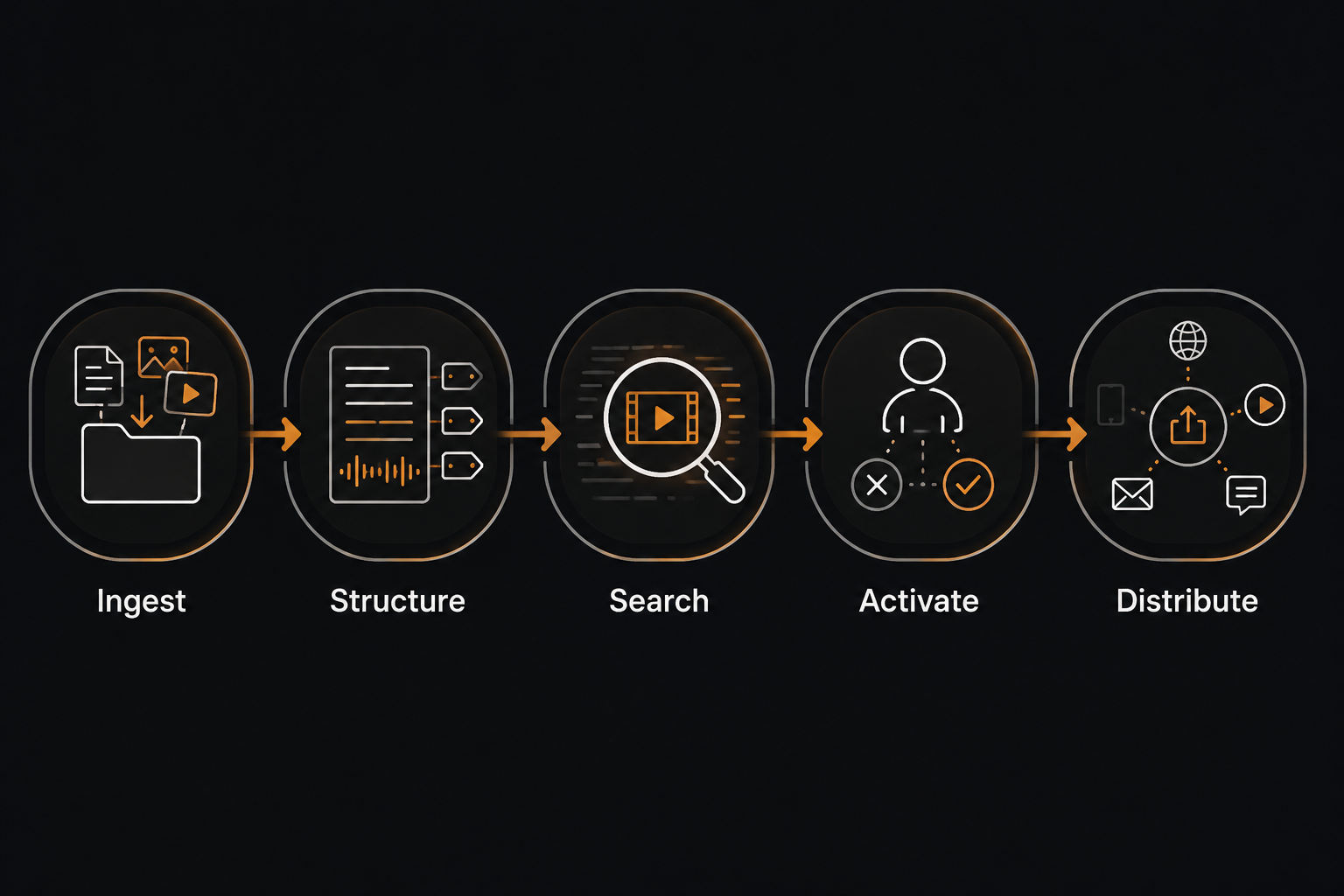
The useful workflow is not “upload video, get clips, post.” That is where most teams get burned. A better operating sequence is Ingest → Structure → Search → Activate → Distribute, adapted from Flowstate’s short-form optimization framework [2]. It separates asset preparation from editorial judgment, which is the difference between a batch workflow and a folder of almost-usable clips.
| Stage | What AI Can Own | What Humans Still Own |
|---|---|---|
| Ingest | Import the long-form source, detect basic video and audio data, prepare it for processing | Choose which source videos are actually worth repurposing |
| Structure | Transcribe, segment, identify speakers, produce captions and metadata | Correct important terminology, names, claims, and context |
| Search | Surface candidate clips, highlight spikes, extract likely hooks, suggest titles | Decide whether the moment has a real audience reason to exist |
| Activate | Format clips, generate captions, propose descriptions, create first-pass edits | Rewrite the hook, restore brand voice, check facts, approve or reject |
| Distribute | Export vertical assets, help schedule, adapt basic metadata | Publish with platform-appropriate captions and track performance by hook |
Ingest: Start With Source Selection, Not Tool Selection
The first decision happens before the AI tool sees a file. Do not feed the system every recording just because it exists. Pick long-form assets that already have compact moments: a strong answer, a clean explanation, a visible demonstration, a disagreement, a before-and-after, or a section where the speaker explains one thing without needing five minutes of setup.
Good inputs for this workflow include webinars, interviews, podcasts, tutorials, product walkthroughs, customer education videos, and long-form YouTube episodes. Weak inputs include recordings where the useful idea depends on too much missing context, panels with constant cross-talk, and videos where the best material is only visual but the recording quality makes a vertical crop unreadable.
At this stage, the team should attach a short source note before uploading: audience, main topic, product or brand sensitivities, claims that need review, and any phrases the brand would never use. That note sounds minor until the same batch produces ten clips and someone has to remember why a certain promise should not appear in a caption.
Structure: Turn the Video Into Something Searchable
Structure is where AI earns its keep. The tool transcribes the source, separates speakers when possible, timestamps the transcript, detects sections, and prepares the raw material for clip discovery. This is dull work, and it is exactly the kind of dull work that should not consume an editor’s best attention.
The transcript matters even when the final output is video-first. It lets the team search for ideas, not just visuals. It also creates the base for captions, descriptions, titles, newsletter snippets, LinkedIn posts, and internal content notes. Most teams that only use a video clipper eventually feel the gap here: they can make vertical files, but they still have to reconstruct the thinking around them.
Caption readiness belongs in this stage, not at the last minute. Several industry repurposing guides continue to cite the widely repeated benchmark that 85% of social media videos are watched without sound, which is why captions should be treated as part of the asset, not decoration [3]. Whether that exact rate varies by audience or platform, the production lesson is stable: a Short that cannot be understood silently is not ready for normal feed behavior.
Search: Let AI Find Candidates, Then Make It Compete
Search is the candidate-generation stage. Video-first repurposing tools can detect likely high-retention sections, emotional shifts, speaker emphasis, topic changes, visual motion, and moments that fit a vertical frame. Transcript-side tools can pull out quotable lines, recurring themes, objections, examples, and claims that could become standalone posts.
The mistake is treating every candidate as a draft. A better standard is to make the candidates compete. In a 45-minute webinar, the tool may surface a dozen possible Shorts. The editor should quickly sort them into three piles: obvious keepers, maybe-if-rewritten clips, and false positives. False positives are common: a sentence sounds punchy in isolation, but the viewer needs missing context; a speaker becomes animated, but the point is thin; a generic “you have to be consistent” moment looks motivational but says nothing the brand uniquely owns.
For each likely keeper, capture four pieces of metadata before moving on: source title, timestamp, candidate hook, and the reason the viewer would care. That last field is the one the AI often fakes. If nobody on the team can write a plain reason for the clip to exist, the clip probably should not be activated.
Activate Is Where the Short Becomes Publishable
Activate is the line between automation and publishing. This is where the tool’s first-pass clip becomes a brand asset, or gets rejected. It is also where many AI repurposing workflows quietly fail, because the dashboard looks productive: ten vertical videos, captions burned in, titles suggested, exports ready. The problem is that “ready to export” is not the same as “ready to publish.”

A practical rule is that AI gets the clip 70-80% of the way there. The remaining 20-30% is not polish in the cosmetic sense. It is the part that determines whether the clip sounds like the company, whether the claim is accurate, whether the opening line earns attention, and whether the viewer understands why this moment is worth stopping for.
Rewrite the Hook Before You Touch the Caption
The hook is not necessarily the first sentence spoken in the source video. In long-form content, speakers warm up. They qualify. They refer backward. They build toward the point. A Short usually cannot afford that runway.
The human job is to locate the real entry point. Sometimes that means trimming the first few seconds. Sometimes it means opening with a line from later in the clip, then returning to the explanation. Sometimes it means adding a short on-screen setup so the spoken line makes sense. The test is simple: if a viewer sees the first two seconds with no context, do they understand the tension, promise, or problem?
AI tools are often decent at finding energetic moments. They are less reliable at knowing which energetic moment is strategically useful. A guest saying “this changed everything” might be loud, but a quieter line explaining exactly what changed may be the stronger Short.
Make the Captions Sound Like Someone Edited Them
Auto-captions save real time, but unedited captions are one of the fastest ways to make a good clip feel machine-shaped. The problem is not only transcription errors. It is rhythm, emphasis, and vocabulary. Generic caption styling can flatten a sharp point into a motivational template. Overstuffed captions can make a calm expert sound frantic. A title that says “This One Tip Will Change Your Strategy” can make a credible B2B clip feel like it wandered in from another brand.
Caption editing should check four things: accuracy, line breaks, emphasis, and brand voice. Fix names, product terms, numbers, and acronyms first. Then break lines where the viewer would naturally process the thought. Emphasize the few words that carry meaning, not every phrase the tool thinks is exciting. Finally, replace generic phrasing with language the brand would actually use.
Review Facts Like the Clip Has Left Its Original Context
A claim that was safe in a 50-minute webinar can become too broad in a 38-second Short. The source video may have included caveats before or after the clipped section. The Short may remove the chart, example, or qualifying sentence. Activation has to include factual review for anything involving numbers, customer outcomes, legal claims, medical or financial advice, product comparisons, or promises about performance.
This is where teams should resist the lure of clean-looking exports. If the clip needs one sentence of context to avoid being misleading, add the context or skip the clip. Publishing raw AI output is also the pattern behind a lot of generic, low-trust content problems; Signal & Convert’s own coverage of why unedited generative AI content hurts organic performance makes the same point from the search side.
Use a Short Activation Checklist
- The first two seconds make sense without the long-form setup.
- The clip contains one clear idea, not three partial ideas.
- Captions are accurate, readable, and written in the brand’s voice.
- Any factual claim still holds after the clip is separated from the original video.
- The title or description does not exaggerate what the speaker actually says.
- The clip has a reason to exist beyond “the AI selected it.”
What the Time Savings Can Realistically Mean
The best case for AI repurposing is not that it deletes the editor. It changes where the editor spends time. Taja AI gives a directional comparison of about 75 minutes to create a Short manually versus about 22 minutes per Short in an AI-assisted batch of 5-10 clips [4]. That is a useful benchmark, but it should be read with the right caveat: it comes from a single vendor source, and actual time depends on the video length, source quality, tool setup, review standards, and editor skill.
Still, the shape of the savings is believable. AI reduces the time spent finding moments, transcribing, rough-cutting, formatting vertical frames, and preparing captions. It does not remove the time spent judging hooks, rewriting captions, checking claims, and making the clip sound like the brand. That trade is usually worth taking.
In practical terms, a team with a strong long-form asset can make 10-15+ Shorts plausible in a batch. Plausible does not mean automatic. It means the assembly line is no longer the bottleneck; editorial taste becomes the bottleneck, which is where it should have been all along.
The Tool Stack: One Clipper Usually Is Not Enough
For most marketing teams, the stack splits into two categories: video-first clippers and transcript-to-text tools. The clipper handles vertical video discovery, reframing, subtitles, templates, and exports. The transcript-side tool helps turn the same source into written derivatives: summaries, posts, email snippets, show notes, campaign notes, and searchable idea libraries.
| Tool Type | Examples From 2026 Public Pricing | Best Use |
|---|---|---|
| Video-first clippers | Opus Clip at $15/mo; Vizard at $16.90/mo annually with a 4.7/5 G2 rating; Klap at $29/mo; Munch at $38/mo annually [5][6] | Finding visual clips, reframing, captioning, and exporting Shorts |
| Transcript-to-text tools | Castmagic at $21/mo annually; Notebooks.app at $29/mo [6][7] | Extracting ideas, summaries, written assets, and reusable content notes |
Do not overbuild the stack before the workflow is proven. Start with one video-first tool and one transcript-side tool, then run a full batch from one long-form source. The question is not which interface looks most impressive. The question is whether the team can move from source video to approved Shorts without losing track of context, voice, and review.
Distribute: Publish the Clip, Not the Template
Distribution should be brisk, but not careless. Export the approved Short in the right vertical format, write a YouTube-native title or description, and schedule it with enough spacing that the channel can learn from performance. If the same clip will later move to another platform, rewrite the caption for that context instead of pasting the same text everywhere.
Track the performance signal at the hook level. A batch should teach the team which openings earn attention: direct claim, contrarian line, practical mistake, quick demonstration, customer problem, or expert answer. If reporting only says “Short 3 performed well,” the next batch starts from scratch. If reporting says “the objection-led hook held attention,” the workflow improves.
The published Short should also point back to the long-form ecosystem when it makes sense. That does not mean forcing every caption into a hard promotional loop. It means giving interested viewers a path to the fuller video, related playlist, product education page, or next useful piece of content.
A Workflow That Can Survive Next Week
A workable YouTube Shorts AI repurposing workflow is not glamorous. It is a production map. Ingest the right source. Structure it so the content becomes searchable. Search for candidate moments. Activate only the clips that survive human judgment. Distribute them with platform-appropriate packaging and performance tracking.
That system can cut production time substantially and make batch output realistic from a single long-form asset. But the useful promise is not “AI makes Shorts for you.” The useful promise is narrower and better: AI builds the assembly line, while humans decide what deserves to leave it.
References
- 9 Best AI Content Repurposing Tools in 2026 (Tested & Ranked) — blotato.com
- Repurpose Long-Form Video into Short Clips at Scale | Flowstate — Flowstate
- Repurpose Video Content: Complete Guide for 2026 — PostQuick
- How to Repurpose YouTube Videos for Shorts: 9 Proven Strategies — Taja AI
- How to Turn Long Form Videos into YouTube Shorts at Scale — Opus Clip
- Best AI Video Repurposing Tools: YouTube to Shorts (2026) — GetSmarterTools
- Best AI Tools for Repurposing YouTube Videos (2026) — Notebooks.app

Comments
Join the discussion with an anonymous comment.