

How a Meta Outage Affects Social Media Marketing
When Facebook and Instagram go down, social media marketers need a concrete protocol to minimize losses and recover fast. This playbook covers pre-outage preparation, real-time actions, post-recovery monitoring, and how to request compensation from Meta.
Facebook, Instagram, or Ads Manager goes dark, and the first problem is not philosophical platform dependency. The first problem is operational: can you see whether campaigns are still spending, can you stop a bad budget move, can customers still reach you, and can you prove later that the loss happened during a Meta-side disruption?
That is how a Facebook Instagram outage affects social media marketing in the room where the work actually happens. Paid delivery, organic reach, customer messages, scheduled posts, campaign reporting, and launch timing can all fail at once. On June 12, 2026, Meta services were disrupted from roughly 9:20 a.m. to noon ET, with more than 113,000 Facebook reports and about 10,000 Instagram reports on Downdetector; Ads Manager, Ads Creation, and Ads Reporting were also affected, which meant campaigns could not reliably be paused, launched, or modified during the window.[1][2] Eleven days later, on June 23, another outage hit around 5:00 to 6:15 p.m. ET, with more than 18,000 Facebook reports and the same practical issue for marketers: Ads Manager access and social reach were impaired together.[3][1]
Downdetector counts are user-submitted, not a complete measurement of every affected account. Still, they are useful in the moment because they tell you whether you are dealing with a local browser problem or a wider failure. During a live outage, that distinction changes the next ten minutes.
The first ten minutes: verify before touching budget
When Ads Manager will not load, do not start by refreshing ten tabs, clearing caches, switching devices, and asking three people to try the same broken screen. Open Meta’s status page first. If the official status page shows a platform issue, and Downdetector is spiking at the same time, treat the situation as a Meta-side outage unless your own evidence says otherwise.
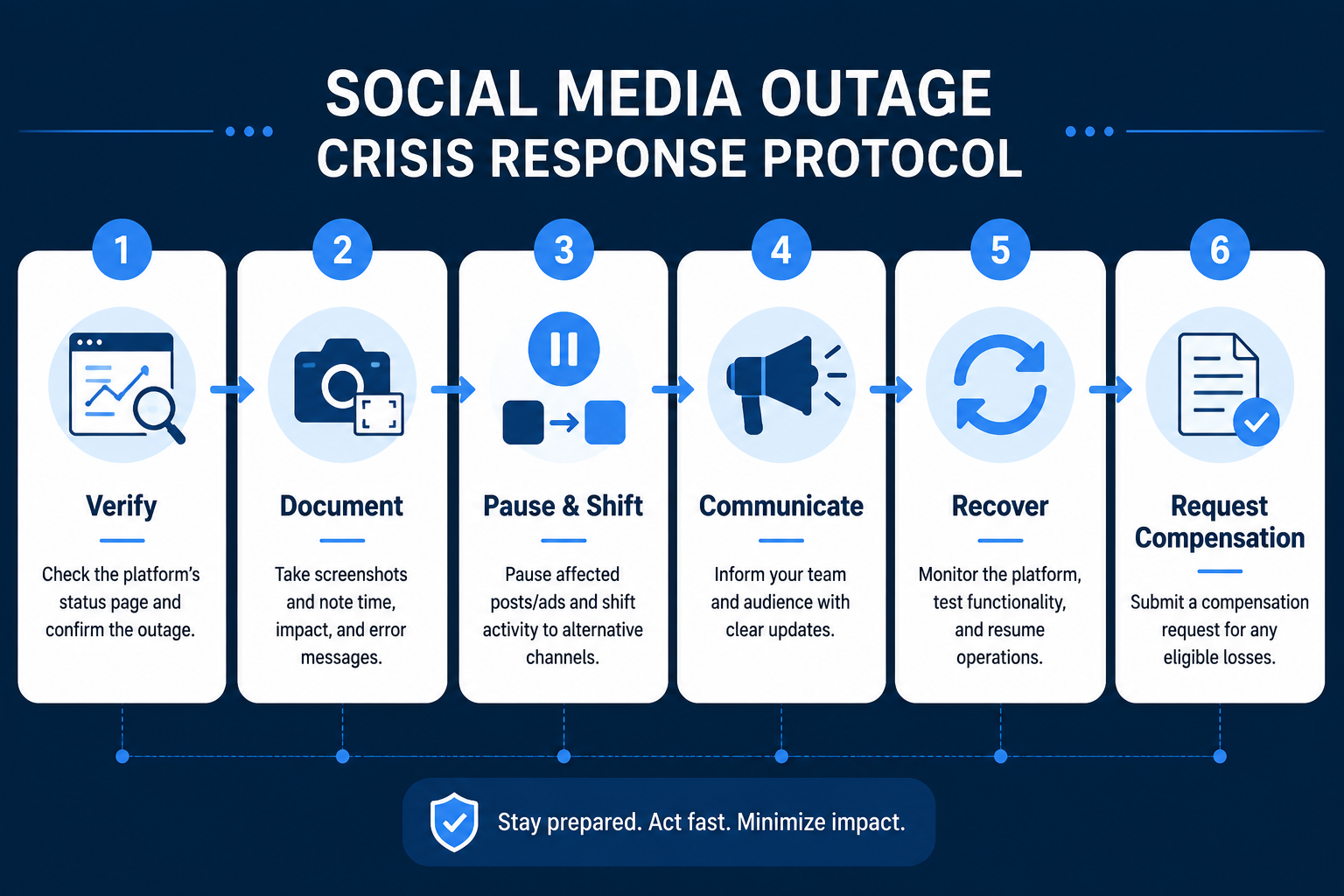
This is also where a lot of expensive mistakes start. If Ads Manager is non-functional, the instruction “pause everything” sounds responsible but may not be executable. You may not be able to confirm whether a pause request went through, whether a campaign state changed, or whether you will be able to restart cleanly. Smart Marketer’s outage guidance puts verification and documentation before campaign intervention for that reason.[4]
| If you see | Treat it as | Do next |
|---|---|---|
| Meta status page confirms disruption and Downdetector reports spike | Likely platform-wide outage | Stop local troubleshooting, start documentation, hold new Meta budget moves |
| Only one teammate has access issues | Possible local account, browser, permissions, or device issue | Test another browser/device and ask another admin to confirm account access |
| Ads Manager loads but actions fail or reporting disappears | Partial operational outage | Screenshot failed controls, avoid major edits, monitor spend and delivery after recovery |
| Facebook and Instagram feeds load but Ads Manager is unavailable | Paid operations risk | Protect launch decisions, document inability to manage campaigns, shift live comms off-platform |
The goal is not to diagnose Meta’s root cause. Meta did not disclose root causes for the June 2026 incidents in the materials available here, and guessing does not help the person responsible for budget. The useful question is narrower: can you verify that the outage is broad enough to justify changing the day’s plan?
Document the outage like you expect a dispute later
Screenshots are not busywork during a platform outage. They are the record that separates “sales were down” from “Ads Manager was inaccessible between these timestamps while these campaigns were active.” Capture the error screen, the campaign view if it loads, the disabled or failing controls, the Meta status page, Downdetector spike, and your own timestamped notes.
- Screenshot Ads Manager errors, failed publish screens, unavailable reporting, and any failed campaign edits.
- Record the time zone in every note. “9:42 a.m. ET” is more useful than “morning.”
- List campaign IDs, ad set names, daily or lifetime budgets, and the last known campaign state.
- Save evidence in a shared folder, not in one person’s desktop screenshots.
- Keep a short incident log: who checked status, who notified the client or founder, who approved budget decisions.
This evidence matters because Meta does not provide advertisers with a contractual service-level agreement that guarantees uptime or automatic make-goods. Compensation, when pursued, has to be requested proactively through support or an account representative, and outcomes are not publicly documented as a predictable success rate.[1][4]
There is also an internal reason to document. After the platform comes back, dashboards can make the day look cleaner than it felt. A founder sees the revenue gap. A client sees a delayed launch. A media buyer remembers the campaign controls failing. The incident log keeps the conversation tied to timestamps instead of memory.
Do not keep feeding a channel you cannot control
If Ads Manager is down, the safest immediate budget move is usually not a heroic in-platform maneuver. It is to stop adding new money, stop launching new Meta-dependent work, and stop making assumptions about controls you cannot verify. That means no rushed campaign rebuilds, no last-minute budget increases, and no pushing a launch deeper into Meta while the operating panel is unreliable.
For campaigns already live, the decision depends on what you can actually access. If campaign controls work and you can confirm state changes, pausing selected high-risk campaigns may be reasonable. If controls are failing, record that you attempted to access or manage the account and could not. Then move effort to channels you can control: email, SMS, the website, search, marketplace updates, or another paid channel that is already approved and operational.
| Situation | Avoid | Better containment move |
|---|---|---|
| Launch window depends on Meta and Ads Manager is inaccessible | Launching blind or asking someone to “try from their phone” repeatedly | Hold the Meta launch, notify stakeholders, move announcements to owned channels |
| High-spend campaigns are active but controls fail | Assuming a pause or budget cut registered without proof | Document failed access, stop additional Meta budget shifts, monitor spend after recovery |
| Ads Manager loads but reporting is incomplete | Optimizing from distorted live data | Freeze major edits, wait for post-recovery reporting checks |
| Organic posts and DMs are unavailable | Waiting for Instagram to become the customer service desk again | Push website banner, email, SMS, and support inbox messaging |
The point is containment, not punishment. Most brands remain heavily exposed to Meta because that is where their audience, creative testing history, pixel data, and campaign infrastructure live. During an outage, the practical standard is not instant diversification. It is refusing to make the exposure worse while the system is impaired.
Move customer communication off Meta fast
Customer communication should not wait for Ads Manager recovery. If Instagram DMs, Facebook comments, shop links, or organic posts are part of the sales path, move the message to places you can still publish. That might be a website banner, email, SMS, live chat, customer support inbox, marketplace storefront, or a pinned notice on another social platform.
Keep the message plain. A useful outage message tells customers where to buy, where to get support, and whether a launch, discount, appointment window, or order deadline has changed. Do not make the customer decode a platform problem. They are not monitoring Meta status pages; they are trying to complete a purchase or get an answer.
Instagram and Facebook are currently experiencing access issues. If you need help or want to place an order, use [support email], [website link], or [SMS number]. We will update this page when Meta service is restored.The business impact can be immediate when Meta is the storefront, not just the media channel. During the 2021 outage, Cheyenne Smith of Dakota Ridge said that when Instagram went down, “sales flowing to my e-commerce site stopped completely,” while Audrey Leighton Rogers said 95% of traffic to her vintage designer business came from Instagram and described her income as “100% dependent” on the platform.[1][5] Those are individual cases, not proof of every advertiser’s risk level, but they show why a customer communication backup cannot be a future project.
What should already exist before the outage
The best live outage response is mostly assembled before the outage. That sounds obvious until the platform is down, the launch calendar is still moving, and the only person who knows the campaign IDs is in another meeting.
- A bookmarked Meta status page and a second scope signal such as Downdetector.
- A shared campaign inventory with campaign IDs, ad set names, objectives, current budgets, launch dates, and account owners.
- Weekly screenshots of key Ads Manager dashboards for active campaigns and major launch windows.
- Pre-approved customer messages for outage, delayed launch, support rerouting, and post-recovery updates.
- Named owners for budget decisions, customer communication, client notification, and compensation request assembly.
- A list of channels that can be activated without Meta approval or access: email, SMS, website, search, affiliates, retail partners, or another paid account.
The campaign inventory is the part teams tend to postpone because Ads Manager usually has the information. During an outage, “usually” is not good enough. A saved document with campaign IDs and budget allocations gives the team something to cite when the interface is unavailable and something to attach later if a compensation request is worth filing.
Recovery starts after the apps load again
The outage is not over for marketing when Facebook and Instagram open again. Recovery is the period when you find out what failed quietly: scheduled posts that never published, campaigns that resumed unevenly, reporting windows that blended outage behavior with normal behavior, and customer messages that arrived late or not at all.
Smart Marketer recommends monitoring Meta performance for 12 to 24 hours after service is restored rather than assuming campaigns recover cleanly.[4] Ignite Social Media also warns marketers to check scheduled content and post-outage publishing behavior, because the visible return of the platform does not guarantee every marketing workflow recovered at the same time.[6]
- Confirm campaign state: active, paused, scheduled, rejected, or stuck in review.
- Check spend during the outage window against the last known budget and delivery state.
- Review CPM, CPC, conversion rate, ROAS, frequency, and delivery volume for distortion before making optimization calls.
- Inspect scheduled organic posts, boosted posts, stories, reels, shop updates, and inbox workflows.
- Annotate analytics reports so the outage window does not become a misleading benchmark.
- If delivery quality remains degraded, consider duplicating affected ad sets rather than endlessly editing a damaged one.
Be careful with performance reads immediately after recovery. A campaign may look inefficient because the sales path was broken, because reporting lagged, because the audience returned unevenly, or because the ad set actually lost delivery quality. Those are different problems. Treat the outage window as contaminated data until you have enough post-recovery signal to separate platform disruption from real audience response.
Build the compensation request while the evidence is still fresh
Meta does not automatically compensate advertisers for downtime, so a refund or credit request has to be assembled and routed by the advertiser. The useful packet is specific: campaign IDs, ad account ID, outage timestamps, screenshots showing Ads Manager inaccessibility or failed controls, spend or delivery during the affected window, and a short explanation of the business impact.[1][4]
| Attach | Why it matters |
|---|---|
| Campaign IDs and ad account ID | Identifies exactly which spend and delivery records Meta support should inspect |
| Outage start and end times with time zone | Connects the claim to the affected operating window |
| Screenshots of Ads Manager errors or unavailable controls | Shows inability to manage campaigns, not just poor performance |
| Meta status page and Downdetector screenshots | Supports that the issue was broader than one user session |
| Spend, delivery, and conversion notes for the window | Frames the financial impact without overstating certainty |
| Internal incident log | Shows who attempted what and when |
Route the request through your Meta account representative if you have one, or through the Ads Manager support channel if you do not. Do not promise the business owner, client, or finance team that compensation will arrive. The process exists; public success rates do not. What you can promise is that the claim will be complete, timestamped, and tied to specific campaigns rather than a vague complaint.
The 2021 outage showed why advertisers ask. Affected businesses self-reported sales drops of 30% to 70%, and Facebook’s lost ad revenue for that incident was estimated at roughly $100 million; the same source noted that advertisers could seek refunds, but the advertiser’s own loss was not automatically measured for them.[7] That estimate is not a direct measurement of every advertiser’s damage. It is a reminder that platform revenue loss and advertiser business loss are different records, and only one of them is automatically visible to Meta.
Close the loop before the next incident
After the compensation request is filed and the 12 to 24 hour recovery window has been reviewed, finish the incident while the details are still available. Update the campaign inventory. Save the screenshots in the account folder. Note which channels worked as backups and which ones were only theoretically ready. Add the outage window to reporting annotations so no one compares a normal launch day against a broken platform day three weeks later.
The teams that suffer least during a Meta outage are rarely the ones with the cleverest live reaction. They are the ones with status links bookmarked, campaign states documented, backup channels ready, and a recovery checklist already approved. During the outage, the only useful protocol is the one the team can open and follow.
References
- Meta Went Down Twice in 11 Days. The Outages Exposed a Risk Many Businesses Ignore, Inc.
- Meta says Instagram and Facebook are 'coming back' online after morning outage, Business Insider
- Instagram, Facebook Down: Users Report App Not Working — Second Major Outage in Two Weeks (June 23, 2026), Newsweek
- How to Handle a Meta Outage: 5 Steps to Protect Your Business, Smart Marketer
- Facebook and Instagram Outage Put Small Businesses at Risk, Time
- Marketing Lessons Learned From the 2021 Facebook Outage, Ignite Social Media
- Facebook outage: Lost ad revenue, advertisers could seek refunds, CNBC, 2021

Comments
Join the discussion with an anonymous comment.