

What to Do With Your Instagram Ads When the Platform Goes Down
Instagram outages can waste ad spend and create attribution gaps. This playbook walks through the exact steps to pause, document, recover, and get compensated by Meta for lost performance.
If Instagram is down and you have live ads, the first job is not to diagnose Instagram. The first job is to separate campaigns that can still spend usefully from campaigns that are now paying for broken behavior: unreachable placements, dead landing pages, stalled checkout paths, missing conversion signals, or engagement objectives that no longer have a functioning surface.
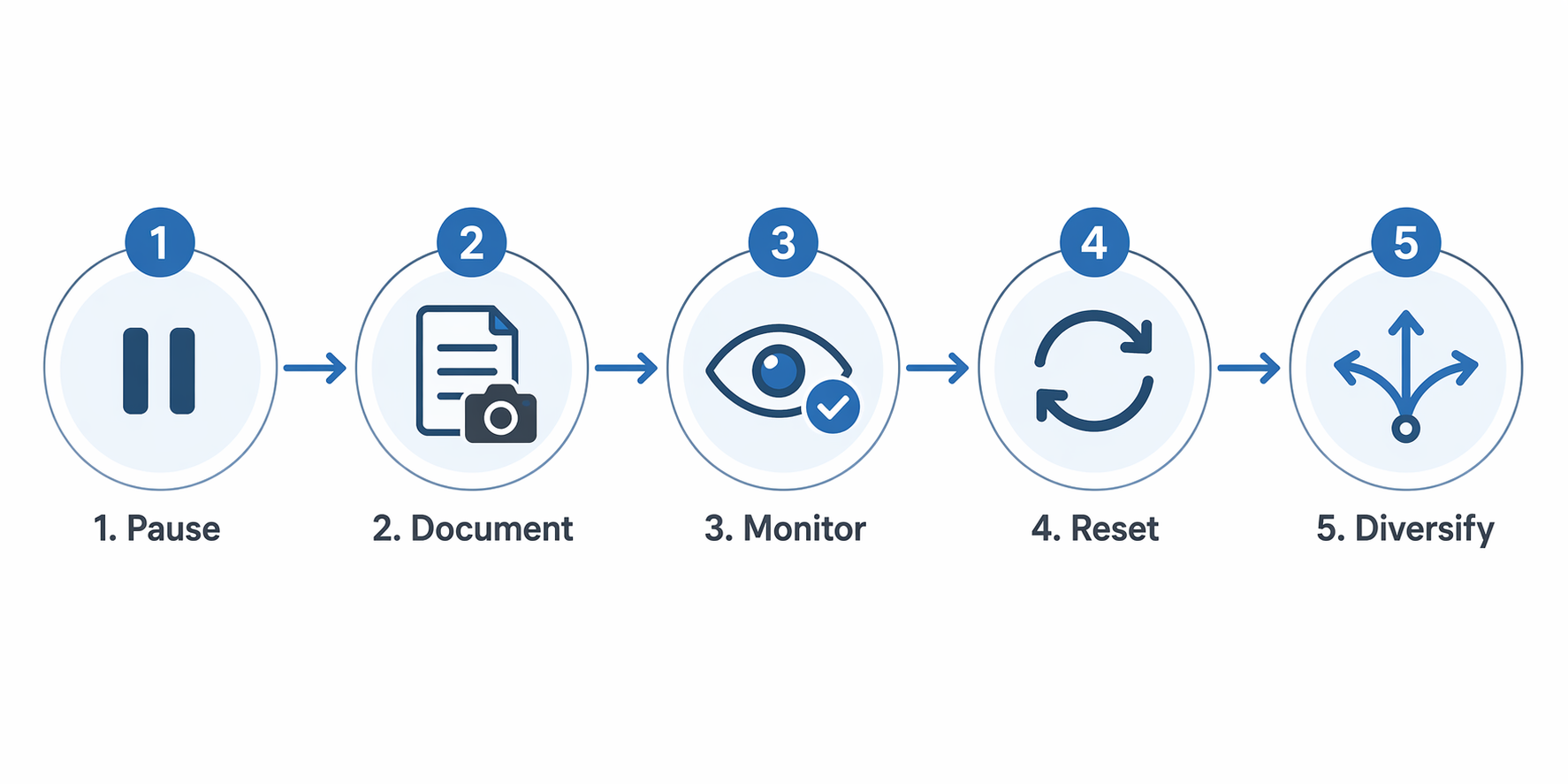
For marketers, the practical response is to pause only the exposed spend, document the interruption while it is happening, monitor restoration without rushing new launches, then reset the campaigns that were damaged by the outage. The order matters because Meta compensation, when available, depends on evidence such as campaign IDs, screenshots of inaccessible tools, and precise timestamps rather than a general complaint that performance dropped. [1][2]
Start With The Spend That Can Still Leak
Open Ads Manager, your landing-page analytics, checkout monitoring, and whatever status source your team trusts. Do not make one account-wide move before you know which failure you are dealing with. An Instagram posting outage, a Messenger or DM outage, a full Meta delivery issue, and a separate website or checkout failure create different waste patterns.
| What is broken | Campaign exposure | Immediate move |
|---|---|---|
| Instagram app, feed, stories, reels, posting, or DMs | Instagram-heavy campaigns, engagement campaigns, DM campaigns, creator/boosted post activity | Pause or reduce only the campaigns relying on the broken surface |
| Ads Manager or reporting access | Decision-making and documentation, not necessarily delivery | Capture access errors and avoid blind optimization until visibility returns |
| Landing page, product page, form, cart, or checkout | Traffic, lead, sales, and retargeting campaigns sending users into a broken path | Pause affected campaigns immediately; spend cannot convert if the destination cannot accept the user |
| Pixel, CAPI, app events, or attribution reporting | Conversion optimization and post-outage reporting quality | Protect evidence and avoid aggressive edits based on incomplete data |
| Only organic publishing or social engagement | Paid campaigns may be less exposed if delivery and conversion paths still work | Monitor closely instead of pausing the whole account by reflex |
The cleanest pause is narrow and timestamped. If a sales campaign is sending traffic to a checkout that is still functioning, a total account pause may create more damage than protection. If the checkout or landing page is affected, pausing those campaigns is a direct safeguard because the click has nowhere useful to go. Envisionit gives the same conditional advice for moments of digital distress: when the outage affects landing pages or checkout, stop campaigns that would keep sending paid traffic into that failure. [3]
For campaigns you do pause, record the status before the edit: campaign name, campaign ID, objective, budget, current spend, delivery status, affected placement, and the exact UTC or local account time. If you reduce budget instead of pausing, record the old and new budget. The future dispute will not be about whether the outage was annoying. It will be about what happened to a specific campaign during a specific window.
Build The Compensation File While The Outage Is Still Visible
A compensation request that starts after everything is restored is already weaker. Smart Marketer and Russell Herder both describe a Meta advertiser compensation path that depends on specific documentation: campaign IDs, screenshots of inaccessible tools, and precise timestamps. [1][2]
Treat the file like an audit trail, not a complaint folder. A screenshot of a broken interface is useful. A screenshot that also shows account context, time, campaign ID, and the action you were prevented from taking is much more useful. If Ads Manager is inaccessible, capture the error state. If reporting is delayed or blank, capture the reporting view. If delivery continues while the destination is broken, capture the campaign status and the broken destination.
- Account and business manager name or ID, if available
- Campaign, ad set, and ad IDs for every affected item
- Objective, budget, bid strategy, and optimization event
- Screenshots of inaccessible Meta tools, delivery anomalies, or broken reporting views
- Screenshots or monitoring logs for affected landing pages, forms, checkout, pixel, CAPI, or app events
- Exact timestamps for first observed issue, pause or budget action, restoration, and relaunch
- Performance baseline from a comparable pre-outage period, without pretending the baseline proves causation by itself
The baseline matters because a support team needs a way to distinguish outage damage from normal volatility. Use it carefully. A same-day revenue drop, an elevated CPM, or a lower conversion rate may support the case, but it does not prove the outage caused every lost sale. The stronger claim is narrower: these named campaigns were live during this documented platform interruption, the interruption blocked delivery, access, attribution, or conversion paths, and the affected spend or performance window is visible in the account record.
Do not wait for perfect numbers before opening the ticket or contacting your Meta rep. Start with the facts you can prove, then add a second note when reporting catches up. If you are managing a client account, keep the same timeline in your own internal incident log so the eventual report does not depend on memory or Slack fragments.
What Not To Claim
Do not promise the client that Meta will refund the account. The compensation process is described by practitioner sources, but it is not the same as a published service-level agreement. Availability can vary by account, region, relationship, issue type, and the quality of the documentation. The correct client-facing language is that you have preserved the evidence needed to request compensation, not that the credit is guaranteed. [1][2]
Monitor Restoration Without Launching Into The Crowd
Restoration is not one moment for a paid account. The app may load before Ads Manager is stable. Ads Manager may return before reporting is complete. Reporting may return before conversion signals normalize. If you relaunch everything at the first green signal, you can turn the recovery into a second performance problem.
Envisionit recommends delaying new campaign launches until 12 to 24 hours after restoration because auctions can become crowded as advertisers resume activity at the same time. [3] That delay is not an instruction to leave proven evergreen campaigns dark for a full day if the business cannot afford it. It is a warning against adding fresh launches, new tests, big budget increases, or major structural edits into a market that may still be absorbing the outage.
Use the first recovery window to verify function, not to chase the lost day. Confirm that ads are delivering, landing pages load, forms submit, checkout completes, pixel or CAPI events are firing, and reporting is no longer frozen. If one of those checks fails, keep the relevant campaigns paused or capped. A campaign is not recovered just because the Instagram app opens on your phone.
| Recovery check | Why it matters |
|---|---|
| Can the account team access Ads Manager and make edits? | You should not resume broad spend if you cannot intervene quickly. |
| Are active campaigns delivering by placement? | Instagram-only or Instagram-heavy ad sets may recover differently from broader Meta placements. |
| Do landing pages and checkout paths complete successfully? | A restored social platform does not help if the paid click still cannot convert. |
| Are conversion events visible again? | Optimization and reporting can remain distorted after the user-facing issue appears fixed. |
| Are CPM, CPC, CPA, and conversion rate moving within a reasonable range? | Post-outage auction crowding can make a technically live campaign economically poor. |
Reset Damaged Campaigns Instead Of Blindly Resuming Them
The post-outage account usually contains three groups: campaigns that were unaffected, campaigns that paused cleanly and can resume, and campaigns whose performance deteriorated enough that simply turning them back on is a bad bet. Spend most of your recovery attention on the third group.
Smart Marketer recommends turning off poorly performing campaigns after an outage, duplicating them, and relaunching; the source says this approach has worked “more than once.” [1] That is not a universal law of Meta delivery, and it should not be treated as a magic reset button. It is a practical option when the original campaign has accumulated messy delivery, weak post-outage performance, or optimization signals you no longer trust.
Use duplication selectively. If an evergreen sales campaign was paused for a short verified window and returns to normal metrics, leave it alone. If a campaign comes back with unstable delivery, inflated costs, or a conversion pattern that no longer matches the pre-outage baseline, duplicate it, keep the targeting and creative variables controlled, and relaunch after the account has passed the recovery checks. That gives the system a cleaner start without rewriting the whole media plan during a noisy period.
- Keep unaffected campaigns running or restore them first, with conservative budget changes.
- For paused campaigns that still look healthy, resume and monitor against the documented baseline.
- For weak campaigns, turn off the original, duplicate it, and relaunch only after the platform and conversion path are stable.
- Delay brand-new launches, tests, or major budget pushes for the 12- to 24-hour window unless the business case clearly outweighs the risk.
- Annotate the outage and recovery window in your reporting so the next performance review does not treat the dip as ordinary campaign learning.
The reporting note is not cosmetic. If the outage interrupts delivery or attribution, a weekly report can make the media buyer look careless and the campaign look structurally worse than it is. Mark the outage window, the affected campaigns, the pause decisions, the relaunch timing, and any compensation request status. If you present blended CAC, ROAS, lead volume, or conversion rate, separate the outage window where possible instead of burying it inside a normal trend line.
Why This Has To Be An Operating Procedure, Not A One-Off Scramble
Outages are no longer rare enough to treat as freak events. Revenue Memo reports that 84% of companies experienced increased network outages in the prior two years, and that organizations averaged 86 outages per year across all platforms in 2025. [4] Those figures are not Instagram-specific, so they should not be used as proof that Meta itself will fail on that cadence. They do show why a paid team needs a repeatable response instead of a new debate every time a platform stumbles.
Instagram had multiple widely reported disruptions in 2026 before Q3: Reuters reported a February 5 incident affecting more than 10,000 U.S. users, Forbes covered a March 11 outage that left users unable to post or DM, and CNET reported a June 12 Facebook and Instagram outage. [5][6][7] News reports capture the visible incidents, not every minor delivery or reporting issue an advertiser may experience, but they are enough to make the planning point.
For businesses that sell directly through social traffic, the damage can be immediate. TIME and BuzzFeed News documented small businesses during the 2021 Meta outage that lost an entire day of sales or saw revenue drops of more than 10% from even short disruptions. [8][9] Paid media teams do not need to dramatize that risk. They need to know which campaigns are exposed and who will explain the missing revenue, the wasted spend, and the attribution gap when the report is due.
Diversify The Fragile Parts Of The Plan
Diversification is not a speech about abandoning Instagram. It is the boring work of making sure one platform outage does not freeze the whole revenue motion. If all demand capture, retargeting, creator amplification, customer communication, and reporting depend on Meta surfaces at the same time, the outage response will always be more dramatic than it needs to be.
The useful version is specific. Keep email and SMS capture working outside social apps. Maintain search, affiliate, direct, or marketplace channels where they fit the business. Preserve first-party event collection so attribution does not rely only on platform dashboards. Build reports that can annotate platform incidents without rewriting the narrative from scratch. Keep a saved outage checklist in the account documentation, including who can pause campaigns, who contacts Meta, who informs the client, and where screenshots are stored.
None of that makes Instagram reliable. It makes the account easier to operate when Instagram is not reliable.
The Working Rule For The Next Outage
When Instagram goes down, do not pause everything just to feel decisive, and do not wait passively while active campaigns keep spending into uncertainty. Find the exposed campaigns, pause or cap the spend that can no longer convert, document the outage at the campaign-ID level, monitor restoration in layers, and reset only the campaigns that actually need a clean relaunch.
You cannot guarantee compensation, and you cannot force the auction to normalize instantly. You can give Meta a cleaner compensation file, give the client a defensible timeline, and give the account a better chance of recovering without turning one outage into a week of bad reporting.
References
- Meta Outage? 5 Tips, Smart Marketer, https://smartmarketer.com/meta-outage-5-tips/
- How to Navigate Through Platform Outages, Russell Herder, https://russellherder.com/how-to-navigate-through-platform-outages/
- Understanding Cloudflare and How Brands Should React in Moments of Digital Distress, Envisionit, https://envisionitagency.com/blog/understanding-cloudflare-and-how-brands-should-react-in-moments-of-digital-distress/
- Business Continuity Statistics, Revenue Memo, https://www.revenuememo.com/p/business-continuity-statistics
- Instagram down for more than 10,000 US users, Reuters, 2026-02-05, https://www.reuters.com/technology/instagram-down-more-than-10000-us-users-2026-02-05/
- Instagram Down: New Outage Leaves Users Unable To Post Or DM, Forbes, 2026-03-11, https://www.forbes.com/sites/kateoflahertyuk/2026/03/11/instagram-down-new-outage-leaves-unable-to-post-or-dm/
- Facebook, Instagram Outage June 12, 2026, CNET, 2026-06-12, https://www.cnet.com/news-live/facebook-instagram-outage-june-12-2026/
- Instagram Outage Small Business Impact, TIME, https://time.com/6105022/instagram-outage-small-business-impact/
- Instagram And Facebook Outage Business Drop, BuzzFeed News, https://www.buzzfeednews.com/article/adeonibada/instagram-facebook-outage-business-drop

Comments
Join the discussion with an anonymous comment.