

How to Use Google Ads AI Image Generation for Marketing in 2026
A practical guide to using Google Ads AI image generation for marketing in 2026, covering three workflows that work around the tool's constraints to produce usable ad images at $0.02 each instead of $50+ for traditional photography.
Google Ads AI image generation for marketing is finally useful enough to put on a paid media production calendar, but only if the assignment is narrow. In 2026, the strongest use case is not “make me a campaign concept.” It is closer to: upload the one approved product shot, generate six clean lifestyle variants, keep the scene simple, avoid policy traps, and give the media buyer something testable before the next creative refresh.
That distinction matters because the tool has improved faster than its operating boundaries have loosened. Google’s Asset Studio is built to generate and scale creative assets inside the ad workflow, including batch generation of up to 100 images per session.[1] Third-party analysis of Nano Banana Pro in Asset Studio reports 4K output and more than 95% text accuracy for strings under 10 words, which is a meaningful change for advertisers who used to treat AI-rendered text as unusable by default.[2] DeepMind’s Nano Banana Pro release also points to stronger reasoning and image generation capabilities behind the model layer.[3]
The cost story is the obvious hook, but it should be handled with a little suspicion. Digital Applied estimates AI image generation at roughly $0.02 to $0.08 per image, compared with traditional photography at about $50 to $200 per image.[2] That is directionally important, not a guaranteed media-plan saving. An image that costs pennies but gets rejected by policy, fails brand review, or cannot carry the product clearly is still production waste.
What the Tool Can Do Now, and Where It Still Says No
Asset Studio is most useful when it is treated as a production layer inside Google Ads, not as a general-purpose art generator. It can help turn existing products, references, and campaign needs into more image options. It is much less useful when the prompt asks for a complete visual identity, a complex branded scene, or a human-centered ad concept that would normally need casting, styling, art direction, and approvals.
The hard stops are not minor. Google’s generated-image policies restrict prompts and outputs involving faces, children, recognizable logos, and artist-style requests.[4] Those restrictions shape the creative brief before the first prompt is written. A marketer who asks for “a smiling parent holding our product beside a Nike-style backdrop” has not written an ambitious prompt; she has written a prompt that is likely to burn time.
Prompt rejection is still part of the workflow. Upgrow’s April 2024 testing reported that roughly 60% to 70% of prompts were declined.[5] That is older evidence, and model and interface upgrades since then may have improved the experience. It remains useful as a warning because practitioner discussions still treat declined prompts as a practical constraint, and there is no newer published benchmark that cleanly replaces it.
| Ask | Likely Fit | Reason |
|---|---|---|
| Place this uploaded product on a neutral bathroom counter with morning light | Strong | Concrete object, simple scene, no human or logo dependency |
| Create five variations using these approved reference images as the visual direction | Useful | Can support basic consistency, but not a full brand system |
| Make a premium lifestyle ad with a family using the product | Weak | Human-centered prompts quickly run into policy and realism issues |
| Create an image in the style of a famous artist or known brand | Not viable | Artist-style and recognizable-brand requests are restricted |
The practical move is to stop writing prompts that describe the ad you wish you could make and start writing prompts that describe the asset Google is likely to generate and approve. That means objects before moods, scenes before abstractions, and short usable text before clever copy.
Workflow 1: Product-to-Lifestyle Images
For ecommerce teams, product-to-lifestyle generation is the workflow most likely to survive contact with the campaign calendar. It starts with something the business already trusts: a clean product shot. Asset Studio then turns that product into scene-based variants that can be tested across Performance Max, Demand Gen, display, or other image-heavy placements.
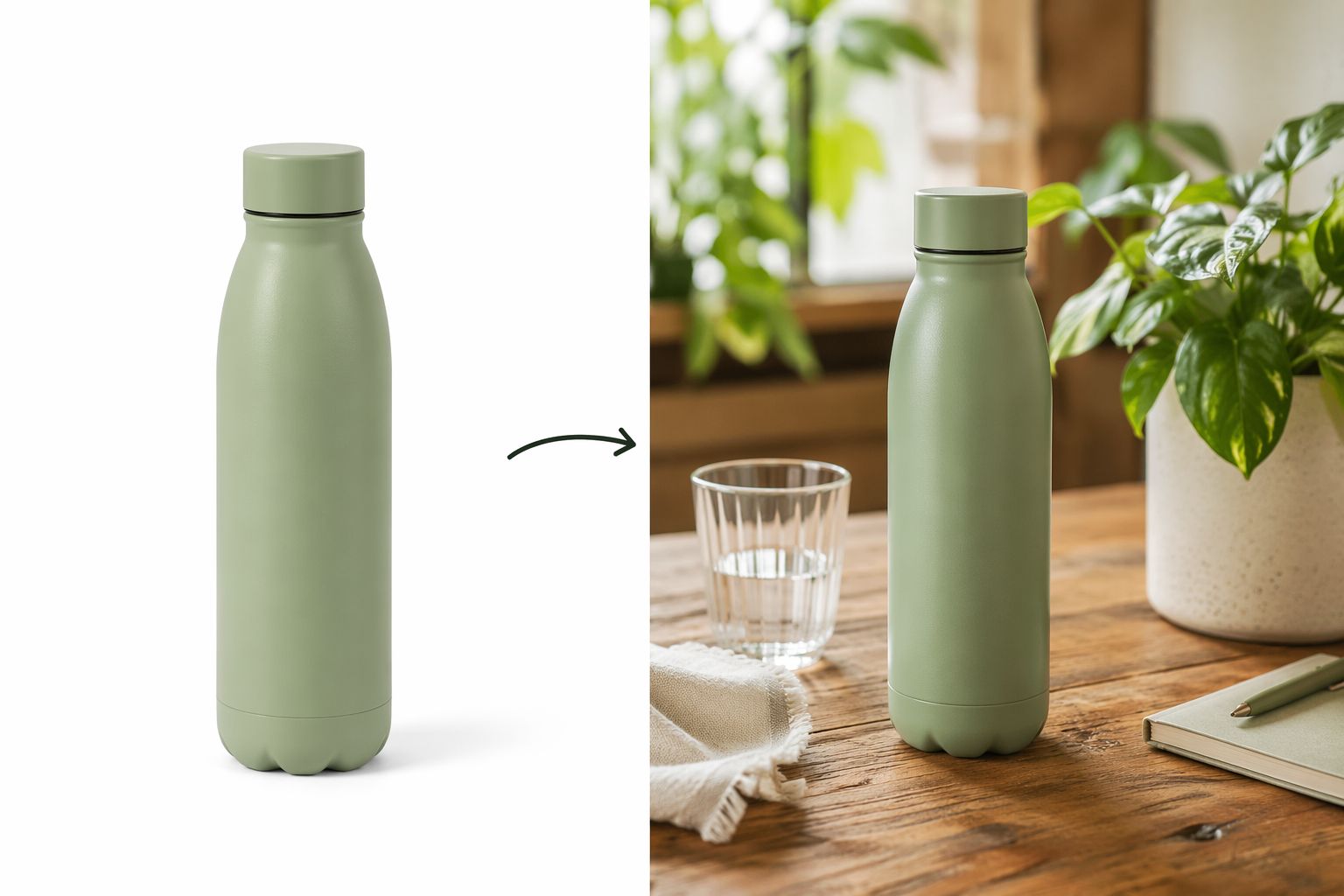
The best starting asset is boring in the right way: front-facing, high resolution, uncluttered, and already approved by the product or brand team. If the uploaded product shot has awkward reflections, old packaging, a cropped label, or a seasonal sticker that legal no longer likes, the generated image will multiply that problem. AI does not turn a compromised source asset into a clean approval path.
Good prompts for this workflow are short and physical. They describe where the product sits, what surrounds it, and what kind of light the scene uses. A skincare bottle can sit on a stone bathroom tray. A coffee bag can sit on a kitchen counter beside a mug. A pet supplement jar can sit on a clean shelf near a leash. These are not award-show concepts, but they are useful ad assets because the product remains the point.
- Start with one approved product image, not a collage or full campaign layout.
- Use prompts that name the product placement, surface, lighting, and one or two surrounding objects.
- Avoid people, faces, children, celebrity cues, recognizable third-party logos, and named artist styles.
- Keep any visible text short; under-10-word strings are where the reported text-rendering improvement matters most.[2]
- Generate more variants than the media plan needs, because policy and brand review will reduce the usable set.
The review step should be stricter than the generation step. Check whether the product label changed, whether the pack shape warped, whether any implied claim slipped into the scene, and whether the surrounding objects create a regulatory or brand problem. A supplement next to medical objects, a beauty product beside clinical props, or a financial app shown with luxury cues can create approval work that the cheap image did not budget for.
This is where the workflow earns its place. Traditional shoots are still better for hero creative, seasonal campaigns, regulated claims, and anything where the exact prop, model, or location carries meaning. But for filling lifestyle gaps around approved product imagery, AI generation can reduce the number of small shoots and retouching requests that slow testing.
A Usable Prompt Pattern
For product-to-lifestyle work, a simple structure is enough: “Place the uploaded product on [surface] in [room or setting], with [lighting], surrounded by [one or two generic objects].” The discipline is in leaving things out. Do not add a person if the product can sit on its own. Do not request a famous visual style. Do not ask the model to invent brand meaning when what the campaign needs is a clean image variant.
A hypothetical prompt for a home fragrance brand might read: “Place the uploaded candle on a light wood coffee table in a cozy living room, soft morning light, with a book and ceramic cup nearby.” It gives the model enough to build a scene without asking for faces, children, logos, or complex copy.
Workflow 2: Style-Reference Batch Generation
Style-reference generation is useful when the team already has a small set of approved images and needs more assets that feel adjacent. Google’s 2026 Asset Studio updates emphasize multimodal capabilities, including working from visual inputs rather than only text prompts.[6] In practical terms, this lets a marketer use reference images to steer tone, color, composition, and environment.
The ceiling is important. Reference images can help produce basic consistency. They cannot enforce a full brand system the way a design team, template library, or production guide can. If a brand’s distinctiveness depends on a precise crop ratio, proprietary illustration style, custom typography, exact product shadows, or a recognizable campaign world, Asset Studio should be treated as a drafting tool rather than the final authority.
The cleanest setup is to choose up to five reference images that are already approved and visually aligned. Do not mix a studio pack shot, a user-generated-style image, a holiday scene, a retail shelf photo, and a glossy hero campaign unless the goal is confusion. The model will average signals that the brand team would normally separate.
| Reference Set | Good Use | Risk |
|---|---|---|
| Approved product scenes with similar lighting | Generate more lifestyle variants for adjacent ad groups | May still drift on product details |
| Past seasonal images with consistent composition | Draft new seasonal backgrounds quickly | Can over-repeat visual cliches |
| Mixed brand, UGC, and retail images | Limited | Produces inconsistent direction and review friction |
Batch generation is where this workflow becomes operationally interesting. If the platform can produce up to 100 images in a session, the manager’s job shifts from “Can we get enough assets?” to “Can we filter fast enough without lowering standards?”[1] That is a different bottleneck. Someone still needs to reject warped products, off-brand colors, accidental claims, awkward text, and scenes that do not match the audience or offer.
A sensible review pass has three columns: policy, brand, and media usefulness. Policy comes first because a non-runnable image has no value. Brand comes second because more assets can quietly dilute a brand if every ad group gets its own slightly different visual world. Media usefulness comes third: does the image give the campaign a new testable angle, or is it just another near-duplicate that will clutter reporting?
Workflow 3: Rapid Ad-Group Iteration
Rapid iteration is the least precious workflow and should stay that way. It is useful for ad-group-specific tests where the image only needs to be relevant, clean, and differentiated enough to learn from. It is a poor fit for campaigns where every impression must look like a flagship brand placement.
This workflow works best when the campaign structure already has meaningful audience or intent differences. A home organization retailer might need different images for closet storage, pantry storage, and garage storage. A B2B software advertiser might need different abstract product-context images for finance, operations, and HR audiences, while avoiding fake UI claims or fabricated customer logos. The asset does not need to carry the whole positioning strategy; it needs to make the ad group less generic.
The danger is that cheap volume can become a substitute for deciding what the campaign is actually saying. If a team generates 80 variants before agreeing on the offer, audience, or proof point, AI has only accelerated the mess. Rapid iteration should follow a clear testing question: which product context, use case, or visual environment helps this ad group earn attention?
- Use rapid iteration for lower-risk variants, not core brand-defining creative.
- Change one meaningful visual variable at a time when possible: setting, product arrangement, color temperature, or context.
- Keep generated assets grouped by ad group so performance reads are not blurred across unrelated concepts.
- Archive rejected prompts and failed patterns so the team does not rediscover the same policy boundary every week.
The Review Process Matters More Than the Prompt Trick
Most prompt advice is too generic for Google Ads because it ignores the approval path. A beautiful image that cannot run is not creative output; it is an interruption. The more useful process is to build review into the workflow from the start.
| Stage | Who Reviews | What They Catch |
|---|---|---|
| Before generation | Paid media manager | Prompt patterns likely to trigger restrictions |
| After generation | Media or creative owner | Product distortion, poor composition, duplicate variants |
| Before upload or launch | Brand, legal, or compliance reviewer | Claims, logo issues, policy risk, market-specific labeling needs |
| After launch | Paid media manager | Whether the asset created a useful performance read |
The first saved document should not be a grand prompt library. It should be a rejection log. Note what the team asked for, what was declined, what was approved, and what later failed brand or legal review. Over a few cycles, that log becomes more valuable than another list of adjectives because it reflects the actual boundary conditions of the account.
It also protects the team from over-reading platform output. Adoption is not effectiveness. Generating 100 images does not mean the account has 100 new learnings. A campaign learns when variants are meaningfully different, mapped to a testing question, and allowed enough delivery to produce a usable read. The image generator can speed up asset supply; it cannot decide which differences matter.
Where the Cost Savings Are Realistic
The strongest cost case is not replacing the flagship shoot. It is reducing the number of small production asks that sit between the media plan and the next test: one more product scene, one more vertical-friendly background, one more ad-group-specific image, one more seasonal environment that does not justify a separate shoot.
The $0.02 to $0.08 per-image estimate is compelling only after accounting for rejected prompts, human review time, and the percentage of generated assets that actually run.[2] If half the batch is unusable, the image cost is still low. The operational cost may not be, especially in regulated categories or brands with tight approval chains.
No independent named-client case studies with specific ROI figures were available in the research materials, so ROI should not be oversold. The defensible claim is narrower: Google Ads AI image generation can lower the marginal cost and turnaround time of certain ad image variants when the task is bounded and the review process is ready for volume.
Compliance Is Part of the Creative Brief
Advertisers also need to check labeling rules before scaling generated assets across markets. Google Ads Help identifies AI labeling requirements for the EU, India, and New York rolling out in July 2026, and the guidance is actively updating.[4] That is not a footnote for legal to discover after a batch has been approved internally. It affects campaign planning, trafficking, and market eligibility.
The safer operating model is to tag AI-generated assets in the asset management system, keep source prompts and uploaded references attached to the final files, and separate market-approved assets from assets that still need labeling or legal review. That may feel heavy for images that cost pennies to generate, but it is lighter than rebuilding a scaled campaign after a compliance miss.
A Grounded Adoption Rule
Use Google Ads AI image generation when the job is specific: turn an approved product image into lifestyle variants, extend an approved visual direction with reference images, or create quick ad-group-specific assets where perfect brand fidelity is not the goal. Avoid it when the concept depends on faces, children, recognizable third-party brands, celebrity or artist cues, complex claims, or a visual system the model cannot reliably enforce.
That makes the tool less glamorous than the broad AI-marketing pitch, but more useful. It is not a replacement for a creative department, a photographer, or a brand system. It can be a reliable low-cost asset production layer for marketers who organize the work around what Google Ads will actually generate, approve, and let them run.
References
- Generate and scale creative assets with Google AI in Asset Studio, Google Blog.
- Gemini 3 Pro Image: AI Visual Marketing Complete Guide, Digital Applied, 2026.
- Introducing Nano Banana Pro, Google DeepMind.
- About generated images in Google Ads, Google Ads Help.
- How To Use Google Ads' New Generative AI Image Generator, Upgrow, April 2024.
- Asset Studio brings new multimodal capabilities, Google Blog, 2026.

Comments
Join the discussion with an anonymous comment.