
Your First 90 Days with AI in Online Marketing: A Practical Workflow Guide
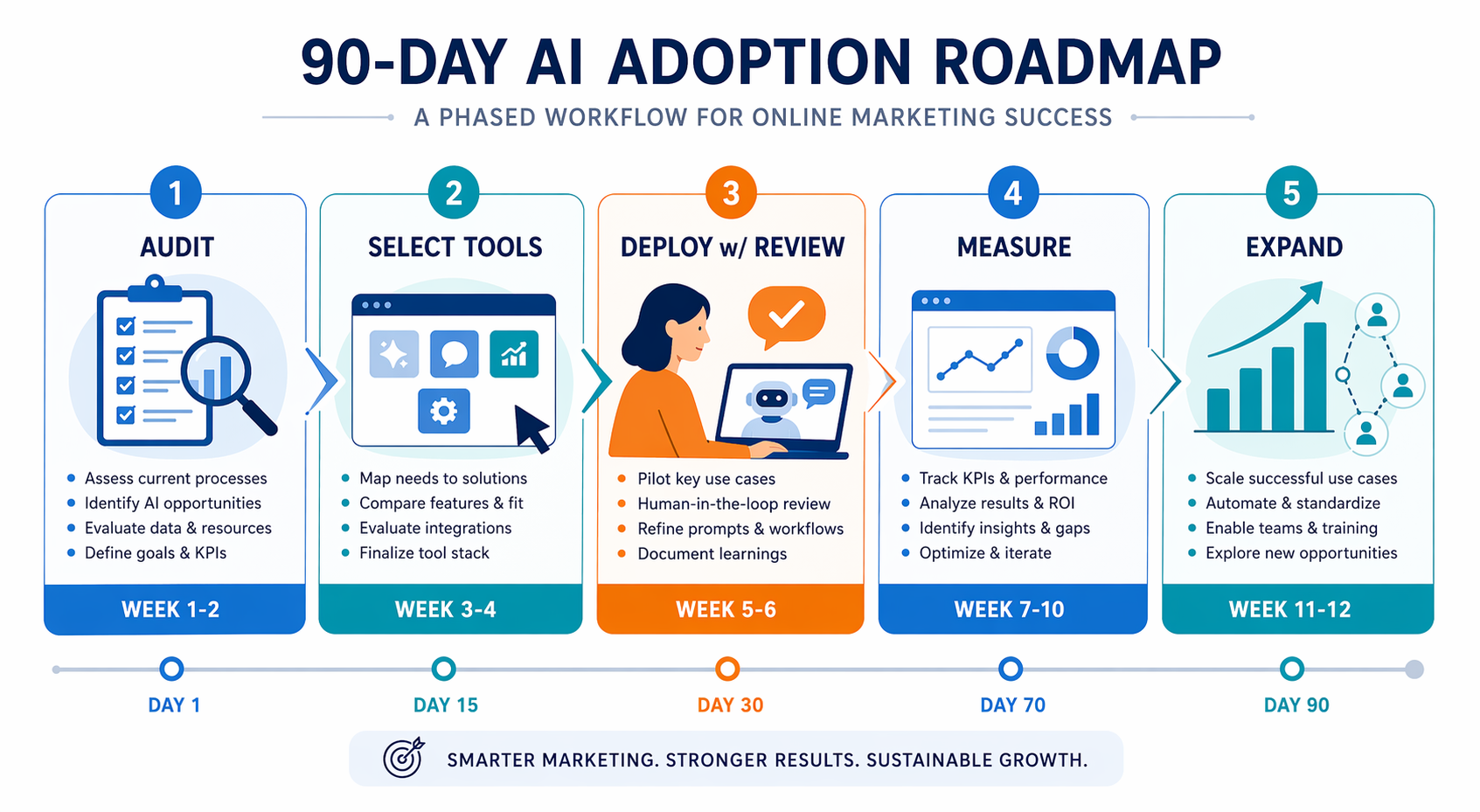
Most marketers have tried AI tools sporadically but lack a structured plan to integrate them into daily workflows. This guide provides a week-by-week roadmap for your first 90 days, from auditing your current processes to deploying AI on high-ROI tasks with human oversight.
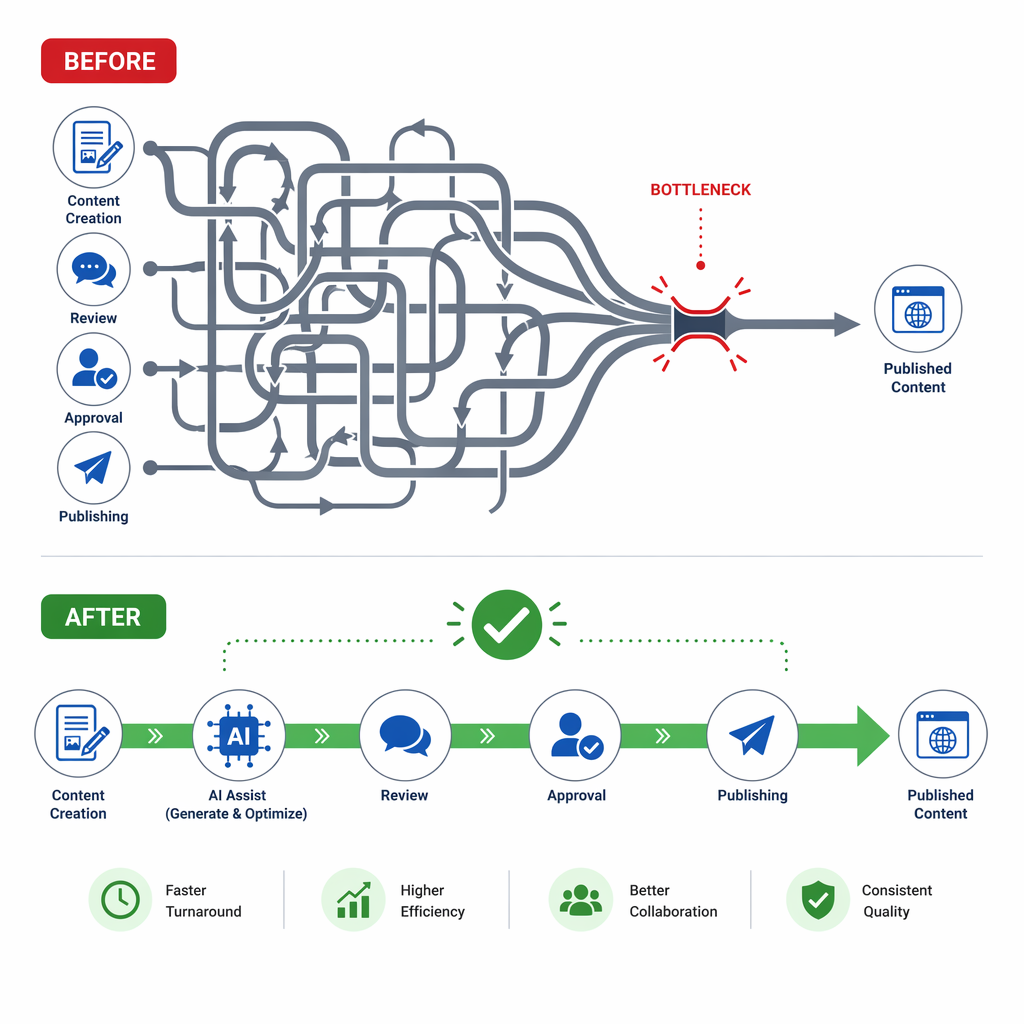
Most teams do not need another AI demo. They need to stop the draft from bouncing between tabs, inboxes, and approvals until the person doing cleanup gives up and rewrites it anyway. If AI is already showing up in your writing assistant, prompt library, or campaign brainstorms, the next step is not more experimentation. It is a workflow that makes Tuesday morning less clogged.
A 90-day workflow map
| Weeks | Primary move | What changes | Exit signal |
|---|---|---|---|
| 1–2 | Audit the current workflow | Map where requests stall, where drafts get rewritten, and where approvals pile up | One bottleneck is clearly ranked above the rest |
| 3–6 | Select 1–2 tools by integration fit | Choose the tools that connect cleanly to your CMS, CRM, CDP, ad platform, or reporting stack | A narrow tool set is approved, with a named owner |
| 5–8 | Deploy AI inside one high-leverage workflow | Put AI into drafting, variant-building, or summarizing with mandatory human review | The team is using one live workflow, not a sandbox |
| 7–10 | Measure velocity and quality | Compare baseline vs. post-deployment cycle time, revision load, and output quality | The team can show whether speed improved without damaging standards |
| 11–12 | Decide whether to expand | Either widen to the next workflow or fix the bottleneck that still remains | A documented go / no-go decision exists |
Weeks 1–2: audit the bottleneck, not the tool closet
By 2026, generative AI use is already mainstream in marketing surveys, so the interesting question is no longer who has tried it. Salesforce’s State of Marketing 2026 puts usage at 87%, which is enough to make scattered adoption feel normal and structured integration feel rare [1]. That is why the first two weeks should be spent tracing one real workflow end to end: request intake, draft creation, editing, approvals, CMS entry, CRM handoff, and anything that forces a human to retype what another system already knows.
For this stage, the best question is not "Where can we use AI?" It is "Where does work pile up fastest?" Content drafting is usually the cleanest first target because the survey hierarchy favors it: teams report 3.2x ROI for content drafting, ahead of personalization, paid social creative, and AI video [1]. That does not make video unimportant; it makes it a poor first-week foundation.
- Track where a draft waits for input, where it gets rewritten for tone, and where approval slows publishing.
- Name the person who performs the cleanup. If that person is not in the room, the plan is probably incomplete.
- Rank workflows by throughput leverage, not by how flashy the use case sounds.
- Start with one use case that touches a visible volume of work, then leave the rest alone for now.
If you want a deeper map of where AI tends to help first, link this stage to Where AI Actually Works in Marketing: A Ranking Based on Evidence rather than starting with a generic tool list.
Weeks 3–6: select tools for integration fit
Feature comparison is where teams lose time. The bigger failure mode is integration. HubSpot’s 2026 data says 60% of failed AI initiatives trace back to poor martech integration, which is a strong reason to stop shopping by headline features and start shopping by connection quality [2]. If the tool does not fit the CMS, CRM, CDP, ad platform, or reporting layer you already use, it will produce more manual cleanup than value.
In practice, that means a narrow selection process: one tool for drafting or summarizing, one tool only if it clearly reduces a different bottleneck, and no extra stack unless it solves a handoff problem. A writing assistant that exports cleanly into your CMS and preserves metadata is more useful than a "smarter" tool that leaves the team copying fields by hand.
- Can it connect natively to the systems where content, leads, or campaign data already live?
- Can it pass structured data, not just generate text?
- Can the person doing review see the original prompt, inputs, and output history?
- Can the workflow fail gracefully without creating a second manual process?
Role matters here too. HubSpot reports an average time savings of 6.1 hours per week, but content marketers save 7.8 hours while event marketers save 3.2 [2]. That is a reminder to sequence the rollout where the return is most visible. Content teams usually feel the lift first because drafting, repurposing, and variant creation are repetitive enough to automate without forcing a new operating model on day one.
Weeks 5–8: deploy one workflow with human review built in
The default from day one should be human review on public-facing output. Salesforce’s 2026 data shows 73% of teams now keep a human in the loop for public AI content [1], which is a useful minimum standard rather than an advanced practice. In other words, the workflow should not ask whether to review AI copy. It should ask what level of review is required, who owns it, and what must be checked before anything moves forward.
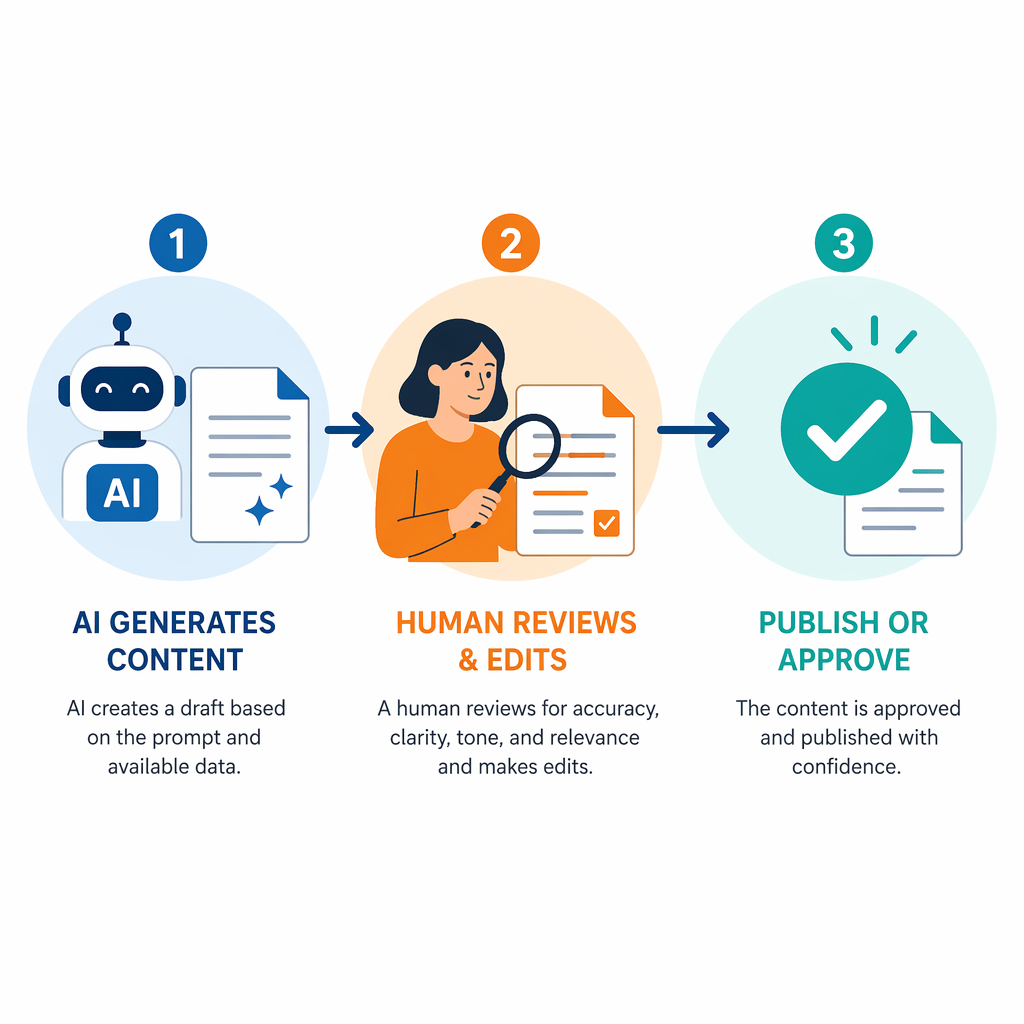
This is where the plan either becomes operational or turns into tool sprawl. Put AI into one workflow that already matters, then define the review threshold before the first live draft ships. For content, that may mean AI creates the outline and first pass, while the marketer checks claims, tone, examples, internal links, and brand language. For paid media, it may mean AI proposes variants, while the manager approves claims and offers before upload. For SEO, it may mean AI accelerates clustering and summarizing, while the specialist checks whether the page still deserves to rank.
If you need a practical framework for what should be automated, edited, or skipped, this is the right place to link to What to Automate, Edit, and Skip When Using AI for Marketing in 2026.
- Set a baseline before deployment: draft turnaround time, revision count, approval lag, and publish delay.
- Track what happens after deployment using the same measures, plus a simple quality check.
- Treat extra cleanup as a signal that the workflow is not ready, not as proof that AI is working.
- Keep the reviewer in the plan from the start, including whoever has to fix the output when it is wrong.
Weeks 7–10: measure velocity without hiding the quality cost
A faster workflow is only useful if the output still survives the people who read it. The 90-day window should therefore compare before-and-after work, not just count outputs. If the team ships more pages but spends the same amount of time fixing generic paragraphs, the bottleneck has simply moved downstream.
Use the same scorecard across the workflow you chose: time to first draft, time to publish, number of review rounds, and the quality signals that matter in your channel. For SEO teams, that may include whether the page still meets a content threshold before it goes live. For demand gen, it may be lead quality and message consistency. For paid media, it may be whether variant testing produced usable creative faster without weakening the offer.
Median payback for AI tools is reported at 4.2 months, which is short enough to justify a pilot but long enough to make a 90-day test only an early checkpoint [2]. So this phase should not pretend to prove full return. It should prove whether the workflow is moving in the right direction and whether the team can sustain the new process without adding hidden cleanup.
For deeper benchmarking across channels, the related read AI for Sales and Marketing: Where the Returns Actually Are in 2026 is a better companion than a generic trend article.
Weeks 11–12: decide whether to expand
By the end of 90 days, the useful outcome is not a claim that marketing has been transformed. It is a narrower decision: did one or two integrated workflows become faster or cleaner, and did the review process hold up without eroding trust? If yes, expand into the next adjacent workflow. If not, fix the process before adding another tool.
That discipline matters more in larger organizations, where 90 days may only cover the first round of decisions. Smaller teams can usually feel momentum sooner if they keep the scope tight. The point is not to finish everything. The point is to prove that AI is attached to a real operating model instead of living as a set of disconnected experiments.
Agentic workflows belong outside this first window. They may be promising later, but they are not the right foundation for a beginner rollout when simpler integrations are still being cleaned up.
What a useful day 90 actually looks like
A good first 90 days ends with a limited but real operating change: one or two AI-assisted workflows, a named review path, a clear baseline and follow-up measure set, and a decision about whether to scale. That is enough to make AI useful in online marketing without pretending the whole department is suddenly reinvented.
If the workflow is still slower or the review burden has not dropped, the next step is to revisit the bottleneck rather than add another tool.
References
- State of Marketing 2026 — Salesforce — 2026 — https://www.hubspot.com/state-of-marketing
- HubSpot 2026 AI Trends / State of Marketing data — HubSpot — 2026 — https://www.hubspot.com/state-of-marketing

Comments
Join the discussion with an anonymous comment.