
Discord Spoiler Channels for Community Marketing Campaigns
Discord's native spoiler channel feature replaces custom bots and role gating for opt-in community campaigns. This playbook provides three ready-to-deploy templates—product teaser countdowns, ARG-light rollouts, and beta feedback funnels—with exact channel structure, automation setup, and metrics to track performance.
The old way to run an opt-in Discord campaign was always a little too heavy for what it promised. You made a hidden channel, wired a bot to assign a role, tested whether the role could see the right rooms, posted instructions, answered the first wave of “why can’t I see it?” messages, then hoped your post-campaign reporting did not depend on three screenshots and a CSV someone forgot to export.
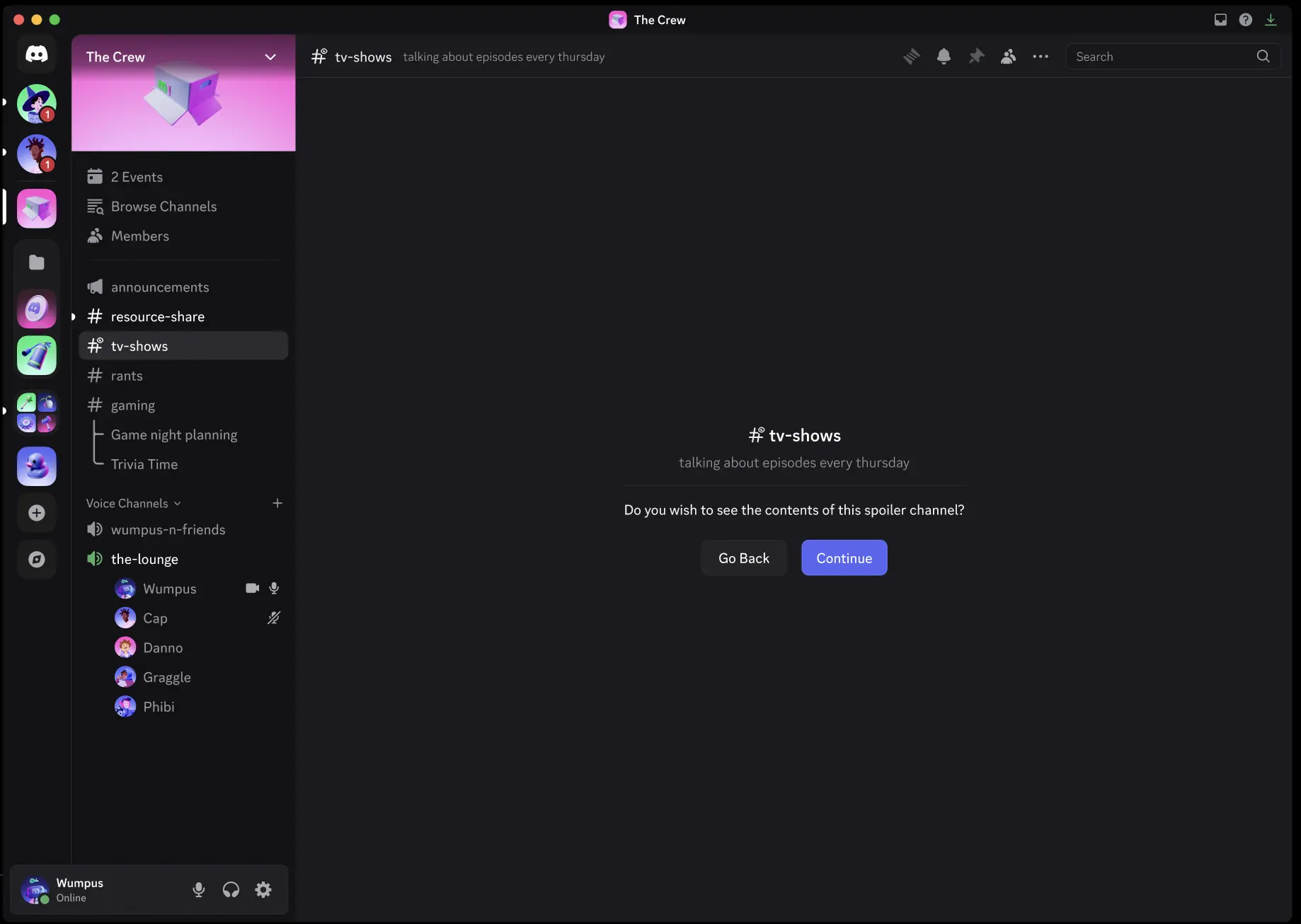
Discord spoiler channels change that workflow. Launched July 15, 2026, the feature lets server admins mark a channel as hidden behind a native click-to-reveal notice, so members explicitly choose whether to view the contents before entering.[1][2] For community marketing, that makes “I want in” visible at the channel level without making every lightweight campaign into a permissions project.
The useful part is not that the channel is mysterious. The useful part is that the member sees a clear topic, understands what they are opting into, and takes an action the community team can measure. Discord’s FAQ says spoiler channels can be used across text, voice, forum, and announcement channels, which matters because most campaigns do not live neatly in one chat room.[1]
That does not make spoiler channels a demand engine. A weak launch is still weak behind a reveal button. What the feature does well is remove the extra scaffolding around opt-in moments: fewer custom bot commands, fewer one-off access roles, fewer invisible permission errors, and a cleaner way to compare who opted in with what happened afterward.
What Spoiler Channels Replace
Role gates are still useful when access needs to persist, branch, or confer status. A beta tester role, customer-only support role, or event attendee role has a job beyond the reveal itself. But many marketing campaigns only need a soft threshold: “Do you want to see this now?” Before spoiler channels, that soft threshold often got implemented with hard infrastructure.
| Old workaround | Where it helped | Where it got messy | Spoiler-channel replacement |
|---|---|---|---|
| Reaction role or button role | Persistent access and visible member segmentation | Bot dependency, permission drift, confused members | Native reveal for one campaign room |
| Hidden category with manual role assignment | Small VIP groups or customer-only access | Manual approvals and slow troubleshooting | Click-to-view gate with a clear topic |
| Bot DM flow before channel access | Complex onboarding or qualification | Drop-off before members reach the actual campaign | Channel-level opt-in, then optional follow-up automation |
| Public announcement with spoiler-tagged messages | One-off hints or small reveals | Hard to separate interested members from passive viewers | Dedicated spoiler channel with measurable opt-in behavior |
The measurement improvement is especially practical for teams using Discord’s Nitro Business tier. Nitro Business launched in 2026 at $199.99 per year and includes Server Insights that can support campaign performance measurement without relying on third-party tools for every basic readout.[1] That is enough for the campaign-level questions most teams need answered first: who opted in, whether the room moved faster than comparable public spaces, and whether opted-in members stuck around.
Discord is worth designing for, not merely syndicating into. Amra & Elma’s 2026 statistics compilation reports 259.2 million monthly active users, average monthly usage of 314.2 minutes, and 41% of users engaging with brand servers monthly.[3] Those numbers do not prove a spoiler campaign will work. They do explain why a brand server deserves mechanics built for participation instead of another announcement feed with emoji reactions attached.
The Measurement Frame Before the Templates
A spoiler channel campaign should be judged with the same frame every time, even when the creative changes. The gate is only interesting if it shows a difference between people who chose to enter and people who stayed outside.
- Opt-in rate per channel: the share of eligible members who click through to view the spoiler channel.
- Message velocity inside versus outside spoiler channels: whether the opted-in room generates more posts, replies, or thread activity than comparable public campaign channels.
- 30/60/90-day retention of opt-in members: whether members who opted in are still active after the reveal cycle ends.
- Support burden: the number and pattern of access questions, because a “simple” mechanic that creates confusion is not simple.
- Downstream action: waitlist joins, beta applications, feedback submissions, event attendance, or purchase behavior where the brand can measure it cleanly.
The first three belong in every spoiler-channel campaign report. The last two depend on the campaign. If the team cannot define the downstream action, the spoiler gate is probably being used as decoration.
Template 1: Product Teaser Countdown
This is the cleanest use case: a short sequence of reveals before a product announcement. Members see a dedicated campaign category, one visible announcement channel, and a small number of spoiler channels that open the story in order. The topic line does the heavy lifting.
| Channel | Type | Member-facing topic |
|---|---|---|
| #countdown-starts-here | Announcement | Launch week schedule, rules, and where each reveal will appear. |
| #spoiler-day-1-signal | Text spoiler channel | Early clue about the problem this release solves. Contains no pricing or final product images. |
| #spoiler-day-2-preview | Text spoiler channel | A closer look at one product detail before the public announcement. |
| #spoiler-day-3-final-hint | Voice or text spoiler channel | Last pre-launch reveal and live discussion before the announcement. |
| #launch-discussion | Text | Public discussion after the full announcement is live. |
What members see is straightforward: a schedule, a promise, and a choice. They should not need a bot command or a role menu to understand the campaign. The announcement channel explains that each spoiler room contains early information and that members who prefer the public reveal can simply skip it.
Configuration stays light. Create the category, create each spoiler channel, write the topic before posting any content, and schedule announcement posts that point to the next reveal. If a live audio moment belongs in the sequence, use a spoiler voice channel for the final pre-launch discussion rather than spinning up a separate event structure. Discord’s support for spoiler channels beyond text makes that possible without changing the basic member experience.[1]
Measure opt-in separately for each day. A normal pattern is not guaranteed, but the useful question is whether the later rooms keep the people who cared enough to enter the first one. Compare message velocity in each spoiler room against #launch-discussion once the full announcement is public. Then tag the opted-in cohort in reporting and check whether those members are still active 30, 60, and 90 days later.
The biggest failure mode is over-promising the topic. “Something huge is coming” is not a topic; it is a dare. “Early clue about the problem this release solves” gives members enough context to decide whether they want the reveal.
Template 2: ARG-Light Rollout
An ARG-light campaign works when the community already enjoys decoding hints, finding patterns, and comparing theories. It should not pretend to be a full alternate reality game unless the team can support one. For most brand servers, the workable version is a sequence of clue rooms, a theory forum, and a small role assignment layer for people who solve or participate.
Broader Discord marketing guides commonly emphasize community norms, exclusive access, and repeat engagement loops.[4][5] That advice fits here only if the team translates it into operational boundaries: how many clues, how often moderators respond, what counts as a solve, and when the game ends.
| Channel | Type | Purpose |
|---|---|---|
| #case-file | Announcement | Rules, schedule, safety boundaries, and the plain-language reward. |
| #spoiler-clue-01 | Text spoiler channel | First clue and instructions for submitting theories. |
| #spoiler-clue-02 | Text spoiler channel | Second clue, visible only to members who choose to continue. |
| #theory-board | Forum spoiler channel | Member theory threads organized by clue or hypothesis. |
| #briefing-room | Voice spoiler channel | Scheduled live recap for opted-in players. |
| #public-recap | Announcement | Non-spoiler progress updates for the wider server. |
The member experience should feel like entering a side quest, not like being trapped in a funnel. #case-file tells them how long the campaign runs, what kind of content they will see, whether they need to solve anything to get the reward, and where public recaps will appear. The spoiler rooms hold the clues; the forum channel holds the messy collective work.
This is the template where bot automation still earns its keep. Use Carl-bot or MEE6 to assign lightweight roles such as Clue Hunter, Solver, or Briefing Attendee when members react to a rules post, submit a correct answer, or attend a scheduled moment. Do not use the bot to hide every step unless access truly needs to branch. Let the spoiler channel handle the opt-in; let the bot handle status, recognition, and routing after the member has shown intent.
A workable setup looks like this: the community manager posts the rules in #case-file, pins an answer-submission format, and creates a private moderation note with accepted solves. Carl-bot or MEE6 assigns a Solver role after a moderator confirms the answer, then that role can unlock a small post-game room or cosmetic recognition. The role is not the main gate. It is the receipt.
Measurement needs to separate curiosity from participation. Opt-in rate per clue channel tells you how many members chose to keep looking. Message velocity inside #theory-board versus normal discussion channels tells you whether the mechanic generated collaborative work or just drive-by clicks. Retention at 30, 60, and 90 days tells you whether the campaign attracted durable community members or a short spike of puzzle traffic.
Brand communities have used role-gated and exclusive-channel behavior before; examples often cited in Discord marketing discussions include gaming and creator communities such as Genshin Impact, Fortnite, and Midjourney, as well as brand activations like Jack in the Box. Those are precedents for community mechanics, not evidence that spoiler-channel-native campaigns already work. As of this launch-era playbook, there are no public brand case studies specifically proving spoiler channels as a marketing campaign format.
Template 3: Beta Feedback Funnel
The beta feedback funnel is where spoiler channels can save the most operational mess, because interest, access, discussion, and feedback usually get tangled. The trick is to separate the opt-in gate from the actual beta qualification. Clicking to reveal a feature preview should not automatically make someone a tester.
| Stage | Channel | What members see | What the manager configures |
|---|---|---|---|
| Interest | #spoiler-beta-preview | A clear preview of the feature area and expectations for potential testers. | Spoiler channel with topic, eligibility note, and link to apply. |
| Application | #beta-apply | Instructions for submitting interest or completing the application. | Form link, bot acknowledgement, or manual review process. |
| Accepted access | #beta-build-notes | Release notes, known issues, and testing windows. | Role-gated channel for approved testers only. |
| Feedback | #beta-feedback | Structured feedback prompts and discussion threads. | Forum channel, tags by feature area, moderator review cadence. |
| Closeout | #beta-recap | What changed because of feedback and what happens next. | Announcement post and retention reporting. |
Members first encounter #spoiler-beta-preview. The topic should say what kind of feature is being discussed, who the beta is for, and whether viewing the channel means they may see unfinished work. Inside, the post can explain the testing commitment in normal language: approximate time required, kind of feedback wanted, and whether there is any reward or recognition. Avoid putting the application link behind a riddle unless the beta itself is for puzzle people.
The manager then splits the path. Spoiler opt-in measures interest. Application or review measures eligibility. Role-gated beta rooms handle confidentiality, tester support, and sustained access. This is one of the places where the old role system still belongs, because accepted testers need ongoing access after the initial reveal.
Automation can stay boring here, which is a compliment. A bot can acknowledge applications, assign an Applicant role, or notify moderators when a new submission arrives. Once approved, the member gets a Beta Tester role for #beta-build-notes and #beta-feedback. If the product team needs feedback organized by feature, use a forum channel with tags instead of letting one text channel become a scrollback swamp.
The most useful report is a funnel, not a vibe check: eligible members, spoiler-channel opt-ins, applications, approvals, active testers, feedback submissions, and retained testers at 30, 60, and 90 days. Message velocity matters too, but read it carefully. A fast #beta-feedback channel may mean high engagement, or it may mean the build is confusing and testers need help. Pair velocity with the kind of messages being posted.
The closeout post matters more than teams think. If members gave thoughtful feedback and then hear nothing, the next opt-in gate will be weaker. #beta-recap should say what changed, what did not change, and what happens to the beta role. It does not need to reveal private product decisions. It does need to prove that the room was not a suggestion box with better lighting.
Writing Channel Topics That Do Not Burn Trust
A spoiler channel topic is a promise. It is the last thing a member sees before deciding whether to reveal the room, so it should make the trade clear: what kind of content is inside, what might be spoiled, and whether any action is expected.
| Weak topic | Better topic |
|---|---|
| You are not ready for this. | Early product clue for members who want launch details before the public announcement. |
| Secret beta stuff. | Preview of an unfinished feature and application instructions for eligible testers. |
| Open if you dare. | Puzzle clue for the weeklong community challenge; contains hints others may want to avoid. |
| Big news hidden here. | Pre-release announcement details for members who want to discuss them before the public post. |
Mystery can still be part of the campaign. Vagueness should not be. A good topic protects the member’s choice; a bad one tricks them into a click and makes the next gate less meaningful.
When Not to Use Spoiler Channels
Do not make ordinary announcements harder to reach. Shipping updates, support notices, event logistics, and community rules belong in normal visible channels. Hiding them behind a reveal gate turns a playful mechanic into a navigation tax.
Do not use a spoiler channel when a persistent role is the real requirement. Customer support, paid member areas, partner rooms, and long-running tester groups still need durable access control. Spoiler channels are better for opt-in moments than for identity or entitlement management.
Do not run every campaign this way. The gate works because it is unusual enough to signal that the member is making a choice. If every promotion, teaser, recap, and discount lives behind a blurred preview, the mechanic becomes another notification style.
And do not report only the click. A spoiler-channel opt-in is a useful signal, not a conversion by itself. The campaign earns its keep when opted-in members talk, apply, test, return, or buy at a rate that justifies the extra room in the server.
Discord spoiler channels for community marketing are most useful when they stay rare, plainly labeled, and measured against behavior after the reveal. Used that way, they replace a lot of brittle campaign plumbing with one native choice the member can understand.
References
- Spoiler Channels FAQ, Discord Support, https://support.discord.com
- Discord spoiler channels coverage, Android Authority, https://www.androidauthority.com
- Discord Marketing Statistics 2026, Amra & Elma, 2026, https://www.amraandelma.com
- Discord Marketing Guide, Neil Patel, https://neilpatel.com
- Discord Marketing Guide, Influencer Marketing Hub, https://influencermarketinghub.com

Comments
Join the discussion with an anonymous comment.