

How to Avoid Dynamic Pricing on Concert Tickets with AI
Learn how AI tools like ChatGPT and strategic tactics such as price alerts and anti-tracking can help you find better prices and overcome surge pricing when buying concert tickets.
The worst ticket price is the one that changes after you have already started judging it. You see a seat that looks expensive but survivable, click through, wait through a queue or a seat map refresh, and then the number has grown because fees appeared, another price tier surfaced, or the platform decided demand was strong enough to justify more. That is the moment this guide is for.
If you are trying to avoid dynamic pricing on concert tickets, AI can help, but only in a very specific way. It can compare faster than you can, expose all-in prices sooner, monitor resale listings when sellers start getting nervous, and reduce some of the behavioral signals that pricing systems may use. It cannot manufacture extra lower-bowl seats for a sold-out arena show. For the hottest events, the realistic win is often paying less badly, not escaping premium pricing altogether.
Start With The Whole Toolkit, Not One Magic Hack
The useful version of AI ticket shopping is a workflow. Each part solves a different problem: discovery, comparison, timing, tracking, and discipline. Skip one and the platform can still win by hiding the real tradeoff until you are already invested.
| Move | What It Helps You Control | What It Cannot Control |
|---|---|---|
| Use an AI ticket-search agent | Search speed, seat filtering, and side-by-side comparisons | The amount of available inventory |
| Compare all-in prices | Fees, platform differences, and misleading pre-fee bargains | Whether every seller is charging a premium |
| Set alerts near the event | Resale drops from sellers who still have unsold inventory | White-hot demand that keeps prices high until showtime |
| Reduce tracking signals | Some personalization based on your browsing behavior | Published price tiers or overall market demand |
| Set a stop price before searching | Panic-buying after repeated refreshes | The disappointment of walking away |
That last row is not a motivational flourish. Ticket sites are very good at turning effort into commitment. Once you have opened six tabs, watched a countdown, lost a pair of seats, and seen a warning about limited availability, the platform does not need to prove the price is fair. It only needs you to believe the next price may be worse.
Use AI For Comparison Before You Use It For Advice
The most practical change in ticket buying is not that an AI can say “try Tuesday afternoon” or generate generic shopping tips. It is that a ticket-search agent can turn a messy set of preferences into a fast, all-in comparison. The ChatGPT and StubHub app integration, launched in December 2025, lets users ask natural-language questions such as “best value lower bowl seats” or “seats in the shade” and see all-in ticket prices across platforms in seconds, according to a ZDNET hands-on test.[1]
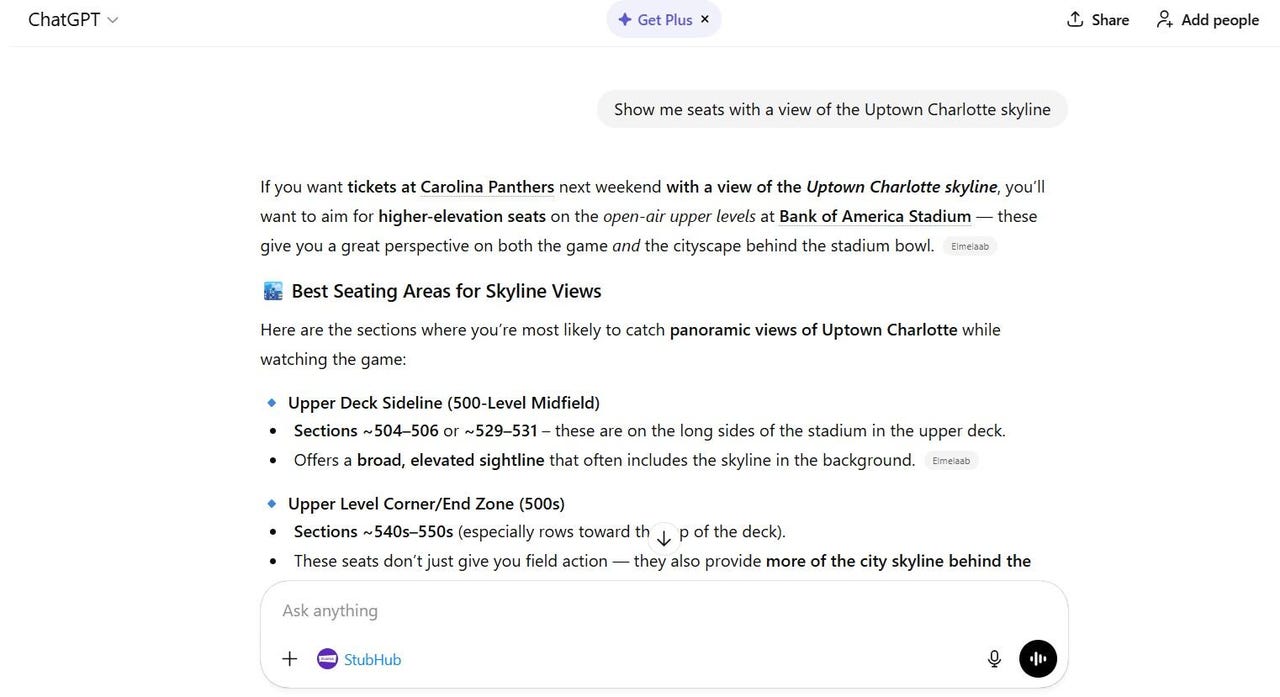
That “all-in” part matters more than the chat interface. A seat that looks like a bargain before checkout can be a worse deal after fees than a nearby listing that looked higher at first glance. AI is useful here because it can compress the boring work that fans already do manually: open platform, filter section, check row, click through, find fees, back out, repeat.
The right prompt is not “find me cheap tickets.” Cheap compared with what? A bad upper-level sightline may be cheap and still be poor value. A floor seat may be expensive and still be comparatively underpriced if similar seats are much higher. Ask the agent to evaluate a defined tradeoff:
- “Find the best all-in price for two tickets under $X, prioritizing lower bowl over floor.”
- “Compare seats with a clear view and no obstructed-view notes across major resale platforms.”
- “Show me the best value, not just the lowest price, for sections closest to the stage.”
- “Flag any listing where fees make the final price meaningfully worse than the displayed price.”
- “If prices are above my ceiling, suggest nearby dates or cities instead of stretching the budget.”
“Best value” should mean a seat-quality-to-final-price judgment, not a vibe. In practice, that means asking the AI to consider final price, section, row, quantity, view restrictions, delivery method, and whether seats are together. If it cannot verify one of those inputs, treat the recommendation as incomplete rather than clever.
There is already a difference between AI tools for this job. Tom’s Guide compared ChatGPT and Claude for StubHub ticket searches and found ChatGPT much stronger on speed, accuracy, and useful recommendations in that test.[2] That does not make ChatGPT a universal ticket oracle; it means tool choice matters when the task requires current inventory, structured results, and a buying flow that does not collapse into generic advice.
Google AI Mode is another option for surfacing ticket choices with more nuanced constraints, and Sportico has described AI search tools moving into agent-style shopping for sports tickets.[3] For a buyer, the distinction is simple: use whichever tool can show current options, preserve your constraints, and make final prices visible before you emotionally attach to a seat.
A Practical AI Search Sequence
Start with constraints, not the artist name alone. Give the AI the city, date flexibility, number of seats, maximum all-in budget, seating preferences, and deal-breakers. Then make it compare rather than merely retrieve.
- Ask for available listings that meet your hard ceiling, using all-in prices only.
- Ask it to group options by seat quality: floor, lower bowl, club, upper level, obstructed or limited view.
- Ask it to identify the best compromise, not the cheapest listing.
- Ask it to compare nearby dates, venues, or cities if your main event is above budget.
- Before clicking buy, verify the final checkout total yourself.
The verification step is annoying and still necessary. Ticketing platforms use CAPTCHAs and anti-bot systems, and AI tools can be blocked, delayed, or shown incomplete availability. Treat the AI as a fast comparison layer, not as the party legally handing you the seat.
Watch The 24–48 Hour Resale Window Without Assuming It Will Save You
The most useful timing tactic is also the easiest to overstate. Kiplinger notes that consumers can set AI alerts 24–48 hours before an event to catch resale price drops, because resellers may lower prices when inventory has not moved.[4] That is a behavior pattern, not a law of physics.
The logic is straightforward. A reseller holding unsold seats has a perishable asset. After the show starts, the ticket is worth nothing. As the event gets closer, some sellers accept less margin to avoid eating the entire cost. AI alerts help because you do not have to sit there refreshing manually; you can define a price ceiling, seat zone, and quantity, then let the tool monitor movement.
This works best when demand is softening, inventory is fragmented across resale platforms, or the event has multiple dates in the same market. It works poorly when the event remains a cultural event in itself. If everyone is still trying to get in, sellers have less reason to capitulate, and late buyers may simply discover that the cheaper inventory disappeared.
A useful alert should be narrow enough to act on. “Notify me if tickets get cheaper” creates noise. Better: “Alert me if two lower-bowl tickets drop below my all-in ceiling,” or “Alert me if any unobstructed pair in these sections falls under my maximum total.” The threshold should be the price at which you are willing to buy immediately. Otherwise, the alert just becomes another way to rehearse indecision.
| Event Pattern | How To Use Alerts | Buyer Expectation |
|---|---|---|
| Multiple shows in the same city | Track all dates and ask AI to rank the best all-in value | One date may soften before another |
| Single high-demand show | Set a hard ceiling and be ready to walk away | Alerts may confirm scarcity rather than reveal a deal |
| Large venue with many resale listings | Monitor sections separately instead of using one broad alert | Price drops may appear in pockets |
| Last-minute plan with flexible seating | Prioritize final price and view quality over exact section | Flexibility is your main advantage |
The alert window also protects you from a common mistake: buying early just to end the discomfort. Early can be smart when face-value inventory is available or demand is clearly rising. But on the resale market, buying early at a panic price often means paying for certainty. If certainty is worth it, fine. Just do not confuse it with beating the market.
Reduce Tracking Signals Before You Shop
Anti-tracking steps are worth doing because they are low effort. They are not worth mythologizing. Private browsing, a VPN, and clearing your browser cache can reduce the data available to AI-driven custom pricing systems, according to Boston University professor Jay Zagorsky, who recommended those tactics on PBS NewsHour.[5]
Use them before the serious search, not after you have already spent an hour signaling interest. Open a private window. Consider a VPN if you already use one and understand the tradeoffs. Clear cache and cookies before comparing prices. Avoid repeatedly logging in, abandoning the same seats, and returning through remarketing links if you are still in the research phase.
These steps can limit personalization signals such as browsing history, repeat visits, location, or device patterns. They do not override published price tiers, seller-set resale prices, or a market where thousands of buyers want the same small pool of seats. If the base listing is expensive everywhere, clearing cookies will not turn it into a face-value ticket.
- Do early research in a private browsing session before logging in.
- Clear cache and cookies before making final cross-platform comparisons.
- Use a VPN only if it does not trigger extra fraud checks or block checkout.
- Compare on more than one device or network if a price looks suspiciously inconsistent.
- Verify the final total after logging in, because checkout can still change the picture.
Know Which Price Movement You Are Actually Fighting
Not every ugly price jump is the same kind of pricing. Ticketmaster’s Platinum and In Demand tickets have been described as dynamically priced products that respond to real-time demand.[6][7] That is the version buyers usually mean when they talk about surge pricing: the system sees demand, available inventory, and willingness to pay, then prices certain tickets above standard face value.
But the Oasis case shows why precision matters. During the 2024 sale, some tickets advertised at £148.50 appeared at £355.20 at checkout, which understandably made fans feel ambushed.[8] The UK Competition and Markets Authority later found no evidence of algorithmic dynamic pricing in that specific case; it treated the issue as tiered pricing rather than real-time algorithmic surge pricing.[8]
For the buyer, both can feel similar because the consequence is the same: the ticket costs more than expected. Operationally, though, they are different. With dynamic pricing, speed and comparison may help you catch a lower moment or avoid a platform where demand has inflated certain seats. With tiered pricing, the main defense is recognizing the tier before you commit and comparing whether another date, section, or platform offers a better all-in result.
Artist and platform choices matter too. Taylor Swift reportedly refused dynamic pricing for the Eras Tour, according to AEG’s Jay Marciano as cited by NME.[9] That did not make tickets easy to get, but it is a useful reminder: scarcity and dynamic pricing are related problems, not identical ones. Removing dynamic pricing can still leave enormous demand competing for limited seats.
Where AI Gives You Real Leverage
The strongest case for AI ticket shopping is not that it outsmarts the entire ticketing economy. It gives ordinary buyers some of the comparison speed and monitoring power that professional resellers and obsessive fans have had for years. Kiplinger describes these tools as giving consumers an information advantage that previously belonged largely to resellers.[4]
That advantage shows up in small but meaningful moments. You learn that the “cheap” pair is worse after fees. You see that a nearby section offers a better view for a similar final total. You discover that the Sunday date is softening while Saturday is not. You stop checking one marketplace as if it represents the whole market. None of this guarantees a bargain, but it reduces the number of ways a platform can make your decision worse.
The workflow is simple enough to run every time:
- Set a maximum all-in price before opening ticket sites.
- Use an AI ticket-search tool to compare sections, dates, platforms, and fees.
- Ask for value-ranked options, not just the lowest displayed price.
- Set 24–48 hour alerts if resale inventory is still above your ceiling.
- Use private browsing, cache clearing, and cautious VPN use to reduce avoidable targeting signals.
- Buy only when the final checkout total matches a decision you made before the pressure started.
For ordinary shows, this can produce genuinely better outcomes. For the biggest tours, it mainly keeps you from being the easiest buyer in the room. That is still worth doing. Use AI to widen visibility, use alerts to avoid panic timing, reduce tracking where possible, and accept that when demand stays extreme, the best available result may be a controlled premium rather than a clean victory over premium pricing.
References
- ChatGPT StubHub Integration, ZDNET
- I used ChatGPT and Claude to search for StubHub tickets — and one AI crushed it, Tom's Guide
- AI Search Tool Agent Shopping Sports Tickets StubHub, Sportico
- AI Ticketing Live Event Spending, Kiplinger
- How to beat AI-driven custom pricing, PBS NewsHour
- Deep Dive into Ticketmaster's Dynamic Pricing, iMusician
- Dynamic pricing, Ticketmaster, Oasis and Taylor Swift, Northeastern University, October 2, 2024
- Ticketmaster advertises tickets Oasis CMA, The Guardian, September 25, 2025
- Taylor Swift reportedly refused to use dynamic ticket pricing for the Eras Tour, NME

Comments
Join the discussion with an anonymous comment.