

How to Build Your First AI Marketing Workflow: A 6-Step Framework for Small Teams
Small marketing teams lose hours each week to repetitive tasks they could automate. This guide walks through a six-step, six-week framework for building a single AI workflow that actually saves time, starting with your most annoying task and avoiding the tool-overload trap.
Small teams do not need another AI subscription as much as they need one marketing task that stops eating the same hour every week.
That distinction matters because the tool tax is already real. One industry synthesis estimates that small marketing teams lose more than eight hours per person each week to repetitive work that could be automated, while Averi’s 2026 post says the average marketing team uses more than 12 tools and spends 40% of its time managing them.[1][2] Those numbers should be treated as directional, not audited proof. The sources are practitioner and industry reports, not peer-reviewed research. Still, they describe the shape of the problem accurately enough: the team is not short on software. It is short on repeatable handoffs.
An AI marketing workflow for a small team should therefore begin with a narrower promise: over the next four to six weeks, build one workflow that reduces a specific recurring drag. Not five workflows. Not a new operating model. One task, one documented process, one context layer, one review loop.
Start With The Task That Keeps Coming Back
The first workflow should not be the most exciting AI demo. It should be the task with the highest time-to-annoyance ratio: frequent enough to matter, structured enough to repeat, and irritating enough that the team will actually use the fix.
For a one-to-three-person marketing team, good candidates usually sit close to publishing and reporting. Turning a webinar transcript into social posts. Drafting a newsletter from a blog post. Summarizing campaign performance for a founder update. Reformatting customer quotes for a landing page. Cleaning interview notes into a usable brief. These are not glamorous, but they have visible before-and-after states.
Use a quick diagnostic before choosing:
- How often does this task happen: daily, weekly, monthly, or only during launches?
- How much human judgment does it require before a draft exists?
- Where does the work slow down: collecting inputs, drafting, formatting, reviewing, publishing, or reporting?
- Who has to clean it up when the first draft is bad?
- Would saving 30 to 60 minutes here change the week, or would it barely register?
A task is ready for a first AI workflow when the input is reasonably predictable and the output has a known shape. “Make our brand more visible” is not ready. “Turn each approved blog post into three LinkedIn post options, one newsletter excerpt, and one image brief” is ready.
| If the recurring pain is... | A better first workflow is... |
|---|---|
| The team keeps rewriting long-form content for social | Content repurposing from one approved asset into defined channel drafts |
| Campaign updates take too long to assemble | Weekly reporting summary from existing metrics and notes |
| Newsletter drafting starts from a blank page | Email excerpt and subject-line draft from an approved source asset |
| Sales asks for quick copy variations | Message variant generation from an approved positioning document |
| Meeting notes never become usable marketing inputs | Transcript cleanup into brief, quote bank, and action items |
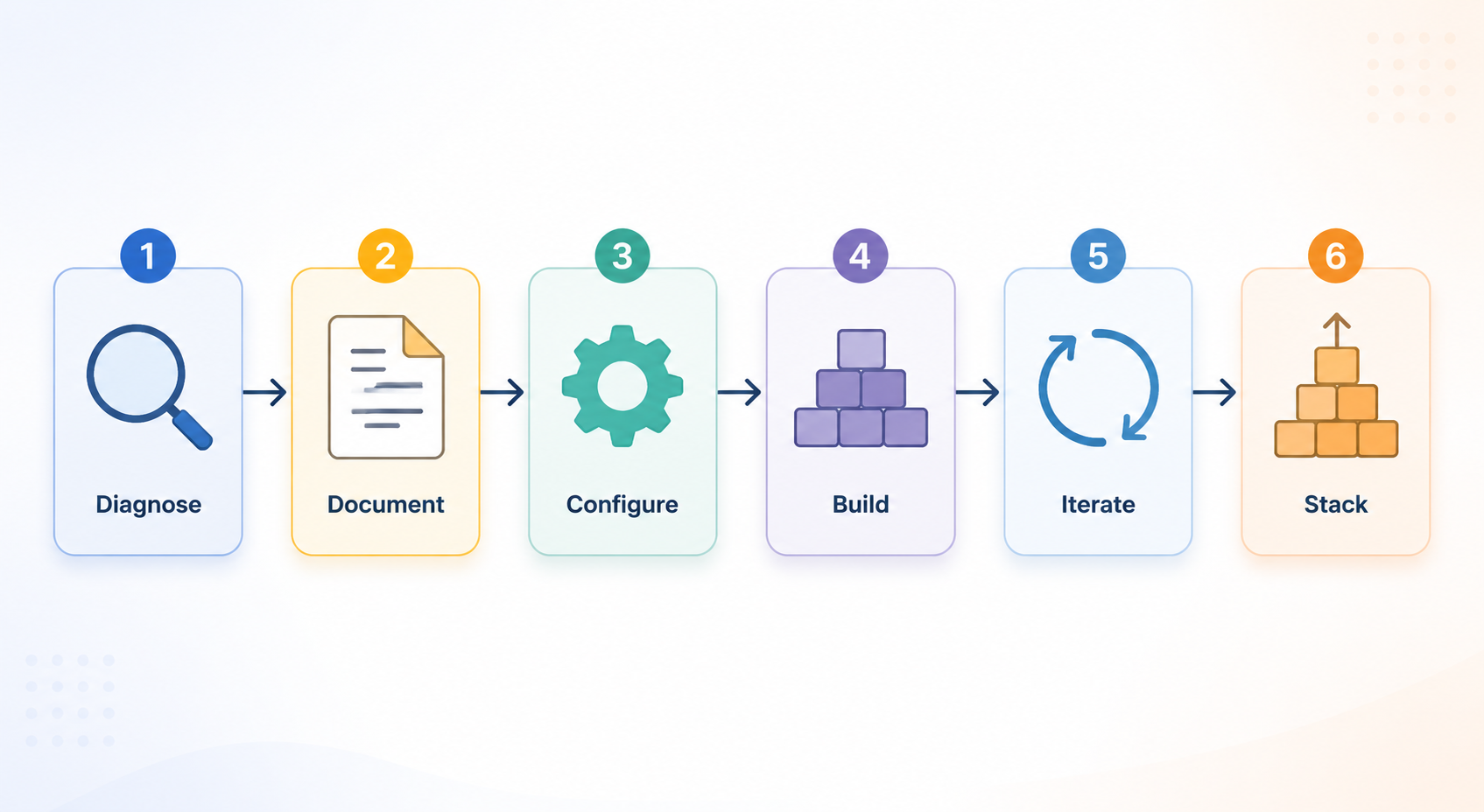
The Six-Week Flow
Many marketers already feel late to AI. SurveyMonkey data cited by Circle S Studio reports that 88% of U.S. marketers use AI in some form, though the methodology is not independently verified in the materials available here.[3] That adoption number explains the pressure, but it does not solve the operating problem. A team can “use AI” every day and still have no workflow.
A more useful path looks like this:
| Week | Work | Deliverable |
|---|---|---|
| Week 1 | Diagnose the recurring task | One workflow candidate with a clear input, owner, and output |
| Week 2 | Document the current manual process | A process map with steps, decisions, pain points, and review rules |
| Week 3 | Create the AI context layer | Brand voice, content rules, formatting instructions, and quality standards |
| Week 4 | Build the first workflow | A working prompt or tool sequence that produces a usable first draft |
| Week 5 | Run four iterations | Improved instructions based on real edits and reviewer feedback |
| Week 6 | Stabilize and choose the next workflow | A repeatable process the team can use without rebuilding it |
Week 1: Diagnose One Workflow, Not A Department
The first week is a selection exercise. The team should leave it with one named workflow and a reason for choosing it.
Do not start by asking, “Where could we use AI?” That question produces a messy inventory: blog ideas, ad copy, chatbots, reporting, personalization, lead scoring, meeting notes. Most small teams can imagine more use cases than they can maintain.
Ask instead: “Which recurring task becomes easier if the first draft is 60% done before a human opens the file?” The 60% threshold is practical. It leaves room for judgment, compliance, voice, taste, and strategy. It also prevents the team from choosing a workflow that only works if AI can replace the whole human review process.
A simple scoring pass is enough:
| Criterion | Score 1 | Score 3 | Score 5 |
|---|---|---|---|
| Frequency | Quarterly | Monthly | Weekly or more |
| Input clarity | Inputs change every time | Some inputs repeat | Inputs are predictable |
| Output clarity | No shared standard | Loose standard | Clear format and reviewer expectations |
| Annoyance level | Mild inconvenience | Noticeable drag | Regular bottleneck |
| Risk | Public, regulated, or sensitive | Needs careful review | Low-risk draft work |
Pick the task with a strong score on frequency, input clarity, output clarity, and annoyance, while keeping risk manageable. If two tasks are tied, choose the one closest to content production. Content workflows tend to expose the context assets the team will reuse later: voice rules, positioning, formatting standards, channel constraints, and review expectations.
Week 2: Write Down The Manual Process Before AI Touches It
This is the step teams want to skip. It is also the step that keeps the workflow from becoming another tab someone has to babysit.
Before choosing prompts, templates, or tools, document how the task works today. Not how it should work. Not the ideal version. The current version, including the ugly parts: where the source document lives, who approves the input, what gets copied by hand, what the editor always rewrites, what the founder always changes, and which details get forgotten when the team is moving fast.
The documentation does not need to be fancy. A one-page process map is enough if it captures these pieces:
- Trigger: what causes this workflow to start?
- Inputs: which approved materials, notes, transcripts, URLs, metrics, or briefs are required?
- Steps: what does the human currently do from start to finish?
- Decision points: where does someone choose angle, audience, format, channel, or priority?
- Output specs: what must the finished draft include, exclude, and look like?
- Review standard: who checks accuracy, voice, claims, formatting, and readiness to publish?
- Pain points: which steps feel repetitive, slow, ambiguous, or easy to forget?
For example, a content repurposing workflow might start when a blog post is approved. The inputs are the final post, the target audience, the campaign theme, and any claims that need careful handling. The human currently reads the post, pulls the strongest points, drafts several social angles, trims them for platform length, writes a newsletter blurb, and asks design for a visual. The review standard includes factual accuracy, brand voice, channel fit, and no unsupported performance claims.
That manual map gives AI a job. Without it, the prompt usually asks for “some social posts” and produces the same generic copy the marketer then has to fix.
Week 3: Build The Context Layer Once
The context layer is the reusable operating file that tells AI how your team thinks, sounds, formats, and reviews. Knak’s implementation roadmap and the U.S. Chamber of Commerce guide both support a start-small approach that defines rules before expanding automation.[4][5] For small teams, this is where the compounding effect begins.
The first version should include five assets.
Brand Voice
Write the voice rules in usable language. “Confident, helpful, and human” is too broad to guide output. Better: “Use plain language. Avoid hype, urgency theater, and unexplained jargon. Prefer concrete operational examples over broad claims. Do not use exclamation points in standard marketing copy. When discussing results, name what the number measures and avoid implying guarantees.”
Content Rules
These are the guardrails that prevent cleanup later. Include banned phrases, claims that require review, preferred terminology, audience assumptions, competitor mention rules, and compliance sensitivities. If the team always changes “revolutionize” to “improve,” write that down. If customer results must be framed as examples rather than promises, write that down too.
Format Instructions
AI performs better when the output container is clear. For a social workflow, specify number of variants, approximate length, hook style, CTA rules, hashtag policy, emoji policy, and whether the output should include rationale. For an email workflow, specify subject-line count, preview text, body length, link placement, and the required relationship to the source asset.
Decision Points
Some choices should stay human. The team may want AI to suggest three angles, but a marketer should choose the final one. AI can summarize a campaign report, but a human should decide which underperformance to name plainly. Mark these points in the workflow so automation does not quietly make strategic decisions by default.
Review Standards
Every AI workflow needs a visible review owner. The reviewer checks facts, source fidelity, tone, formatting, and publish-readiness. “Looks fine” is not a review standard. A better standard says: “Confirm all claims are present in the source material, remove unsupported generalizations, adjust voice against the brand rules, and mark anything that needs subject-matter approval.”
This does not require an expensive stack. Circle S Studio notes that a starter setup of two or three tools — such as a general language model, transcription tool, and scheduling tool — can come in under $200 per seat per month.[6] That is still real money for a small team, but it is a useful reminder: the first workflow is more likely to fail from missing instructions than from missing software.
Week 4: Build The First Workflow Around A Real Asset
Now the team can automate. Not because the tool is ready, but because the task has a map and the AI has context.
Content repurposing is a strong first workflow because the source material already exists. The job is not to invent a campaign from nothing. It is to transform an approved long-form asset into channel-specific drafts while preserving the source’s claims and voice.
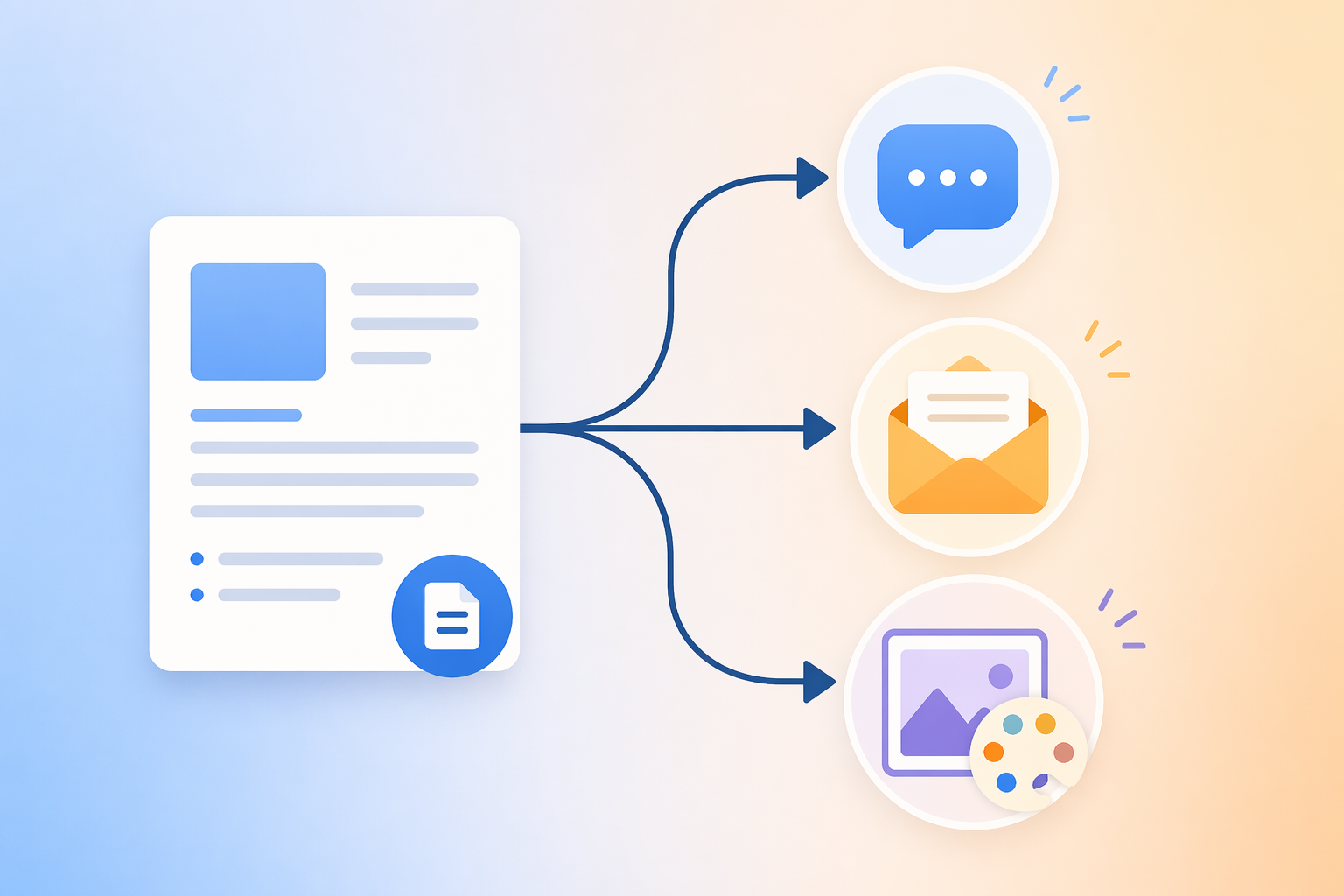
The Igniting Studio documented a content repurposing workflow that reduced first-draft production time from two to three hours per asset to about 15 minutes after configuring the system with client voice and platform-specific rules.[7] That is one agency’s published result, not a universal benchmark. Results will vary with source quality, approval complexity, subject matter, and how strict the brand review is. Still, the case is useful because the improvement came from process and context, not from asking AI to “write better posts.”
A practical first version can be simple:
| Input | AI task | Human review |
|---|---|---|
| Approved blog post or guide | Identify the core argument, audience, supporting points, and usable quotes | Confirm the summary preserves the source and does not overstate claims |
| Brand voice and content rules | Draft three social variants with different angles | Choose the strongest angle and edit for voice |
| Email format instructions | Draft one newsletter excerpt with subject-line options | Check source fidelity, clarity, and link context |
| Image brief template | Create one design brief tied to the asset’s main idea | Remove visual cliches and add any brand or campaign constraints |
The workflow prompt should not be a single clever instruction. It should be a sequence. First, ask AI to analyze the source. Then ask it to draft outputs. Then ask it to check its own draft against the stated rules. Then route the result to a human.
Workflow: Repurpose one approved long-form asset

1. Read the source asset and summarize:
- Primary audience
- Main argument
- Three supporting points
- Claims that must stay close to the source
- Phrases or examples worth reusing

2. Using the brand voice and content rules, draft:
- Three LinkedIn post options with different angles
- One newsletter excerpt
- One image brief for design

3. Before finalizing, check the drafts against these rules:
- Do not introduce facts not present in the source
- Do not imply guaranteed results
- Avoid banned phrases
- Keep the tone practical and specific
- Mark anything that needs human confirmation

4. Output in clearly labeled sections so the reviewer can edit quickly.
The human reviewer still matters. They choose the angle, trim the language, verify claims, and decide whether the piece is worth publishing. The win is that they are editing a structured first draft instead of rebuilding the same set of derivatives from scratch.
Teams implementing this specific example can use a deeper content repurposing workflow using AI tools as the build-out reference once the basic process is stable.
Week 5: Iterate Four Times Before You Judge It
The first run is not the workflow. It is the first draft of the workflow.
Run the same process on four real assets before deciding whether it works. After each run, capture what the human changed. Those edits are not just cleanup; they are training material for the workflow instructions.
| Iteration | What to inspect | What to update |
|---|---|---|
| Run 1 | Did the output match the requested format? | Tighten output structure and labels |
| Run 2 | Which voice issues appeared again? | Add examples to the brand voice rules |
| Run 3 | Where did AI invent, exaggerate, or flatten the source? | Strengthen source-fidelity and claim-handling instructions |
| Run 4 | Which edits still take the reviewer too long? | Revise the prompt sequence or split one step into two |
Keep the iteration notes short. A small team will not maintain a 20-page governance document. A running changelog is enough: date, asset used, issue found, instruction changed. The point is to make the next Tuesday easier than the last one.
Do not switch tools during these four runs unless the tool physically cannot perform the task. Switching too early hides the real issue. Sometimes the problem is the model. More often, the input is vague, the output format is loose, or the review standard only lives in one person’s head.
Week 6: Stabilize, Then Stack The Next Workflow
A workflow is stable when someone on the team can run it without a kickoff call, a consultant, or a new explanation from the person who built it. The standard is not perfection. The standard is repeatability.
Before adding a second workflow, make sure the first one has:
- A named owner
- A clear trigger
- Required inputs
- A saved prompt or tool sequence
- Brand and content rules attached
- A human review step
- A place to record future improvements
Only then choose the next workflow. This is where the earlier setup starts to compound. The brand voice file, content rules, formatting standards, and review checklist from the first workflow do not disappear. They become the starting configuration for the next one.
If the first workflow was content repurposing, a logical second workflow is monthly planning. The team already has rules for voice, channel fit, and source fidelity; now it can apply them to prioritizing themes, mapping assets, and assigning production slots. A deeper AI monthly content calendar workflow is the natural next layer once the first process is no longer fragile.
What Time Savings Can You Reasonably Expect?
The available evidence base is mostly practitioner reports, industry surveys, and vendor-adjacent case studies. That does not make it useless, but it does mean the numbers should be used for planning, not promises. Treat any estimate as a hypothesis your team verifies over several runs.
| Workflow type | Where time may decrease | Evidence quality |
|---|---|---|
| Content repurposing | First-draft creation, formatting, channel variation | Strongest available concrete case: one agency reported moving from 2-3 hours per asset to about 15 minutes for a first draft after setup.[7] |
| Meeting-note cleanup | Transcript summarization, quote extraction, action-item drafting | Directional; depends heavily on transcript quality and review needs |
| Newsletter excerpt drafting | Pulling the angle, drafting subject lines, creating a first body draft | Directional; strongest when source content is already approved |
| Campaign reporting summary | Turning notes and metrics into a readable update | Directional; requires careful human review because numbers and causality can be misread |
| Monthly content calendar planning | Theme grouping, draft slotting, brief generation | Directional; more useful after voice and content rules already exist |
The more important measurement is local: how long did this task take last time, how long did it take after the workflow, and how much review cleanup remained? Track that for four runs. If the workflow saves time but creates risk, it is not stable. If it saves time only when one person runs it, it is not documented well enough yet.
Common Mistakes That Create More Work
The expensive mistakes are usually operational, not technical.
- Skipping the voice doc: without reusable voice and content rules, every output becomes a fresh editing project.
- Publishing AI output without human review: AI can draft, summarize, and reformat, but a person still owns accuracy, judgment, and brand risk.
- Building five workflows at once: small teams rarely have enough review capacity to stabilize that many new processes at the same time.
- Switching tools before the workflow is stable: a new interface will not fix unclear inputs, missing rules, or an absent review standard.
- Automating the wrong step: if approval is the bottleneck, faster drafting may only create a larger queue.
A useful AI marketing workflow for a small team is not the one with the most impressive demo. It is the one someone can run again next week, with the same inputs, the same standards, and less cleanup than before. Build that once. Then build the next one on top of it.
References
- Marketing Mary synthesis citing HubSpot 2024-2025 workflow time studies and Salesforce automation benchmarks
- Averi 2026 post on marketing tool usage and management time
- SurveyMonkey AI marketer adoption statistic via Circle S Studio
- Knak implementation roadmap
- U.S. Chamber of Commerce guide to AI implementation
- Circle S Studio note on starter AI marketing stack cost
- The Igniting Studio content repurposing workflow case

Comments
Join the discussion with an anonymous comment.