
AI Keyword Clustering Prompt Template: Copy, Paste, and Adapt for Intent-Accurate Groups
A reusable, structured prompt template you can copy into ChatGPT, Claude, or Gemini that produces well-organized, intent-accurate keyword clusters in a consistent format — with clustering criteria, output schema, and validation rules already baked in.
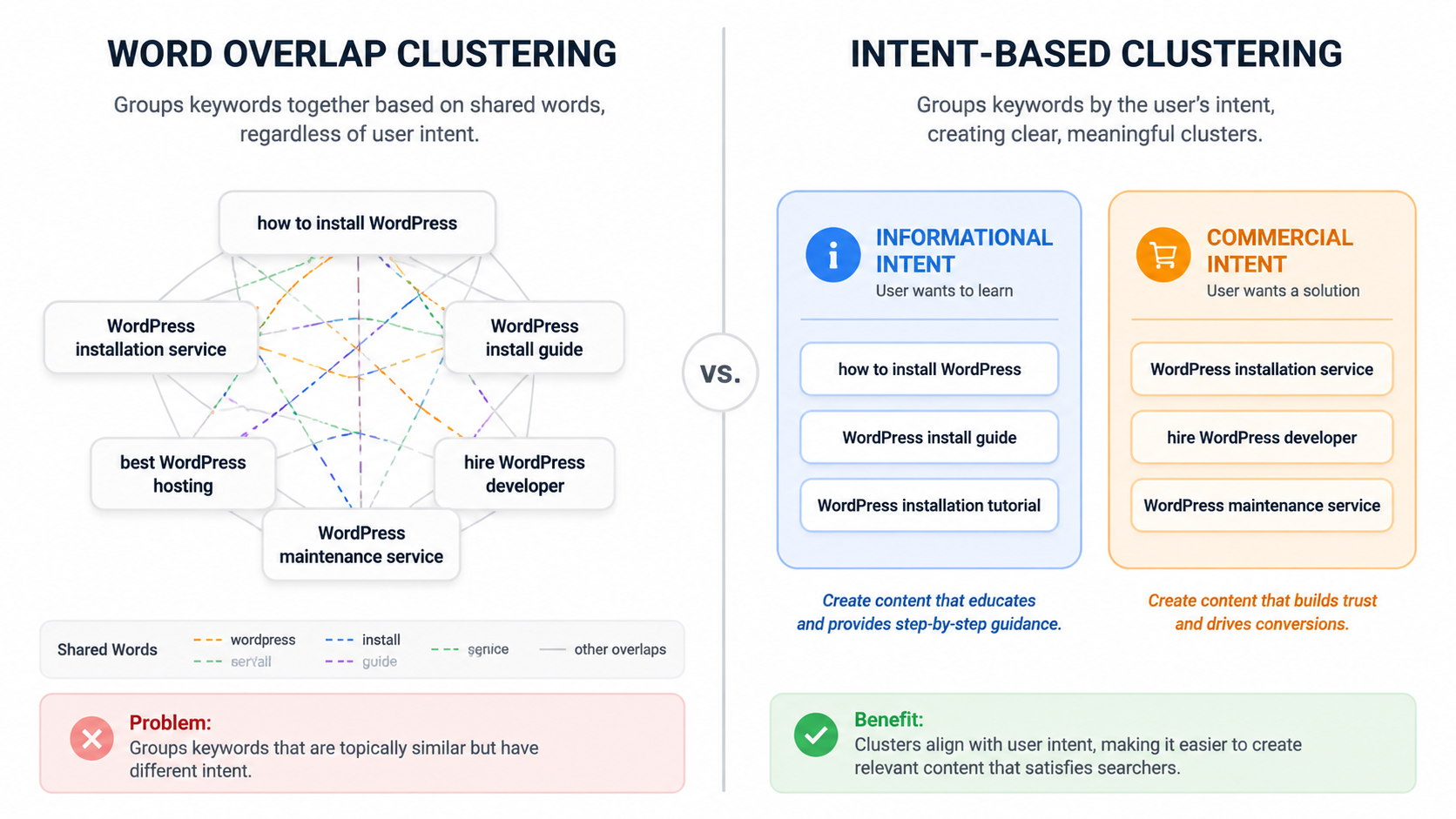
Use this AI keyword clustering prompt template when you want clusters based on search intent, not just shared words. The point is to make the model decide whether keywords belong on the same page before it gives you a tidy table.
You are an SEO keyword clustering specialist. Your job is to group keywords into actionable content clusters that can be used for SEO content planning, editorial briefs, and cannibalization review.

Current date: [CURRENT_DATE]
Market / country: [MARKET]
Language: [LANGUAGE]
Website or brand context: [WEBSITE_CONTEXT]
Primary content goal: [CONTENT_GOAL]
Audience: [TARGET_AUDIENCE]

Keyword list:
[PASTE_KEYWORD_LIST]

Optional keyword data included:
- Search volume: [YES/NO]
- Keyword difficulty: [YES/NO]
- CPC or commercial value: [YES/NO]
- Current ranking URL: [YES/NO]
- Existing content URL: [YES/NO]

Clustering method:
Use [SEMANTIC / INTENT-BASED / HYBRID] clustering.

Definitions:
- Semantic clustering groups keywords by topical meaning and entity relationship.
- Intent-based clustering groups keywords by the searcher's likely goal and the page type needed to satisfy that goal.
- Hybrid clustering uses intent as the first filter, then semantic similarity as the second filter.

Clustering rules:
1. Do not group keywords together only because they share the same words.
2. Keep keywords in separate clusters if they require different page types, such as a how-to guide, product page, service page, comparison page, category page, template, checklist, review, or local landing page.
3. Keep informational, commercial, transactional, navigational, and local intents separate unless the same page could realistically satisfy them.
4. If a keyword could fit more than one cluster, place it in the best-fit cluster and note the ambiguity.
5. If a cluster contains mixed intent, split it.
6. If a cluster has too few keywords but represents a distinct intent, keep it as a thin cluster rather than forcing it into the wrong group.
7. If search volume or business value data is provided, use it to help choose the primary keyword, but do not let volume override intent.
8. If current ranking URLs or existing content URLs are provided, flag possible cannibalization or consolidation opportunities.

Output format:
Return the results as a table with these columns:

1. Cluster ID
2. Cluster name
3. Primary keyword
4. Supporting keywords
5. Primary search intent
6. Recommended content type
7. Funnel stage
8. Notes on why these keywords belong together
9. Ambiguities or exclusions
10. Cannibalization risk, if applicable

After the table, add a short validation report with:
- Clusters that may need manual review
- Keywords excluded from clusters and why
- Clusters that may be too broad
- Clusters that may be too thin
- Any intent conflicts you detected

Before finalizing, run this self-check:
- Would one page satisfy all keywords in this cluster?
- Are any keywords grouped only because they share a noun or phrase?
- Does each cluster have one dominant intent?
- Does the recommended content type match that intent?
- Are commercial and informational queries separated when they need different pages?

If the answer to any self-check question is no, revise the cluster before returning the final table.
Why the Prompt Starts With Intent
The most common AI clustering failure is also the easiest one to miss in a spreadsheet: the model groups keywords because the words look related, even when the searcher wants something completely different. Answer Socrates uses the example of “how to install WordPress” and “WordPress installation service” to show the problem. One query points toward an informational tutorial; the other points toward someone looking to hire help. They share words, but they do not belong on the same page [1].
That is why the prompt does not simply say “cluster these keywords.” It makes the model answer a more useful question: could one page reasonably satisfy every keyword in this group? If the answer is no, the cluster is not ready for a content map.
The table schema is doing more work than it may appear to do. W3Era’s prompt engineering framework emphasizes structured outputs as part of scalable SEO workflows, and that same principle applies here: a predefined table forces the model to name the cluster, choose a primary intent, recommend a content type, and explain the grouping logic instead of returning a pretty but under-specified list [2].
How to Fill In the Variables
Most bad clustering prompts fail before the keyword list is even pasted in. They omit the market, language, page goal, and output rules, then leave the model to infer too much. These fields keep the result closer to something an SEO specialist, content marketer, or editor can use without rebuilding the work manually.
| Prompt variable | What to enter | Why it matters |
|---|---|---|
| [CURRENT_DATE] | Use the date you run the workflow. | Keeps the model grounded when you later compare results across runs. |
| [MARKET] | Example: United States, UK, Canada, Australia. | Search intent and SERP expectations can vary by market. |
| [LANGUAGE] | Example: en-US, en-GB, es-MX. | Prevents mixed-language assumptions in cluster names and content types. |
| [WEBSITE_CONTEXT] | One or two sentences about the site, product, service, or niche. | Helps the model judge business relevance instead of clustering in the abstract. |
| [CONTENT_GOAL] | Example: build a blog hub, plan service pages, refresh existing content, reduce cannibalization. | Changes how aggressively the model should split or consolidate clusters. |
| [TARGET_AUDIENCE] | Example: B2B SaaS marketers, local service buyers, beginner WordPress users. | Helps separate beginner education from purchase-stage research. |
| [PASTE_KEYWORD_LIST] | Paste one keyword per line, with optional metrics in columns. | Cleaner input usually produces cleaner clusters. |
| [SEMANTIC / INTENT-BASED / HYBRID] | Choose one method before running the prompt. | Prevents the model from blending incompatible grouping logic. |
If you have volume, difficulty, CPC, current ranking URL, or existing URL data, include it. The prompt tells the model to use those fields for prioritization and cannibalization review, while still keeping intent as the main grouping constraint. That order matters: a high-volume keyword does not become a good cluster fit just because it is attractive.
Choose the Clustering Method Before You Run It
Semantic, intent-based, and hybrid clustering are not three labels for the same job. InfraNodus describes keyword clustering through AI knowledge graphs and network relationships, which is useful for understanding topical structure and connected entities [3]. Nightwatch’s keyword clustering guidance also points toward practical grouping methods and SERP overlap signals when deciding whether terms can rank together [4]. Those are related inputs, but they lead to different editorial decisions.
| Method | Use it when | Watch for |
|---|---|---|
| Semantic | You are mapping a topic, entity set, or content hub and want to see how terms relate conceptually. | It can over-group keywords that sound related but need different page types. |
| Intent-based | You are planning pages, briefs, or consolidation decisions and need each cluster to map to a searcher goal. | It may split a topic into more clusters than expected, which is often correct for SEO planning. |
| Hybrid | You want an editorial content map: intent first, topical relationship second. | It requires clearer instructions, but usually produces the most useful weekly planning output. |
For most content planning work, choose hybrid. It gives the model permission to use semantic similarity, but only after it has passed the intent test. That is the difference between a topic map that looks coherent and a content plan that can be assigned.
What Each Prompt Block Is Doing
Role Definition
“You are an SEO keyword clustering specialist” is not decorative. It narrows the task from general organization to SEO planning. The model is being asked to think about page types, search intent, editorial use, and cannibalization risk rather than simply sorting phrases into themes.
Clustering Criteria Selector
The selector is where you stop the model from silently changing methods halfway through the task. If you choose semantic clustering, you are asking for topical proximity. If you choose intent-based clustering, you are asking for shared searcher goals. If you choose hybrid clustering, you are asking the model to separate intent first and refine by topical closeness second.
Output Schema
The table columns are a forcing function. “Cluster name” helps the team discuss the group. “Primary keyword” gives the brief a target. “Supporting keywords” keeps the long-tail opportunity visible. “Primary search intent” and “recommended content type” expose whether the grouping actually makes sense. “Ambiguities or exclusions” gives the model a place to admit uncertainty instead of hiding it.
Validation Rules
The self-check is the part most one-line prompts skip. It asks the model to inspect its own clusters for mixed intent, noun-overlap grouping, wrong page types, and commercial-informational collisions before returning the final table. It will not catch everything, but it catches the exact class of error that usually creates cleanup work.
A Practical Run Pattern for Large Keyword Lists
Nightwatch demonstrates the practical value of clustering large keyword sets, including grouping hundreds of keywords into a smaller set of actionable clusters for SEO planning [4]. That is where AI is useful: it compresses the first pass. It does not remove the need to inspect whether the clusters can become pages.

Practitioner workflows and prompt-engineering examples suggest that reusable AI clustering systems can reduce manual grouping time substantially; a reasonable synthesized estimate is often in the 60–80% range for the first-pass sorting work. Treat that as a workflow estimate, not a controlled benchmark. W3Era describes AI prompt workflows as producing a 3–5× output multiplier, but that does not prove the same gain for every keyword set, tool, or team [2].
For weekly use, run the process in three passes:
- First pass: generate the full cluster table using the main template.
- Second pass: use the refinement prompts to split, merge, and flag risks.
- Final pass: review clusters against SERP reality, existing pages, and business priorities.
Follow-Up Prompt 1: Split Overstuffed Clusters
Use this after the first output when one cluster looks too broad, contains too many modifiers, or mixes page types.
Review the keyword clusters you just created. Identify any clusters that are too broad, overstuffed, or likely to require more than one page.

For each problematic cluster:
1. Explain why it should be split.
2. Split it into smaller intent-accurate clusters.
3. Assign a primary keyword to each new cluster.
4. Recommend the content type for each new cluster.
5. List any keywords that remain ambiguous.

Do not split clusters only because they contain many keywords. Split only when the keywords suggest different search intents, funnel stages, audiences, or page types.
The last line is important. A large cluster is not automatically wrong. A large cluster is wrong when one page cannot satisfy the whole group.
Follow-Up Prompt 2: Merge Thin Clusters
Use this when the model becomes too conservative and creates tiny clusters that probably do not deserve separate pages.
Review the keyword clusters you created. Identify any thin clusters that may be safely merged with another cluster.

For each possible merge:
1. Name the clusters being considered.
2. Explain the shared search intent.
3. Confirm whether one page could realistically satisfy both clusters.
4. Recommend whether to merge, keep separate, or keep separate but internally link.
5. If merged, provide the revised cluster name, primary keyword, supporting keywords, and recommended content type.

Do not merge clusters if they require different page types or represent different funnel stages.
This prompt is especially useful when you are planning a hub and the model has separated every modifier into its own row. Thin clusters can be useful, but only when they represent a distinct intent.
Follow-Up Prompt 3: Flag Cannibalization Risks
Use this when you include existing URLs, ranking URLs, or a content inventory. Without those fields, the model can only flag theoretical overlap.
Review the keyword clusters and the existing URLs provided. Identify possible SEO cannibalization risks.

For each risk:
1. List the cluster name and affected keywords.
2. List the existing URLs that may be competing.
3. Explain whether the pages appear to target the same intent or only a related topic.
4. Recommend one action: consolidate, differentiate, redirect, internally link, update one page, or leave unchanged.
5. Explain what should make each page distinct if the recommendation is to keep multiple pages.

Only flag cannibalization when the pages appear to target the same or highly overlapping search intent. Do not flag pages merely because they mention the same topic.
The distinction between same topic and same intent keeps this from turning into a false-alarm generator. A glossary page, a comparison page, and a service page can all mention the same phrase and still serve different jobs.
ChatGPT, Claude, and Gemini Adjustment Notes
The same template can work across ChatGPT, Claude, and Gemini, but the cleanup instructions should change slightly depending on the model behavior you see. Do not assume identical outputs across model versions.
| Model | Adjustment | Reason |
|---|---|---|
| ChatGPT | Ask for the table first, then the validation report. If the output gets long, tell it to continue from the last completed cluster ID. | It usually follows structured tables well, but long keyword lists can push it toward compressed summaries. |
| Claude | Keep the full methodology in the prompt and ask it to preserve all columns exactly. | It is often strong at reasoning through ambiguity, but may rewrite formats unless the schema is explicit. |
| Gemini | Use concise rules and ask for CSV-compatible output if you plan to paste results into a spreadsheet. | It can be useful for fast sorting, but the output format may need tighter constraints. |
If the model returns clusters that look too neat, ask it to show exclusions and ambiguities. If it returns too many clusters, run the merge prompt. If it returns broad topic buckets, run the split prompt and tell it to prioritize page type and intent over wording.
Where One-Line Prompts Still Fit
Ahrefs publishes AI keyword research prompt examples that are useful for quick ideation, and RightBlogger shows a simple ChatGPT keyword cluster prompt that can get a fast first pass [5][6]. That kind of prompt is fine when the keyword list is small, the stakes are low, or you only need a brainstorm.
For repeatable planning, the one-line version usually leaves too much interpretation for later. The structured template makes the model state the method, apply intent rules, produce a consistent schema, and expose the clusters that need human review. That is the difference between “interesting output” and something a team can move into briefs.
Once the clusters are validated, the next step is turning each approved cluster into an assignable brief. The ChatGPT content brief prompt template for SEO writers is the natural next workflow. If your team is standardizing prompts across multiple editors or strategists, the Claude Projects setup guide for SEO content brief templates is the better scaling path.
References
- How To Cluster Keywords With ChatGPT, Answer Socrates
- Prompt Engineering for SEO 2026: Build AI Workflows That Scale, W3Era
- Keyword Clustering with AI Knowledge Graphs, InfraNodus
- Keyword Clustering: How to Group Keywords to Rank for More Searches, Nightwatch
- AI Keyword Research: How It Works and 9 Prompts to Start, Ahrefs
- How to Use ChatGPT to Make an SEO Keyword Cluster (Prompt), RightBlogger

Comments
Join the discussion with an anonymous comment.