
How to Export ChatGPT History for Ad Campaign Analysis
Media buyers produce dozens of ChatGPT conversations per week analyzing campaign data, but most treat them as temporary chats. This article covers a three-tier export workflow—one-off exports, bulk JSON backup, and structured conversion—so you can turn those analyses into client-ready reports, audit trails, and reusable documentation.
- Platform
- Multiple
- Creative type
- General
- Last reviewed
- 2026-07-25
The annoying moment comes after the useful part. You uploaded a campaign export, asked ChatGPT to group weak search terms, explain a conversion-rate drop, or turn creative fatigue into a client-safe note. The answer is good enough to use. Then the account manager needs it for a QBR, the PPC lead wants to know why the budget shift was recommended, or the client asks how the conclusion was reached.
That is when “export ChatGPT history for ad campaign analysis” stops being a housekeeping task and becomes part of the work. The question is not just which button exports a chat. It is which export path matches what the analysis has to become next.
| Future use | Export path | Best output | Main catch |
|---|---|---|---|
| Client report or internal note due now | One-off conversation export | Markdown, PDF, plain text, or selected CSV | You still have to choose the useful part and name it clearly |
| Full history backup and audit recovery | OpenAI native data export | conversations.json inside the account export | Official and complete, but not client-ready without conversion |
| Reusable campaign documentation | Structured conversion | Named notes, account logs, knowledge-base pages, or review packets | Requires a naming and storage habit, not just an export file |
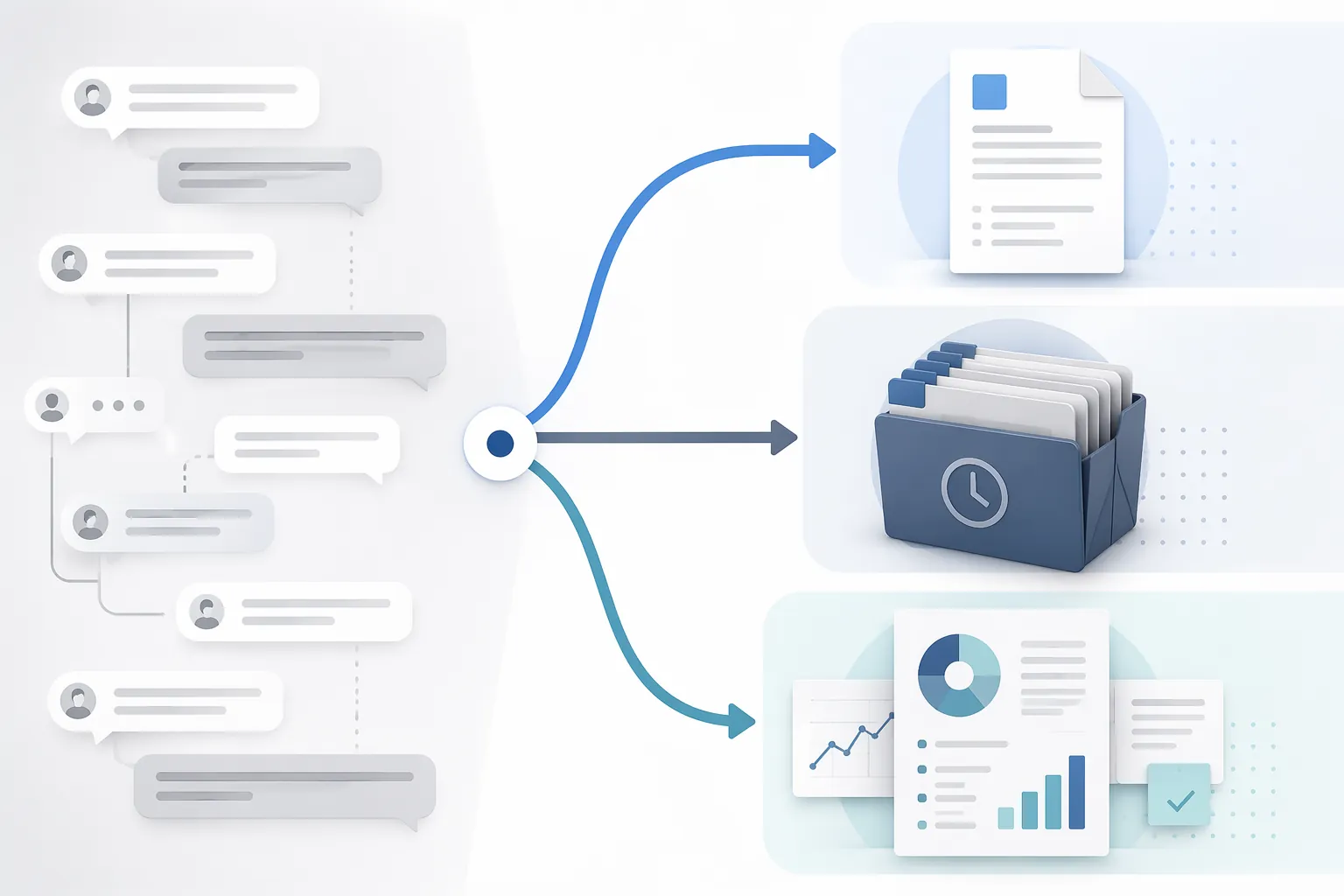
The right workflow usually uses all three. A per-chat export handles the immediate report. OpenAI’s full data export protects the history. Structured conversion turns the better analyses into something your team can find, review, and reuse later.
Start With The Use Case, Not The Export Button
A ChatGPT conversation can contain several different kinds of work product. One thread may include the uploaded file summary, the questions you asked, the assumptions ChatGPT made, a few bad first passes, the corrected analysis, and the final client-facing paragraph. Exporting all of that as one undifferentiated file may preserve the record, but it rarely helps the next person who has to use it.
Before exporting, decide which of these jobs the file has to do:
- Support a client-facing deliverable: preserve the useful recommendation, the supporting evidence, and enough context to keep it from sounding like an orphaned AI paragraph.
- Create an internal audit trail: preserve prompts, timestamps, the reasoning path, and the campaign period being discussed.
- Build reusable documentation: convert the conversation into a named campaign note, test readout, search-term review, creative analysis, or pacing memo.
- Back up everything: use the official account export so the team is not relying on ChatGPT’s left rail as a filing system.
Those are different outputs. Treating them as the same job is how teams end up with a folder full of files called “ChatGPT export final final” and no memory of which one affected the budget.
Tier 1: Export One Conversation For The Report You Are Writing Now
For the day-to-day agency problem, one-off export is the path that matters most. You have one campaign analysis, one deadline, and one person waiting for the wording, table, or rationale. Browser-based export tools exist largely because ChatGPT’s native full export is too broad for this job: it gives you account data, not a clean report excerpt.
Third-party tools such as ChatGPT Exporter describe per-conversation export options across formats including Markdown, PDF, plain text, and CSV; the same vendor material also frames bulk export as a separate challenge rather than a solved one-click workflow for every use case.[2]
| Format | Use it when | Avoid it when |
|---|---|---|
| Markdown | You need editable structure, headings, tables, prompt labels, or code-style blocks that can move into a doc, Notion page, CMS, or internal wiki. | The recipient only needs a locked visual copy and will not edit the content. |
| You need layout preservation for a client packet, internal archive, or sign-off record. | The next person needs to rewrite, excerpt, or restructure the analysis. | |
| Plain text | Formatting does not matter and you only need the reasoning, notes, or final wording. | Tables, bullets, and prompt-response boundaries need to stay readable. |
| CSV | You are extracting structured rows for machine-readable use. | You need the conversation context, reasoning path, or client explanation. |
Markdown is usually the least painful working format for campaign analysis. It keeps more structure than plain text and is easier to edit than PDF. If ChatGPT grouped search terms, drafted budget notes by campaign, or summarized creative themes in a table, Markdown gives you a better chance of moving that into a client doc without rebuilding the whole thing.
PDF has a narrower job. It is useful when you want a stable copy of what was reviewed or shared, especially for an internal record. It is less useful when the account manager still needs to turn the answer into a narrative. Once the analysis is locked into a PDF, every edit becomes more annoying than it needed to be.
Plain text is fine for short recommendation chains: “Why did we pause this ad group?” or “What was the final explanation for the budget reallocation?” It is a poor home for dense campaign tables. CSV should be treated as extraction, not documentation. A CSV may preserve rows, but it will not preserve why the rows mattered unless you pair it with a note.
What To Include In A Per-Conversation Export
Do not export only the polished answer if the recommendation may be questioned later. A useful ad-analysis export usually needs the final answer plus enough of the setup to show what the model was responding to.
- Campaign or account name, using the same naming convention your team uses elsewhere.
- Analysis date and campaign date range, especially if the recommendation relates to pacing, seasonality, or a test window.
- The file or report type uploaded, without exposing unnecessary client-sensitive data in the exported note.
- The prompt that shaped the analysis, not every casual correction unless the correction changed the conclusion.
- The final recommendation and the evidence ChatGPT used to support it.
- Any human override: what the buyer accepted, rejected, rewrote, or sent for review.
That last item matters. An exported ChatGPT answer is not the same thing as an approved campaign decision. If the recommendation influenced spend, targeting, creative rotation, or client-facing reporting, the record should show where human judgment entered.
Tier 2: Use OpenAI’s Full Export As The History Backup
OpenAI’s native export is the official way to export ChatGPT account data. OpenAI’s help documentation says users can export their data from ChatGPT settings, and that the export includes chat history in a file named conversations.json.[1]
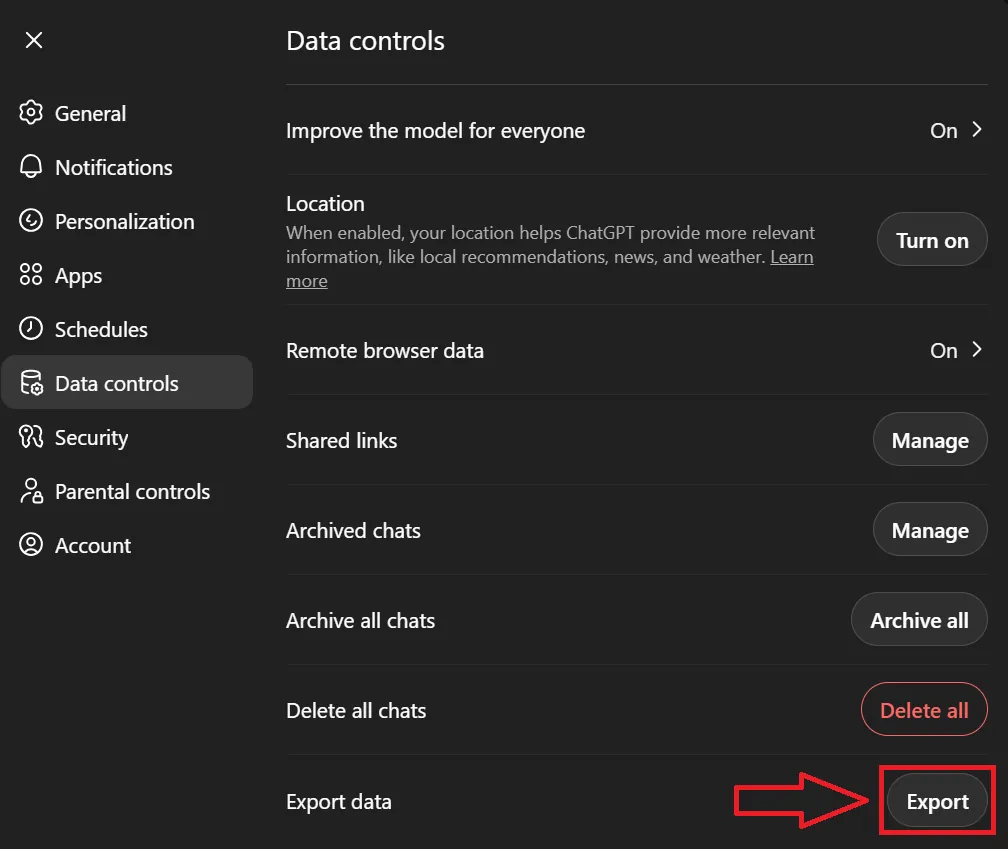
This is the export you want when the goal is recovery, completeness, or audit preservation. It is not the export you want to paste into a QBR. A JSON file is structured for machines and conversion tools, not for clients, account managers, or agency owners who want to quickly understand why a campaign recommendation was made.
The value of conversations.json is that it can preserve the conversation record at a level a polished excerpt cannot. For ad analysis, that matters because the reasoning chain is often scattered across turns: the first prompt defines the account context, a later message corrects a campaign name, another asks ChatGPT to ignore a misleading row, and the final answer compresses all of that into five bullets.
| OpenAI full export helps with | Why it matters for campaign analysis |
|---|---|
| Full-history backup | The team is not depending only on visible chat history or someone remembering which thread contained the analysis. |
| Timestamps | A conversation can be cross-referenced against campaign dates, reporting periods, and decision logs. |
| Message pairs | Prompts and responses can be reviewed together instead of preserving only the polished recommendation. |
| Model metadata | The record can show which model context was associated with the conversation, where that metadata is available in the export. |
| Conversion later | JSON can be transformed into readable notes, searchable archives, or selected excerpts after the immediate reporting rush. |
The trade-off is friction. A full export gives you too much and too little at the same time: too much account history to browse manually, and too little formatting to hand directly to a client. It needs a conversion step before it becomes useful for reporting or documentation.
That does not make it optional. If your team produces dozens of ad-analysis chats in a week, per-conversation exports will miss things. Someone will forget to export the useful thread. Someone will copy only the final answer into Slack. Someone will rename a file in a way that makes sense for two days. The account-level export is the safety net.
A Practical Backup Rhythm
A small agency does not need a theatrical archive ritual. It needs a repeatable one. For active ChatGPT-assisted PPC work, a monthly account export is a reasonable starting point for many teams; weekly may make sense during heavy audit, launch, or QBR periods. The exact cadence is less important than assigning ownership.
- Store the raw OpenAI export unchanged in a restricted archive folder.
- Label the folder with the export date, not a vague name like “ChatGPT backup.”
- Keep converted excerpts separately so the raw export does not become a working-document junk drawer.
- Review the process when OpenAI changes export behavior, file handling, or data controls.
This guidance is current as of July 25, 2026. That date belongs in the operating note because AI product interfaces and data controls do change. A screenshot-based process from last year is not a policy.
Tier 3: Convert The Better Analyses Into Reusable Campaign Documentation
The third tier is where the work becomes more valuable than an archive. Not every ChatGPT thread deserves this treatment. A quick headline rewrite or a casual “make this clearer” prompt can stay temporary. A conversation that interprets performance, recommends budget movement, summarizes a test, or explains creative fatigue should not disappear as a chat title you might search for later.
Structured conversion means taking the exported conversation and turning it into a durable campaign asset. That asset can live in a project management tool, shared drive, internal wiki, client folder, or account documentation system. The format matters less than the retrieval path.
| Conversation type | Convert it into | Minimum fields to preserve |
|---|---|---|
| Search term review | Search-term cleanup note | Account, campaign, date range, source report, exclusion logic, accepted negatives, rejected suggestions |
| Budget pacing analysis | Budget decision log | Spend period, pacing issue, recommended shift, reviewer, final action |
| Creative fatigue read | Creative test note | Creative set, performance window, observed pattern, recommendation, next test |
| Client-facing explanation | Approved reporting language | Original issue, final wording, reviewer, where it was used |
| Account audit | Audit trail or findings packet | Prompt, uploaded report types, major findings, human review notes, follow-up actions |
The Q1Media Google Ads audit prompt is a useful example of the kind of ChatGPT-assisted work worth exporting. Their published prompt asks OpenAI’s o3 Deep Research to audit Google Ads using multiple exported reports, including account structure, campaign settings, asset groups, search terms, landing pages, change history, and performance data.[3] That kind of analysis can produce structured findings across several account surfaces. It also creates exactly the export problem this workflow is meant to solve: the audit may be useful, but the durable record still depends on what gets saved, named, and converted after ChatGPT answers.
The lesson is not that one prompt creates a finished audit system. The lesson is that structured inputs make export discipline more important. If a buyer asks for a multi-part audit, the output should not be left as one long thread with a title like “Google Ads help.” It should become an audit note with sections that match the account areas reviewed.
A Simple Conversion Template
For most PPC teams, the converted note only needs a few stable fields. More fields usually means fewer people will use the system.
| Field | What goes there |
|---|---|
| Account / client | The same name used in your reporting and file storage. |
| Campaign or channel | The campaign, channel, ad set, asset group, or reporting view analyzed. |
| Analysis date | When the ChatGPT-assisted analysis happened. |
| Data period | The date range represented by the uploaded report or pasted data. |
| Source files | The report names or export types used, such as search terms, campaign performance, change history, or creative results. |
| Prompt summary | The main instruction or question, not every conversational turn. |
| Key findings | The useful interpretation, separated from raw model output. |
| Human decision | Accepted, rejected, modified, or needs review. |
| Where used | QBR, client email, internal action log, test plan, or optimization ticket. |
| Link to export | The Markdown, PDF, text, or raw conversation reference. |
This is the point where a lot of “AI productivity” breaks down. ChatGPT helped with the analysis, but the team did not package the analysis. A week later, the useful part is trapped between a file upload, three clarifying prompts, and a response nobody can confidently quote.
Browser Extensions Are A Bridge, Not The Archive
Browser extensions can be the right answer for a very specific problem: “I need this conversation out of ChatGPT in a usable format right now.” They are especially helpful when the native full export is too broad and the team does not want to manually copy a long thread into a document.
The caution is scope. Vendor documentation for ChatGPT export tools can make exporting sound tidier than it is in a real agency week. Even when an extension makes per-chat export fast, someone still has to decide which chats matter, what format to use, how to name the file, where to store it, and whether the exported answer is approved work product or just an AI draft. ChatGPT Exporter’s own bulk-export discussion frames bulk handling as a workflow concern rather than a magic cleanup pass for every conversation.[2]
That is not a reason to avoid extensions. It is a reason to put them in the right tier. Use them for per-conversation exports and formatted working files. Use OpenAI’s export for full-history backup. Use your own documentation layer for decisions that need to survive.
Record What ChatGPT Actually Saw
The exported conversation is only as defensible as the input record behind it. If a buyer uploads a campaign file and ChatGPT analyzes only part of it, the exported answer may look more complete than it really is.
OpenAI’s Data Analysis documentation says ChatGPT supports spreadsheet and data files including .xlsx and .csv, and notes file size limits.[4] For large campaign exports, that boundary matters: the UI ceiling is roughly 100MB, with lower practical limits possible in use. A conversation export may preserve what ChatGPT said, but it will not automatically prove that the full dataset was included.
For campaign work, the safest habit is to record the report source and any omission in the converted note. If a search-term export was filtered before upload, say so. If a campaign report was split into parts, say which parts were included. If a large file failed and the buyer pasted a summary instead, the note should not pretend the model reviewed the original file.
- Good record: “Analyzed Google Ads search terms export for Brand campaign, June reporting period; uploaded filtered CSV excluding exact-match brand terms.”
- Weak record: “ChatGPT reviewed search terms and suggested negatives.”
- Good record: “Budget pacing note based on campaign performance export and manual spend target pasted by buyer.”
- Weak record: “AI recommended moving budget to Campaign B.”
The difference is not paperwork for its own sake. It is the difference between a reusable analysis and a sentence nobody can safely defend.
A Naming System That Does Not Create A Second Mess
Exporting without naming discipline just moves the mess from ChatGPT into Drive, Dropbox, Notion, or a project folder. The file name should tell a tired account lead what the export is before they open it.
YYYY-MM-DD_Client_Account_Campaign_AnalysisType_SourcePeriod_Format

2026-07-25_Acme_GoogleAds_NonBrand_SearchTerms_Jun2026.md
2026-07-25_Acme_Meta_Prospecting_CreativeFatigue_Q2-2026.pdf
2026-07-25_Acme_GoogleAds_AllCampaigns_BudgetPacing_2026-07-01_to_2026-07-24.md
The storage path should be just as boring:
Client Folder
/AI-Assisted Analysis
  /Raw ChatGPT Exports
  /Converted Notes
  /Client-Ready Excerpts
  /Monthly OpenAI Account Exports
The point is separation. Raw exports are evidence. Converted notes are working knowledge. Client-ready excerpts are approved language. Monthly OpenAI exports are backups. When those live in the same pile, the team eventually stops trusting the pile.
What Not To Archive
There is a real risk of overcorrecting. Not every ChatGPT exchange needs to become a record. A prompt asking for ten headline variations, a quick grammar cleanup, or a brainstorm that never affects the account does not need the same treatment as a budget recommendation.
A practical cutoff is influence. If the conversation influenced campaign interpretation, creative recommendations, budget movement, targeting, reporting language, or a client-facing explanation, export it according to its future use. If it did not influence a decision or deliverable, leave it alone unless your agency has a stricter internal policy.
The export habit is not meant to turn media buyers into archivists. It is meant to keep useful analysis from becoming unrecoverable work product. One-off exports serve the report in front of you. OpenAI’s full export protects the history. Structured conversion gives the team a defensible record it can reuse. Anything less depends too much on someone remembering which Thursday the good answer happened.
References
- Exporting your ChatGPT history and data, OpenAI Help Center
- How to Bulk Export ChatGPT Conversations, ChatGPT Exporter
- Google Ads ChatGPT, Q1Media
- Data analysis with ChatGPT, OpenAI Help Center
This is a record of what happened and what was tested, not legal advice. Compliance determinations require qualified counsel.